Xhmaster Formula Indicator: Meaning, Settings, Strategy, Buy/Sell Signals & Accuracy


 Author

 Editor
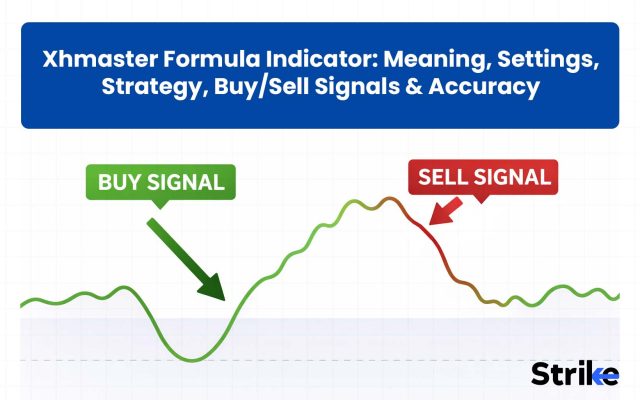
The Xhmaster formula indicator, often called Xmaster formula indicator, is a technical analysis tool that was introduced in the 2010s. The Xhmaster formula indicator has gained traction among forex traders because of its simplicity. Xhmaster combines complex indicators like MACD, RSI, and parabolic SAR into simple binary visual signals of “Buy” or “Sell.”
Here we will learn about the Xhmaster formula indicator in detail and get to know how traders use it. After reading this article, you will be able to understand what Xhmaster is and how to use it to make better trading decisions.
What is the Xhmaster Formula Indicator?
The Xhmaster formula indicator is a custom-made trend-following momentum indicator that combines the information provided by other indicators, such as moving averages, RSI, MACD, and parabolic SAR, into a single visual system. Xhmaster Formula Indicator gives a buy signal using a green upward arrow and a sell signal using a red downward arrow.
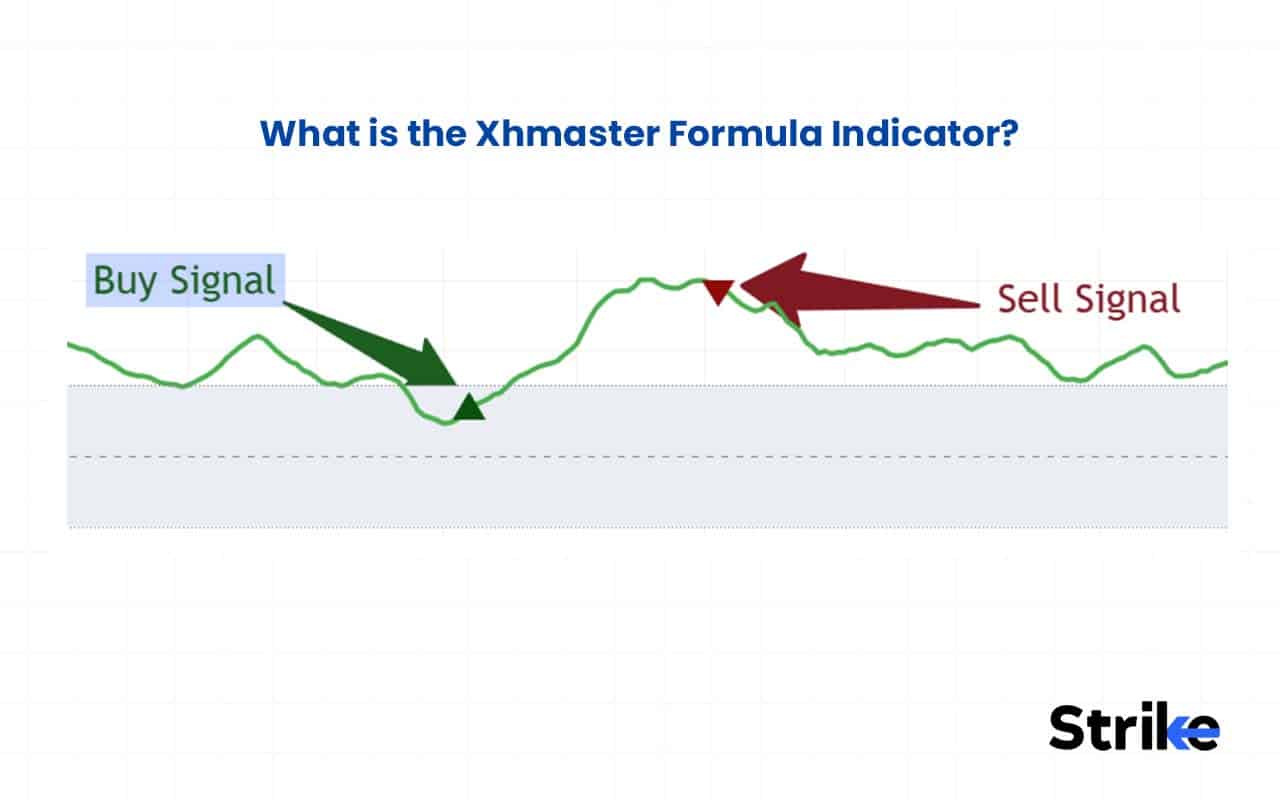
The Xhmaster formula indicator is popular among forex traders due to its clear buy or sell signals.
History of Xhmaster Formula Indicator
The Xhmaster formula indicator has been in use for more than a decade, developed by the TradingFinder team in the early 2010s.
- Inception (Early 2010s): Launched as the “Xmaster Formula,” the indicator gained a cult following for combining multiple indicators into a simple red/green visual on the MT4 platform.
- 2020-2021: The Xmaster formula was rebranded as “Xhmaster Formula Indicator.” Xhmaster included advanced filters to reduce market noise, which made it popular among forex traders.
- 2022-2023: Expansion into the MT5 platform brought faster processing. Developers added adjustable sensitivity, allowing traders to switch between aggressive scalping and conservative swing modes.
- 2024-2025: Xhmaster’s current version features a strict no-repaint algorithm and “hybrid” logic. Xhmaster now integrates ATR and RSI and offers reliable signals for gold, crypto, and security indices.
Over the years, Xhmaster has transformed into an industry-standard tool because of its simple color-coded signals. Starting as a simple trend-following script, Xhmaster has now evolved into a comprehensive multi-asset trading suite.
How Does the Xhmaster Formula Indicator Work?
The Xhmaster formula indicator works by helping traders to identify the trend direction, filter momentum and volatility, and generate buy/sell signals.
- Trend Detection: Xhmaster uses a moving average crossover to determine the primary trend of the market. When the short-term EMA crosses the long-term EMA from below, Xhmaster signals an uptrend, and when the short-term EMA crosses the long-term EMA from above, Xhmaster signals a downtrend. This trend detection serves as the foundation for the signal provided by Xhmaster. The default settings of short-term and long-term EMA are 10 and 38, respectively.
- Momentum and Volatility Filtering: Xhmaster avoids the trap of “fake” signals by using momentum and volatility components like MACD and RSI. This filters out weak signals that occur during market consolidation and ensures that the momentum is sustainable.
- Signal Generation and Visualization: Xhmaster generates buy and sell signals once trend and momentum are confirmed. The buy signal is visually represented by a green upward arrow, and the sell signal is represented by a red downward arrow. These arrow signals help traders know when to enter and exit a position.
The line graph below the candlestick pattern indicates the level of Xhmaster indicator. Xhmaster’s systematic approach helps beginners and professional traders to avoid false signals and make better trading decisions.
How does Xhmaster Calculate Buy/Sell Signals?
The Xhmaster formula indicator calculates buy and sell signals using two distinct modes. The modes are briefly discussed below.
- Standard Mode (EMA Differential): The standard mode of Xhmaster calculates the distance between a short EMA (10) and a long EMA (38) on a scale of 0 to 100. If the value crosses above 55, a green upward arrow is displayed, signifying a buy signal. A green signal is indicated by a red downward arrow that appears when the value falls below 45.
- Advanced Mode (Hybrid Logic): In advanced mode, Xhmaster uses moving averages and other tools like RSI strength, MACD for momentum, stochastic for finding turning points, and parabolic SAR for finding trend changes. When all these indicators align in the same direction, a green buy or red sell signal is generated.
The table below shows the exact condition of all indicators for generating buy/sell signals.
| Indicator | Buy Condition | Sell Condition |
| MACD | Histogram > 0 (Green) | Histogram < 0 (Red) |
| RSI | Below 30 (Oversold) | Above 70 (Overbought) |
| Stochastic | Below 20 | Above 80 |
| Parabolic SAR | Dots below price | Dots above price |
| EMAs (200 EMA) | Price above 200 EMA | Price below 200 EMA |
The standard mode of Xhmaster is more susceptible to market noise compared to the advanced mode. The advanced mode is more accurate to market noise because it combines multiple indicators to generate signals, making it less susceptible to market noise.
How to Interpret Xhmaster Buy and Sell Signals?
Interpreting Xhmaster is about understanding trend and momentum alignment, not blindly following arrows.
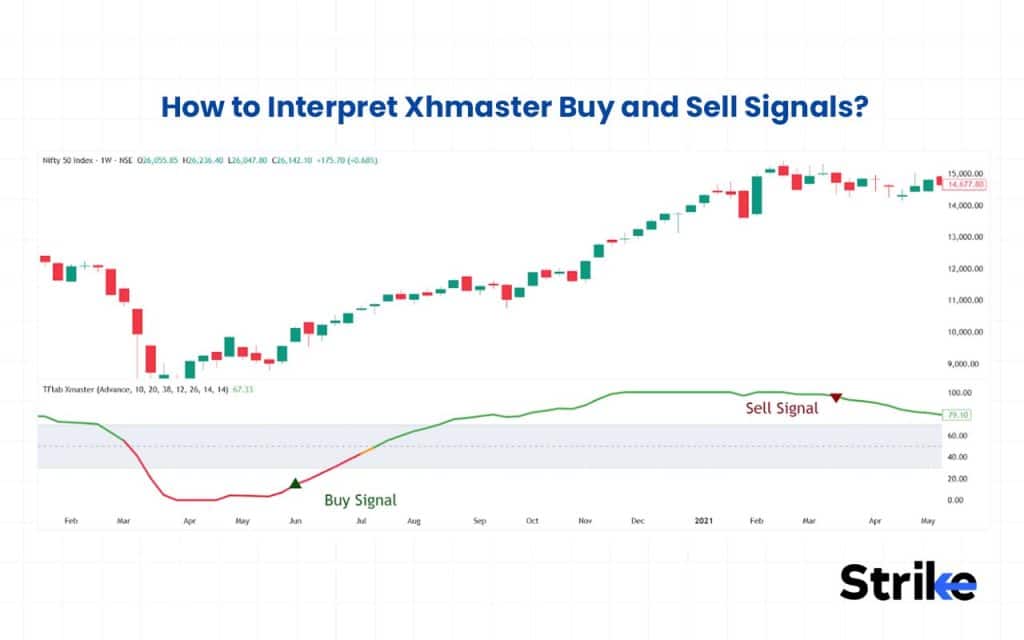
- Green Arrow (Buy Signal): Appears when the EMAs give a bullish crossover with momentum strengthened. It is more valid when at or above the 50/200 EMA and when trending or breaking out. This signal is particularly relevant when the market is experiencing an uptrend.
- Red Arrow (Sell Signal): Occurs when EMAs shift bearish and selling pressure increases. It is effective when the major moving averages are below and when the trend is downward.
Every arrow is not tradable; avoid sideways markets, and never ignore overall market structure.
Does the Xhmaster Formula Indicator repaint?
No, the official Xhmaster formula indicator is a non-repainting indicator. The signal in Xhmaster is generated based on candle close, which remains fixed on the chart once formed, making it reliable for backtesting and live trading.
However, some unofficial or modified MT4/MT5 versions may get repainted. Always verify the source and test on historical charts.
What are the Default Settings of the Xhmaster Formula Indicator?
The default settings of the Xhmaster formula indicator depend on the mode of the indicator that you are using.
| Section | Setting | Parameter | Default Value | Purpose / Interpretation |
| Trend Settings (EMA) | Moving Average | Short EMA Length | 10 | Captures short-term price momentum |
| Mid EMA Length | 20 | Identifies medium-term trend direction | ||
| Long EMA Length | 38 | Defines broader market trend structure | ||
| Momentum (MACD) | MACD Setup | Fast Length | 12 | Measures short-term momentum strength |
| Slow Length | 26 | Measures longer momentum cycle | ||
| Signal Line | 9 | Confirms MACD crossover signals | ||
| Momentum Filter (RSI) | RSI Setup | Length | 14 | Standard momentum strength filter |
| Oscillator (Stochastic) | Stochastic Setup | Length | 14 | Identifies overbought and oversold zones |
Traders can adjust the default inputs of Technical Indicators to switch between an aggressive intraday setup and a conservative long-term strategy, making these Technical Indicators adaptable to different trading styles.
What are the Best Settings for Xhmaster?
The best settings for Xhmaster depend on the characteristics of the security that you are analyzing.
| Asset Class | Mode | Period (Length of Look-Back Period) | Sensitivity | Recommended Timeframe |
| Forex | Advanced Mode | 20-50 Bars | Medium | 15 minutes, 1 hour, and 4 hours. |
| Equities | Standard Mode | 20 Bars | High | 1 Hour, Daily |
| Crypto | Advanced Mode | 50 – 100 Bars | Low | 4 Hours, Daily |
| Gold | Advanced Mode | 38 – 50 Bars | Medium | 30 Minutes, 1 Hour |
| Indices | Standard Mode | 100 Bars | Low | 4 Hours, Daily |
The best Xhmaster setting in Forex Trading is not the one with the most signals; it is the one that aligns with the asset’s behavior and your risk management. In Forex Trading, you should optimize for consistency, not excitement.
When Should I Increase the Sensitivity of the Xhmaster Indicator?
You should increase the sensitivity of the Xhmaster indicator during the period of high volatility or a fast-moving market. Higher sensitivity of Xhmaster allows traders to react quickly to sharp breakouts and trend acceleration.
However, achieving better results requires understanding the ideal setting change through backtesting and forward testing. Aim to get a win rate of more than 55%.
Which Timeframe Works Best for Xhmaster?
Xhmaster indicator generally works best on higher timeframes like 1-hour, 4-hour, and daily charts due to less market noise. Multi-indicator confirmations also perform better with less market noise on higher timeframes. While it can be used on a lower timeframe, the false signals increase significantly.
| Timeframe | Trading Style | Reliability |
| 1m – 5m | Scalping | Low |
| 15m – 30m | Intraday | Moderate |
| 1H – 4H | Swing | Best |
| Daily (D1) | Macro | High |
Try to align your trade with a high volatility session and choose the right timeframe for trading, while avoiding filter-ranging markets via ADX > 25. Selecting the appropriate timeframe for trading helps improve signal quality and overall trade accuracy.
How Do You Trade with Xhmaster?
There are four major steps to trade Xhmaster formula indicators. The steps include trend identification, entry, stop loss, and target.
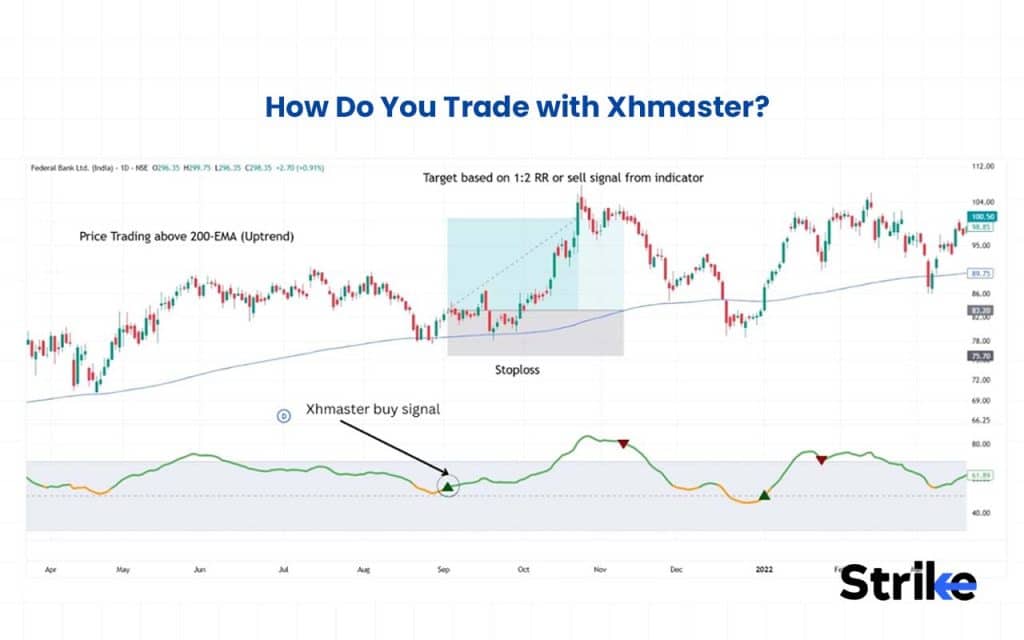
- Identify the market condition: Identify whether the market is trending up or down using the 50- or 200-period EMA or other trend-identifying indicators. Price trading above EMA signals an uptrend, and price trading below EMA signals a downtrend.
- Entry: Enter the long trade if the price is in an uptrend and the Xhmaster indicator gives a buy signal. If the Xhmaster indicator indicates a sell signal and the price is in a downward trend, enter the short trade.
- Stop Loss: Place your stop-loss near the previous swing high/low, fixed at 1.5× ATR, or opposite signal.
- Target: Keep the minimum of 1:2 RR, or trail it with 20 EMA, or exit at the opposite Xmaster signal.
Xhmaster, as a trading software, is better used as a trend-following confirmation system, not a prediction tool. This trading software works best when combined with price action and key levels for higher probability trades.
Where to Download Xhmaster Indicator?
The Xhmaster indicator can be downloaded for free from the official MQL5 Market directly through your MT4/MT5 terminal’s “Market” tab. The Xhmaster indicator is also offered by reputable trading forums like Forex Factory. Official developer websites also provide verified .ex4 or .ex5 files to ensure you get a non-repainting version.
Is Xhmaster Formula an Official Indicator?
No, the Xhmaster formula indicator is not an official indicator by TradingView, MetaTrader, or any major trading platform. Xhamster is an unofficial and custom-built indicator, a third-party technical tool created by independent developers and shared among traders.
Is Xhmaster Indicator Free or Paid?
The Xhmaster Indicator is a freemium tool. A trader can opt for a free version, which offers the core buy and sell signals. If a trader requires extra features like “no-repaint” guarantees and additional filters, they opt for the premium product.
How to Install the Xhmaster Indicator?
The Xhmaster indicator can be installed on MT4 and MT5 platforms by following the steps mentioned below.
- Download the .ex4 (MT4) or .ex5 (MT5) file from MetaTrader’s website.
- In MetaTrader, go to File > Open Data Folder.
- Navigate to MQL4 (or MQL5) > Indicators and paste the file.
- Right-click Indicators in the Navigator panel and select Refresh.
- Drag XHMaster onto your chart.
The Xhmaster indicator can be used on TradingView by following the steps listed below.
- Open a chart and click the indicator button.
- Type “Xhamster” or “Xmaster” in the search bar.
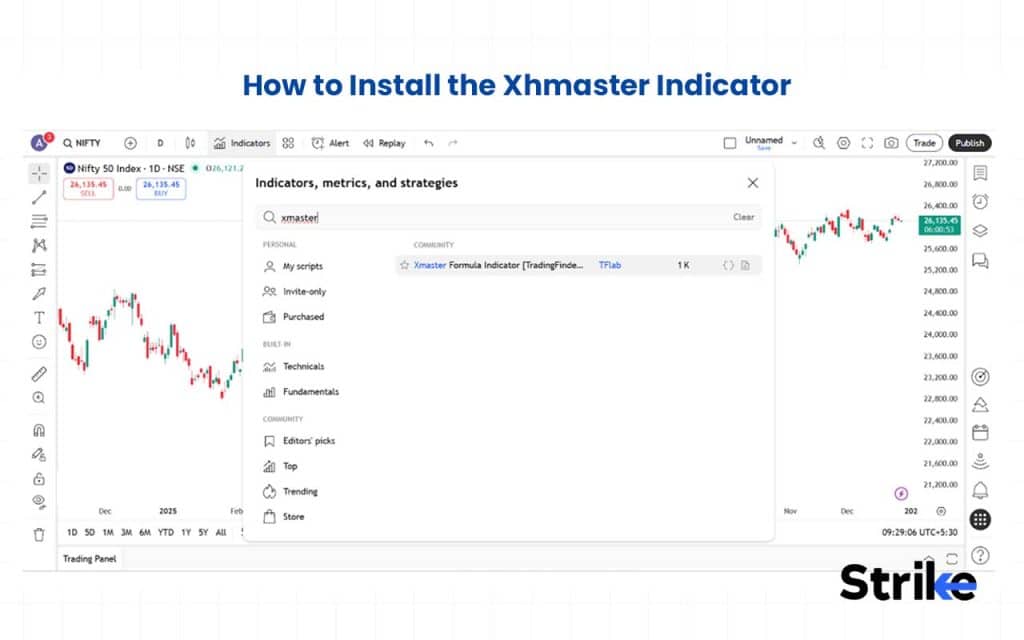
- Click on the Xmaster Formula Indicator.
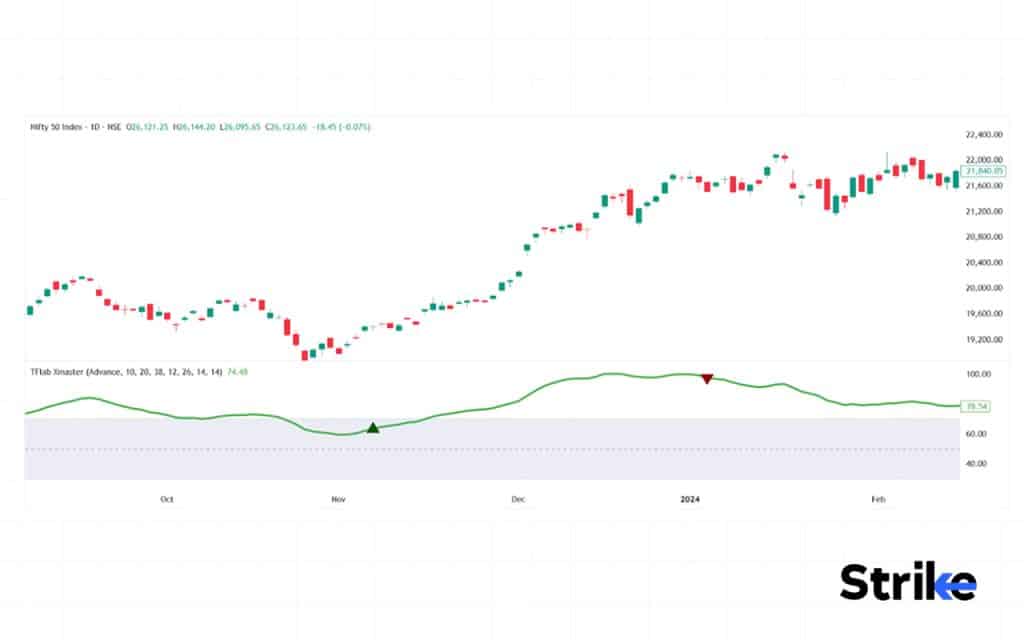
- Xhmaster will be instantly applied on the chosen chart.
Installation is simple, but proper testing is critical. Never trust signals immediately after installation. Validate performance through backtesting and forward testing before using real capital.
Is Xhmaster Safe to Install?
Yes, installing Xhmaster is safe if installed from verified sources like MT4 and MT5. It is also safe when used directly on TradingView. However, installing pirated versions from unverified sources is not safe, as some of them contain malware.
Can I use Xhmaster on mobile?
Yes, Xhmaster indicator can be used on your mobile phone if you are accessing it using TradingView’s mobile application. However, Xhmaster can’t be accessed on your mobile phone through the MT4 and MT5 mobile applications.
In Which Type of Instrument Does Xhmaster Work Best?
Xhmaster works exceptionally well in the forex market, especially on trending currency pairs like EUR/USD or GBP/JPY, because of their liquidity and sustainable long-period trend. Xhmaster also works on other instruments like crypto, stocks, or indices, but the reliability changes based on the movement of the particular instrument.
Cryptos are highly volatile and create more false signals, especially on lower timeframes. It is advisable to use Xhmaster on a higher timeframe if trading crypto. Whereas on stocks and indices, Xhmaster performs very effectively during breakout moves, earnings momentum, and sector-driven rallies.
Are Xhmaster Signals Accurate?
The accuracy of Xhmaster depends on the market context. During a trending market, the accuracy of Xhmaster is found to be in the range of 70% to 75%, as per an article on Ultima Markets. The accuracy of Xhmaster also depends on the asset on which it is being used.
Can Beginners Use Xhamster Safely?
Yes, using Xhmaster is safe for beginners, as it provides clear buy and sell signals that are easy to understand even for beginners and helpful in making trading decisions. However, Xhmaster can give false signals, especially when traders increase sensitivity and use it for scalping. You can avoid this problem by using Xhmaster with lowered sensitivity.
What is the Best Confirmation for Xhmaster?
The Xhmaster formula indicator can be used in combination with other technical tools, such as RSI, MACD, and moving averages, to get better confirmations.
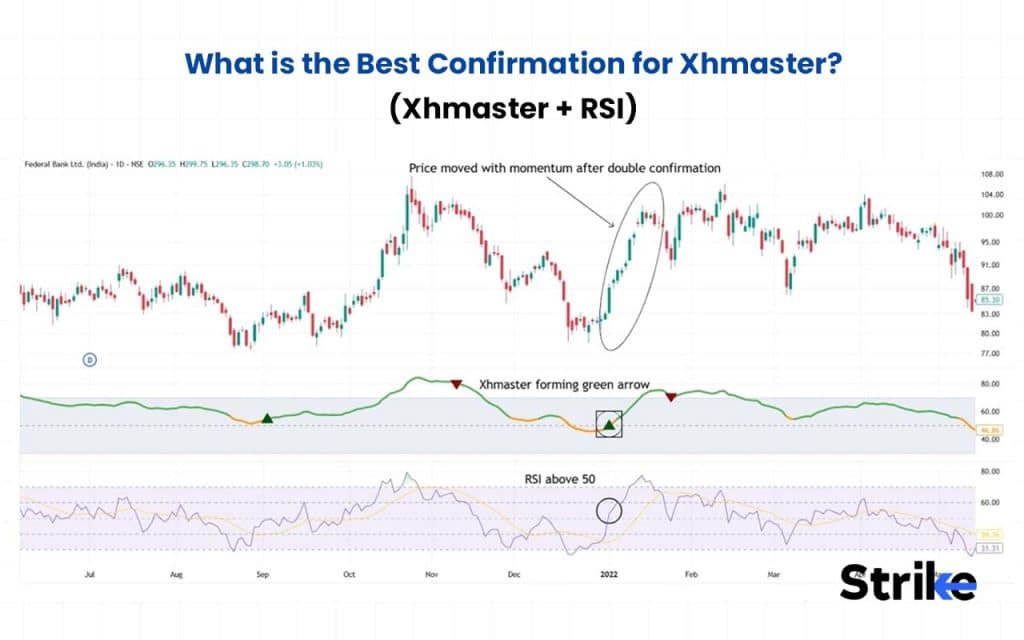
- Xhmaster + RSI: Combining a green arrow with RSI above 50 or a red arrow with RSI below 50 is considered a strong confirmation.
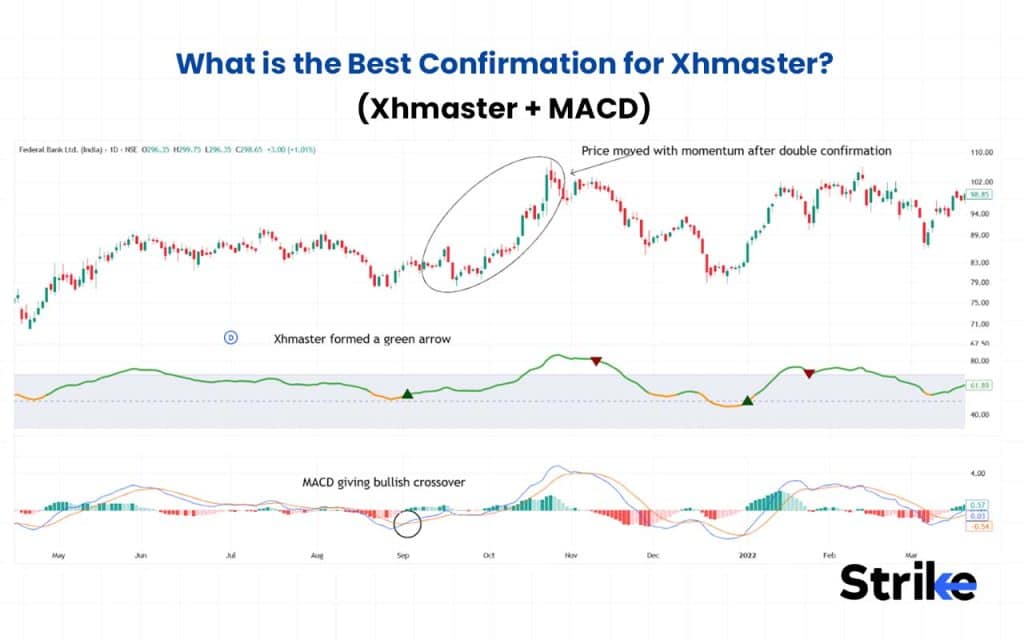
- Xhmaster + MACD: A green arrow with a positive MACD histogram suggests a strong signal.
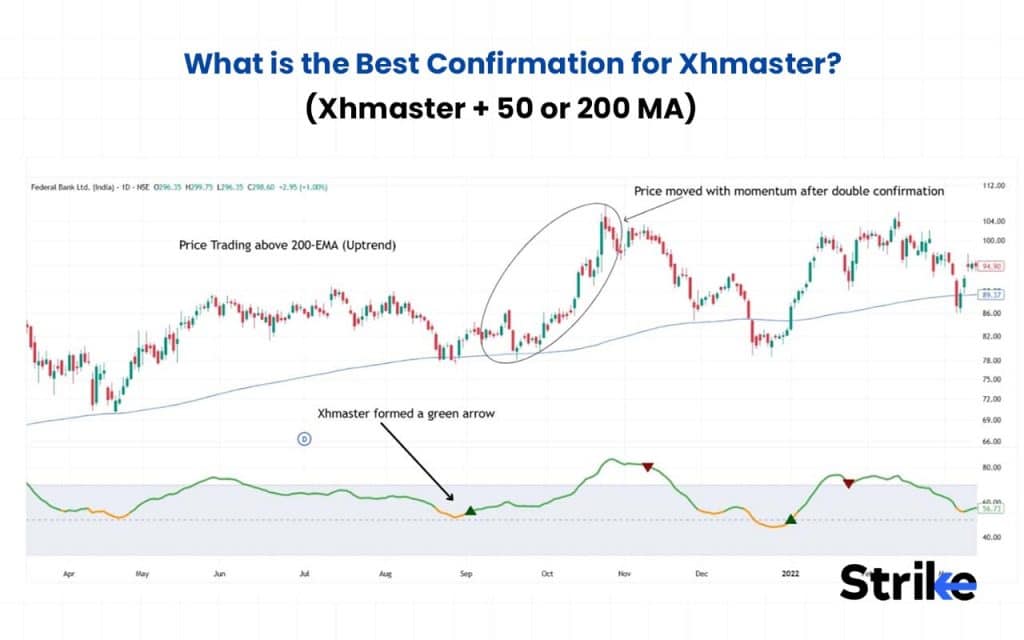
- Xhmaster + 50 or 200 MA: Price above 50 or 200 EMA, along with a green arrow, is a strong confirmation.
Combining the Xhmaster indicator with the above-mentioned indicators increases the probability of high-quality trade.
How to Backtest the Xhmaster Formula Indicator?
There are two major approaches to backtesting the Xmaster formula indicator, a manual and an automated one. Both approaches involve a four-step process to backtest the Xhmaster Formula Indicator.
- Decide Fixed Rules: Define when to enter (after the candle closes or at the next candle open), when to exit (1:2 or trailing SL), and what your stop loss would be (candle low or swing low).
- Backtest: Use well-defined rules to backtest either manually by entering every trade into an Excel sheet or by using programming languages like Python or Pine Script to automate the process.
- Analyzing Key Matrix: After backtesting, analyze the key matrix, such as win rate, average win, and average loss.
- Evaluate and Adjust: Assess the key metrics, such as a profit factor greater than 1.5, acceptable drawdown, and a smooth equity curve. Please consider refining the criteria if the strategy proves to be ineffective.
Backtesting the Xhmaster Formula Indicator helps you determine whether it has a real statistical edge. Clear rules, proper analysis, and disciplined evaluation turn signals into a structured, testable strategy.
Benefits vs Limitations of Xhmaster Formula Indicator
The benefits vs. limitations of Xhmaster formula indicator are mentioned below in the table.
| Benefits | Limitations |
| Combines multiple indicators (e.g., RSI, MACD, SAR) for better signal confirmation | Can act like a “black box”—hard to interpret exact logic |
| Reduces false signals compared to simple trend tools | May lag in extremely fast moves due to smoothing |
| Filters noise and whipsaws in choppy markets | Requires parameter optimization for different assets/timeframes |
| Offers clearer entry and exit signals | Not standardized—versions may vary between platforms |
| Better suited for higher timeframes and swing trading | More complex than simple moving average systems |
| Helps incorporate market strength, momentum, volatility | Backtesting required to avoid curve-fitting |
| Can improve accuracy when aligned with price action | Can still produce false signals in extreme volatility |
Xhmaster, as one of the advanced Trading Indicators, can provide more refined and filtered signals than simple moving average crossovers, but its effectiveness depends on correct usage, market conditions, and proper risk management. Using such Trading Indicators effectively requires discipline and a clear trading strategy.
Also a trader should use other technical patterns like chart patterns & different types of candlesticks to make this indicator more reliable.
Is Xhmaster Based on Moving Averages?
Yes, the Xhmaster Formula Indicator is based on moving averages, particularly in its core standard mode, where signals are derived using the crossover of short-period and long-period moving averages.
However, the Xhmaster Formula Indicator goes beyond simple Moving Averages in its advanced mode and integrates MACD for trend strength, RSI and Stochastic for overbought/oversold levels, and Parabolic SAR for reversals, making it more powerful than traditional Moving Averages alone.
Is Xhmaster Formula Indicator better than the Moving Average Crossover?
Yes, the Xhmaster formula indicator is considered to be better than the simple moving average crossovers because of its multiple indicator confirmations. Moving average crossovers only measure trend directions, not market strength, volatility expansion, or market context. That makes it simple but also prone to whipsaws in sideways markets and often late in strong trends.
Whereas modern versions of Xhmaster integrate tools like RSI, MACD, and Parabolic SAR, helping filter weak signals and improve overall accuracy. While both tools can be used for trading decisions, Xhmaster is often preferred on higher timeframes where reduced false signals matter more, whereas moving average crossovers are commonly used for scalping and short-term trades due to their simplicity and responsiveness, often relying on MACD for additional confirmation.

 5 mins