Investar Review (Data-Backed) 2026: Features, Pros vs Cons, Pricing, Reviews, Is It Worth It?

 Author

 Editor
The Investar review tries to cover different aspects of the platform to guide traders, looking for an efficient trading partner, on whether to opt for it. In this Investar review article, you will get to explore the features of the platform, the benefits and challenges it comes with, the pricing it is available at, the third-party integrations it supports, and a little detail about the learning curve involved.
To make sure this Investar review covers it all in-depth, I have used the features and the website as a whole personally. I have clicked every option and every link on the website to go through whatever Investar has to offer. After my thorough observations, I have consolidated my thoughts to give you, our readers, clarity. By the end of this article, you will know if you should choose Investar for your trading needs.
What is Investar?
Investar is a software that automates stock analysis for traders and investors, thereby making it easier for them to buy or sell them at the right time. With Investar, traders get a chance to automate the analysis part and identify opportunities to book profitable trades.
The software uses artificial intelligence to ensure the buy/sell signals, support-resistance levels, trendlines, supply/demand zones, and harmonic patterns are identified accurately. This way, it makes sure traders and investors choosing it for trading references are never disappointed.
Investar claims to have a success rate of 83% with free technical analysis tools being used for trading by users. As a trader/investor, you can also conduct fundamental analysis based on the raw data that is shared and assessed by Investar. Along with that, the software comes with the portfolio management feature, using which users can have a look at all the assets they have invested in while assessing their real-time performance simultaneously.
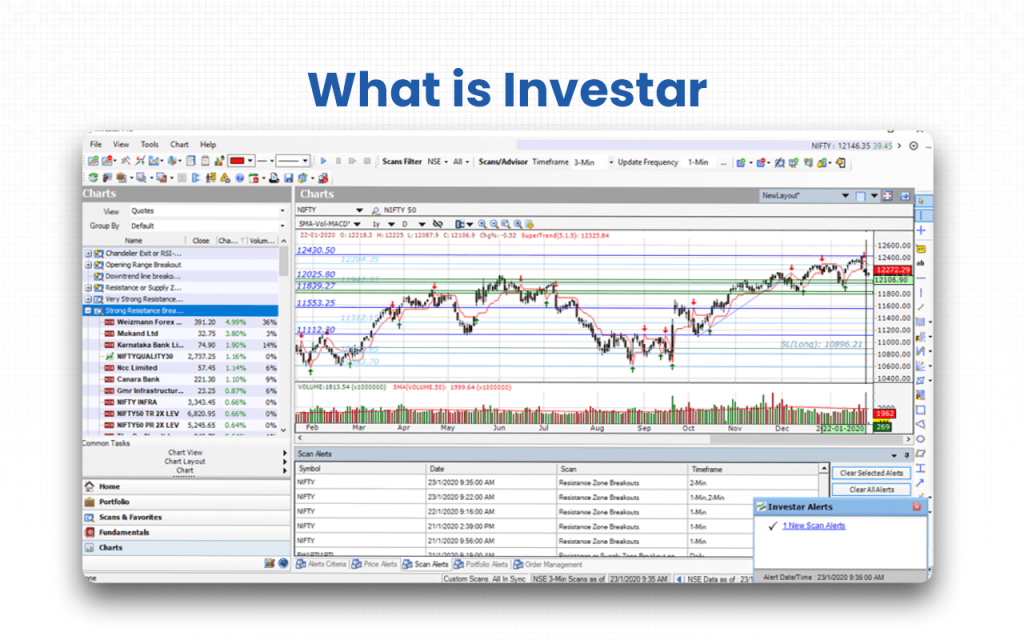
I personally felt that the auto-update screener and automated support-resistance are quite effective, especially for swing traders like me. The updates are quite fast, but the volatile market makes the data sensitive enough to be trusted for too long.
Hence, if you are someone who takes trades frequently, you must be ready to act instantly, or else you might miss a chance. The software can automatically plot lines for reference, but how fast you act will determine how effective Investar proves to be for you as a trader or investor.
Verdict
Overall Rating – 4.2/5
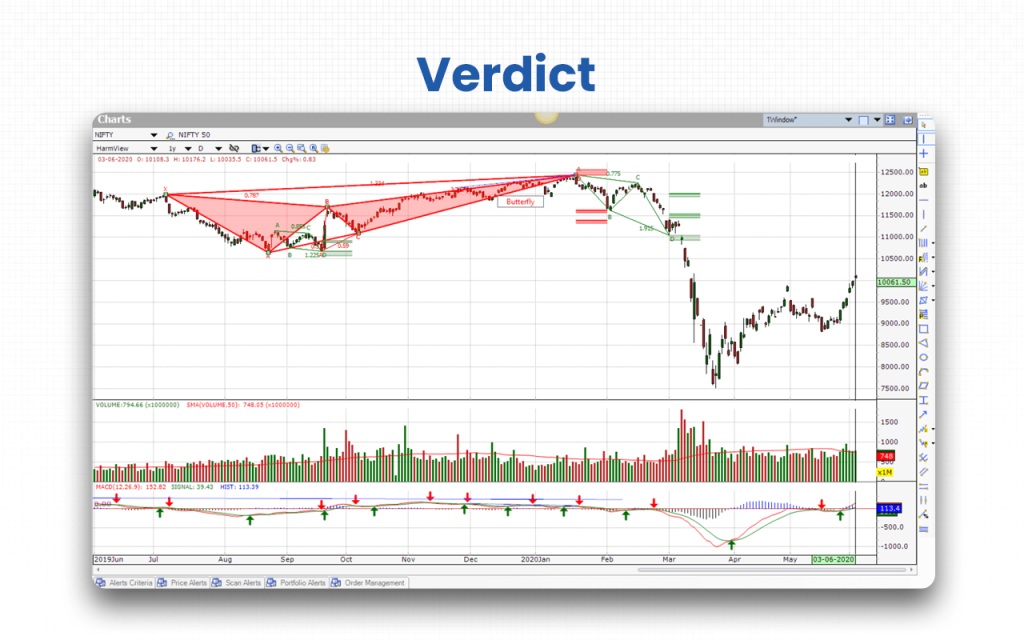
For me, Investar has been quite fruitful. The speed at which it updates data is impressive. If you are an active trader, the automated features will surely guide you. In addition, their charting and technical tools allow you to conduct your own analysis and not rely on the automated versions blindly. However, per my experience, this software builds a good reference for you in terms of data and plotting.
Investar enables users to set their price action and indicator-based strategies using its no-code technology. This means you can custom-create your strategies even if you do not have any programming knowledge.
The backtesting features are also embedded within the software, with the help of which you can get access to historical data to predict the latest trends and act accordingly.
If you are a long-term investor, Investar is for you too. Through the fundamental analysis tools it offers, you can carry out your research. This is done manually. You don’t get automated support here. The software allows you to access company data, the stocks of which you wish to buy. They provide the financial ratios, which you can assess to check if you should invest and hold it for the long term.
If you have any doubts, you can cross-check all the data that the software provides from your trusted sources to make sure the Investar data is relevant enough to refer to.
One thing that is concerning about Investar is the pricing, which might make beginners rethink their decision to use this software. However, the software is available with a 7-day trial. So, in case of doubts, you can utilize this trial period and then decide if you would like to continue with Investar.
Key Features
There are eight key features that will tell you why you should trust Investar when you have so many other options available.
- Buy/Sell signals: The software generates auto buy and sell signals on the chart based on the embedded technical indicators. You can check them and make your trading decisions.
- Auto-updating screener: You can use this feature to assess data across multiple timeframes and accordingly determine when to take your trade or make an investment for long or short term.
- Integrated analyses: Whether you are someone looking for technical analysis for instant trades or you are using the software for fundamental analysis for making long-term investment decisions, Investar can help you in both instances.
- Auto detections: Besides auto buy and sell signals and screeners, Investar also supports automated plotting of harmonic patterns, support/resistance levels, supply/demand zones, trendlines, and classic patterns on the charts.
- Backtesting: Investar offers access to historical data, which can be analyzed by traders and investors to identify expected upcoming patterns and frame or modify their strategies accordingly.
- Risk management: Through Investar, traders are given an opportunity to limit their risks by using multiple tools, including performance analytics, a position sizing calculator, and features such as limit orders, stop loss orders, etc.
- Portfolio management: When you have Investar downloaded, you can manage your portfolio efficiently. All your investments get reflected on the same page, and you can monitor and manage each one of them from the same place.
- Real-time data: The real-time data allows active traders to take the right trades at the right time. The data is quite sensitive, given the volatility of the markets. Hence, even a slight delay in taking a relevant action can lead to losses.
By now, you have possibly gathered an idea about whether to go ahead with Investar. If not yet. Let’s take you to the next section to explore some of its benefits.
Investar Advantages
Nine advantages of Investar make it a must-try product for all traders and investors out there.
- Offers AI-powered automated technical analysis with auto-plotted zones, trendlines, divergences, targets, and stop-losses for faster decisions.
- Combines technical charts, fundamental insights, and portfolio tracking in one integrated platform to simplify a trader’s entire workflow.
- Provides extensive predefined scans that auto-refresh daily, helping traders quickly identify fresh stock opportunities without manual effort.
- Allows advanced customization through IQL, enabling traders to build personalised scans, filters, and multi-timeframe strategies effortlessly.
- Delivers instant desktop and mobile alerts for buy/sell signals or screener outputs, ensuring traders never miss key movements.
- Supports direct trading from charts or alerts in compatible setups, enabling quick execution without switching multiple platforms.
- Includes a powerful custom screener that lets users scan across timeframes and align filters precisely with their strategy.
- Offers comprehensive options analytics such as chains, OI data, Greeks, and trend charts to strengthen options trading decisions.
- Enables no-code algo trading so users can automate indicator-based or price-action strategies without any programming knowledge.
Now that you know the benefits of the software, let’s also explore the flaws it comes with.
Investar Disadvantages
There are four disadvantages that you must know about Investar to make sure you play it safe while using the software.
- Market volatility: The fluctuations in the market are common. Hence, the direction changes in seconds. Hence, users are expected to be alert while observing the market to take action instantly.
- Pricing structure: The software is expensive. Hence, a casual trader or a beginner might find it hard to pay the amount to use the product. Even seasoned traders/investors might not agree to it and switch to other platforms, offering similar features.
- Time commitment: The data being time-sensitive because of the volatile market makes it essential for traders to be available to book a position as soon as it’s the right time. If they do not do that, they might have to incur a loss.
- Prior knowledge: As the software automates detection, users need to have prior knowledge of trading so that they understand if the signals or patterns shown should be trusted. Sometimes, experience speaks louder than visuals.
Though the disadvantages are there, you can still try Investar for the efficient technicals and fundamentals it offers.
Overall Summary
Overall Rating: 4.2 / 5
Investar is a comprehensive trading and analysis platform suitable for active traders and retail investors. It offers AI-powered technical analysis, automated signals, portfolio management, and fundamental analysis tools. While the software is feature-rich and reliable, the pricing and steep learning curve may be challenging for beginners or casual users. Its Lite edition provides a risk-free way to explore core functionalities before committing to a paid plan.
| Feature | Rating (out of 5) | Notes |
|---|---|---|
| Technical Analysis | 4.5 | Robust AI-driven charting, indicators, pattern detection, trendlines, and backtesting for active traders. |
| Fundamental Analysis | 4.0 | Provides financials, ratios, and company data, helpful for long-term investors, but lacks automation. |
| Portfolio Management | 4.2 | Integrated portfolio tracking with real-time performance monitoring, watchlists, and charting tools. |
| Risk Mitigation | 4.1 | Performance analytics, position sizing, and order control tools aid in managing trading risk effectively. |
| Alerts & Notifications | 4.3 | Price, volume, push, and news alerts keep users informed for timely decision-making. |
| Ease of Use / UI | 4.0 | Intuitive interface but learning curve is moderate; dedicated tutorials and webinars are available for guidance. |
| Pricing & Value | 3.8 | Expensive for casual traders; Lite edition offers free limited access, paid plans offer full features. |
| Customer Support | 3.5 | Mixed feedback; responsive for some, but delayed or unavailable during critical trading periods for others. |
Investar Pricing Structure
Investar provides four desktop editions, namely, Lite, Basic, Standard, and Pro. Users can pick the one that fits their experience level and needs, from entry-level charting and EOD history to full-featured scanning, auto-S/R / trendline tools, custom screeners and advanced multi-timeframe capabilities.
| Plan | Cost (approx.) | What’s Included |
|---|---|---|
| Lite | Free | Entry-level charting and technical toolsFixed-parameter indicatorsLimited drawingsBasic scansEOD history |
| Basic | ₹ 495/month (starter price) | Starter version with 15-year EOD dataLimited technical analysis toolsBasic chart typesPortfolio managerSuitable for casual investors |
| Standard | ₹ 995/month | 65+ technical indicators35+ drawing tools6-window chart layouts190+ auto-updating technical & fundamental scansAuto S/R zones, trendlines/divergence detection,Direct trading from charts/scan/portfolio |
| Pro | ₹ 1,345/month | All Standard featuresCustom screeners,Multi-timeframe & custom-timeframe scansUse of IQL, and advanced scan options based on candlesticks, indicators, Heikin-Ashi, and price action |
Who is Investar for?
Investar is for active traders, retail investors, analysts or strategies, and learners or beginners in trading.
- Active Traders: The technical analysis tools, charting tools, and auto-updating screener make it relatively easy for active traders to take trades frequently, as and when it is the right time.
- Investors: Investar also has effective fundamental analysis tools to offer. It gives details of the financials of the company you want to make a long-term investment in. You can assess the details and analyze them to check if they are worth the investment.
- Analysts: The automated signals, patterns, and zones identification feature that Investar offers is of great help to analysts and strategists. They back these detection points with their own research and then predict almost-accurate points to take trades with maximum profits.
- Learners/Beginners: Investar has a section dedicated to Education, where it offers trading and investment training to newbies. So, if you are someone looking for a good resource to learn where to invest to build wealth, Investar can help you.
If you are someone who believes in a buy-and-hold approach for investment, Investar is not for you. It is for active investors who keep a frequent check on the market data.
Investar Customer Support Concerns
As an active trader with considerable experience, I never needed any support from the customer service team as of now. But some beginners in trading have found them inefficient.
- Delayed response: Some users have observed that the customer support team responds quite late and sometimes, it does not respond at all.
- Absence in critical moments: Few users complained that the support team is unavailable when their technical assistance is highly required.
- Restricted reach: As a trading-related website, being available only via email is big challenge that users face. There is no other way to communicate with them even in emergencies, which has been annoying for me as well.
One of the anonymous users on Mouthshut wrote:
“The lack of support during critical trading moments has made me feel uneasy about relying on the platform. The app tries to do so many things at once which makes it lag during peak trading hours.”
On the contrary, there are some users who have appreciated the efficience of the customer support people at Investar. If you want to check how they respond to you, you may connect with them via email – support@investarindia.com.
What are Investar’s Review Ratings from Review Sites?
| Platform / Site | Rating/Score | Summary of Reviews |
|---|---|---|
| MouthShut.com | 2.57 / 5 | Users find basic features, like charts, support/resistance levels, but many complain about data accuracy, lag, or weak value for money. |
| TechJockey | ~ 4.5 – 4.6 / 5 | Reviewers praise the intuitive interface, auto-signals/scan tools, and believe Investar offers good value for its price. |
| SourceForge | 4.0 / 5 (single user review) | The lone reviewer appreciated the built-in indicators, scanning & charting tools, but the small sample size limits the reliability of the rating. |
| Slashdot | Mostly positive | The user found Investar helpful for setting stop-loss/target and option analysis; flagged chart resolution as a drawback. |
What are the Core Features of Investar?
The core features of Investar can be classified into five categories, which include technical analysis, fundamental analysis, portfolio management, risk mitigation, and alerts and notifications.
Technical Analysis
Investar’s technical analysis tools help traders study price movements, trends, and patterns. It combines AI-powered indicators, charting, and backtesting features to enable informed trading decisions efficiently.
- Smart drawing tools: Investar’s advanced drawing tools allow traders to accurately mark trends, support, resistance, and chart patterns for analysis.
- Trendlines: Trendlines are automatically detected and plotted, helping users identify market direction, potential breakouts, and reversals effectively.
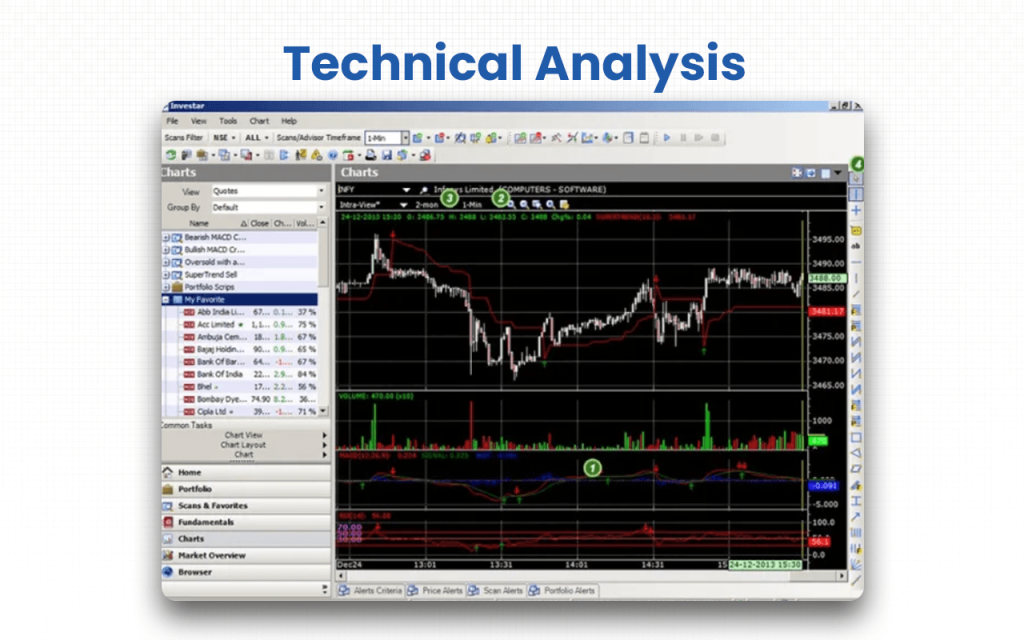
- Indicators: The platform offers over 65 technical indicators to analyze price movements, momentum, volatility, and market trends across multiple timeframes.
- Pattern detection: Classical and harmonic chart patterns are detected automatically, assisting traders in confidently anticipating potential price movements.
- Backtesting: Users can backtest trading strategies on historical data to evaluate their effectiveness before applying them in live markets.
Fundamental Analysis
Investar provides fundamental analysis tools to assess a company’s financial health, profitability, and valuation. It enables long-term investment decisions based on reliable data.
- Financials: Investar provides comprehensive company financial statements, including balance sheets, income statements, and cash flow statements for analysis.
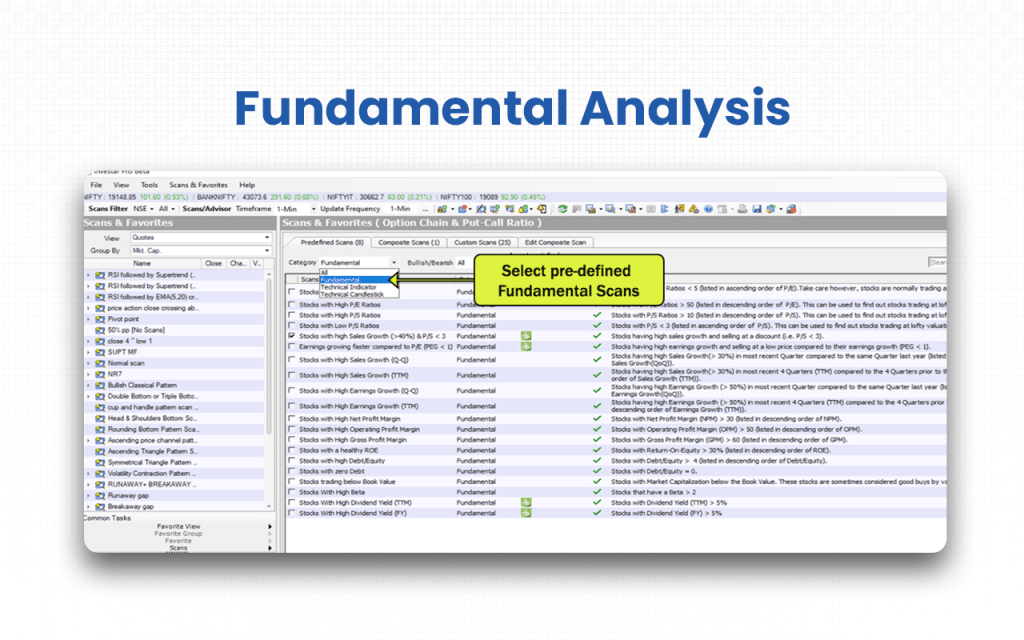
- Financial ratios: Key ratios such as P/E, ROE, and debt-to-equity are calculated to assess company performance and stability effectively.
Portfolio Management
Investar’s portfolio management feature allows users to track, analyze, and manage their investments efficiently, all within a single platform.
- Market data: Users can monitor live stock prices, indices, and historical data to track portfolio performance accurately in real-time.
- Charting tools: Charts for portfolio holdings allow investors to visualize trends, patterns, and investment health over time efficiently.
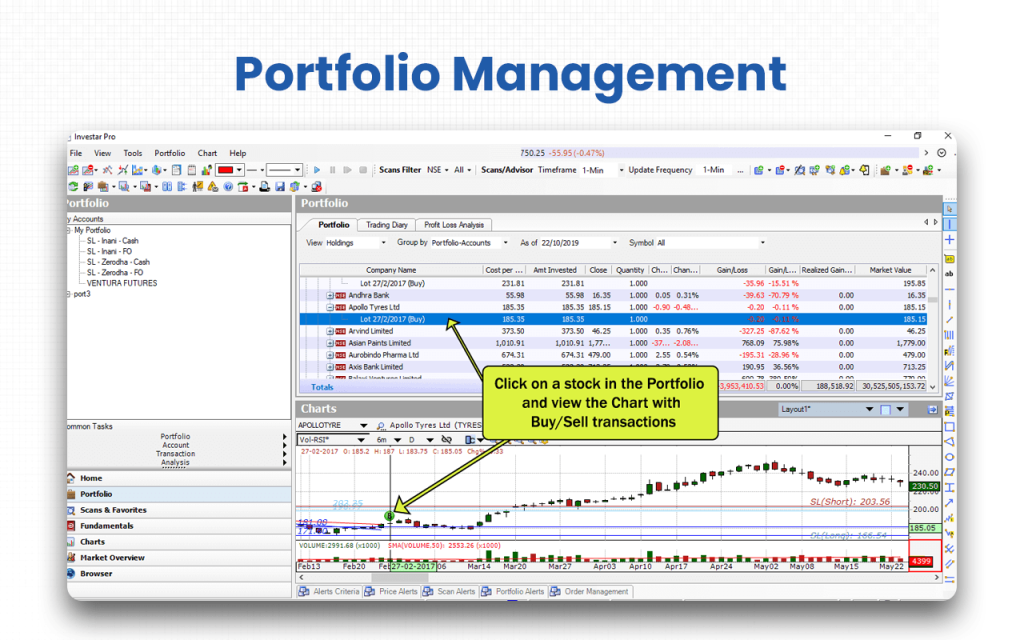
- Watchlist: Investors can create and manage multiple watchlists to monitor selected stocks or assets and identify trading opportunities.
Risk Mitigation
Investar offers risk mitigation tools to help traders control losses and optimize position sizing, improving overall portfolio safety.
- Performance analytics: Portfolio performance metrics help traders understand risk exposure, returns, and profitability comprehensively for better decision-making.
- Position sizing calculator: Optimal position sizes can be calculated based on risk tolerance, capital allocation, and market conditions to reduce losses.
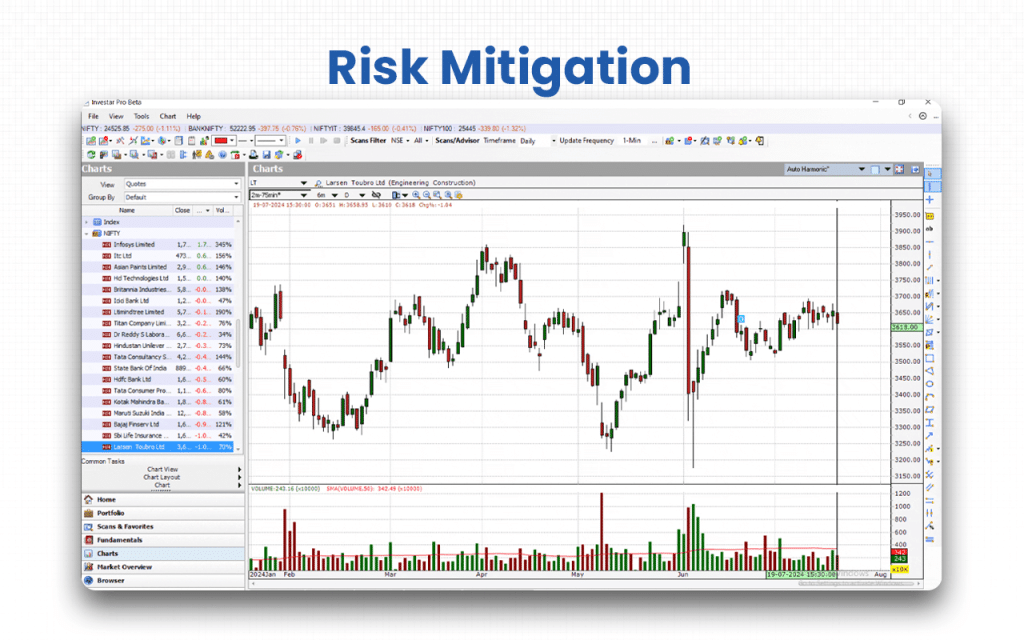
- Order execution: Trades can be executed efficiently to minimize slippage, ensure accuracy, and maintain control in volatile markets.
- Order control: Stop-loss, target, and trailing orders allow users to manage exposure and protect profits consistently in trading.
Alerts and Notifications
Investar’s alert system keeps traders informed about market movements, news, and volume changes, enabling timely decision-making.
- Price alert: Users can set price-based alerts to receive notifications when assets reach their predefined buy or sell levels.
- Push notification: Real-time push notifications on mobile or desktop keep traders informed about market movements instantly, wherever they are.
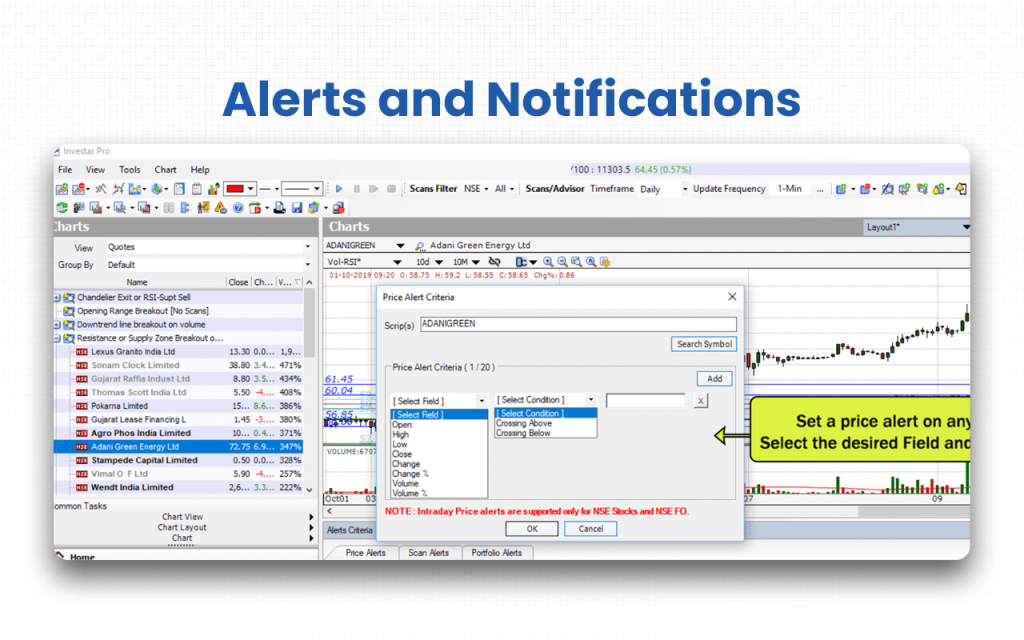
- Volume alerts: Alerts for unusual trading volume help identify potential opportunities, breakouts, or market anomalies promptly.
- News alerts: Users receive timely notifications about important market news, announcements, or corporate actions affecting their investments.
The features in depth above cover everything that Investar can give you once you sign up. Now let’s dive deep into the markets and assets it supports.
Supported Markets and Assets on Investar
Supported Markets
- Indian stock market coverage, including major exchanges such as NSE and BSE.
- Indian Futures & Options market, including stock-F&O and index-F&O segments.
- Indian index markets, supported through editions like Nifty Special and Nifty-50 Edition.
- Indian commodity markets, covering MCX and NCDEX through EOD charts and screeners.
Supported Assets
- Equity (Cash Market): All major Indian-listed stocks.
- Equity Derivatives: Stock futures, stock options, index futures, and index options.
- Market Indices: Indian indices with charting and screening support.
- Commodity Futures: MCX/NCDEX commodities supported via end-of-day data.
Broker Integration and Trading Execution of Investar
Investar supports direct integration with Zerodha for live trading. Users can place buy/sell orders via Investar that execute through their Zerodha account.
- To enable this integration, you need your Zerodha User ID, password, API key & secret, and authentication key. Once set up, Investar connects to Zerodha’s API for order execution.
- Through this setup, you can place trades directly from chart windows, scan alert triggers, watchlists/favourites, or from Investar’s Portfolio Manager, offering flexibility for both technical-analysis-based and alert-based trading.
- If you do not have a Zerodha account, you can open it through Investar by filling out a form available on the website.
After orders are executed through Zerodha, trades are automatically logged into Investar’s Portfolio Manager. This removes manual contract-note import for Zerodha trades, simplifying record keeping and performance tracking.
Investar’s User Interface & Learning Curve
Investar presents an integrated interface, combining charts, technical and fundamental analysis, screeners, and portfolio management, giving a unified view for users.
- Charts are rich, auto-support/resistance zones, auto-trendlines, auto-supply/demand zones, auto-divergence, and auto harmonic or classical patterns are plotted automatically (AI-powered), reducing manual charting work.
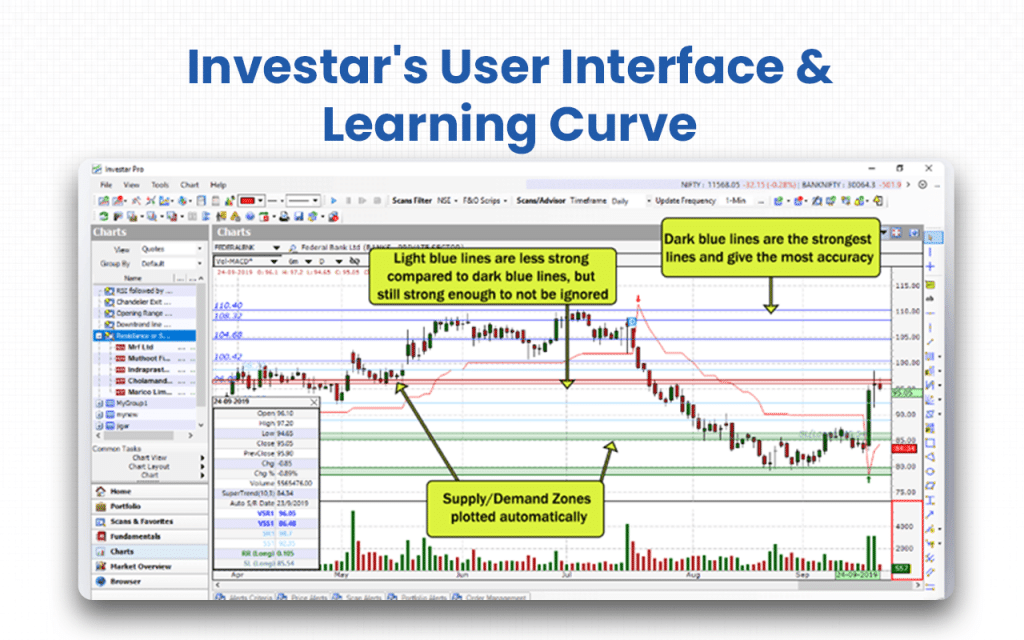
- Users get access to a wide set of tools: fundamental tools, 65+ technical indicators, 30+ drawing tools, enough to satisfy both basic and advanced charting needs.
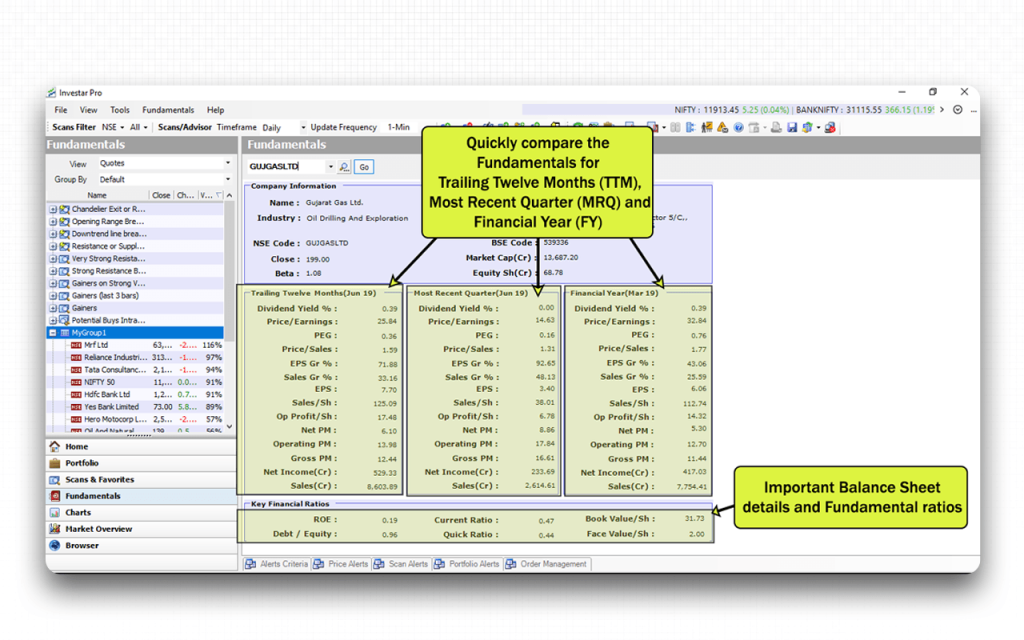
- There’s a built-in screener and alert system: auto-updating scans, scan alerts, and custom-screener support, all allowing quick discovery of trading/investment opportunities.
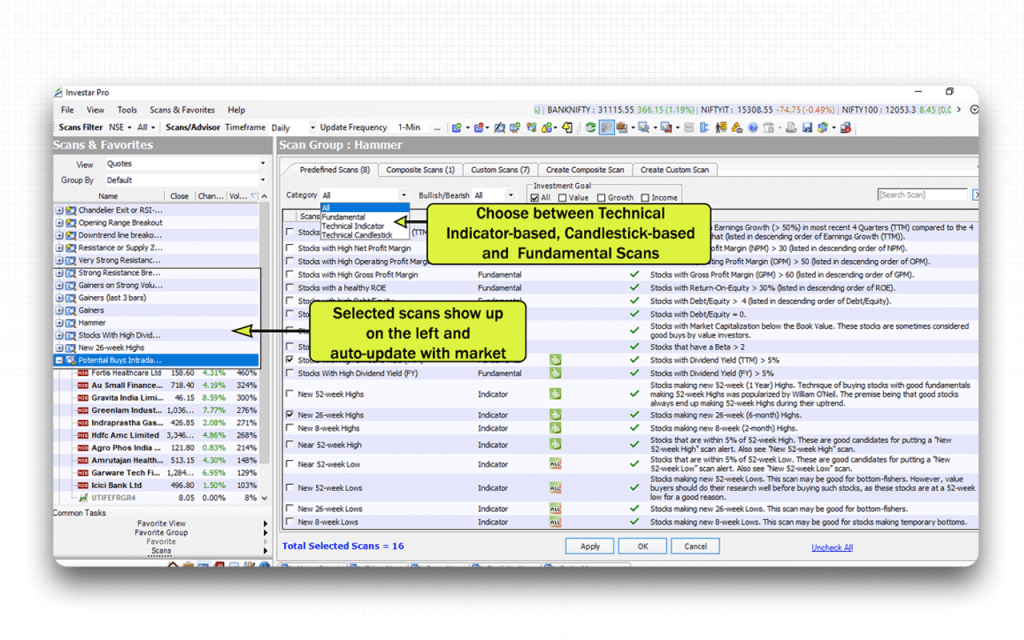
- Portfolio management is integrated with charting: you can view your holdings, past transactions and P/L directly on charts, which helps in tracking performance and making informed decisions.
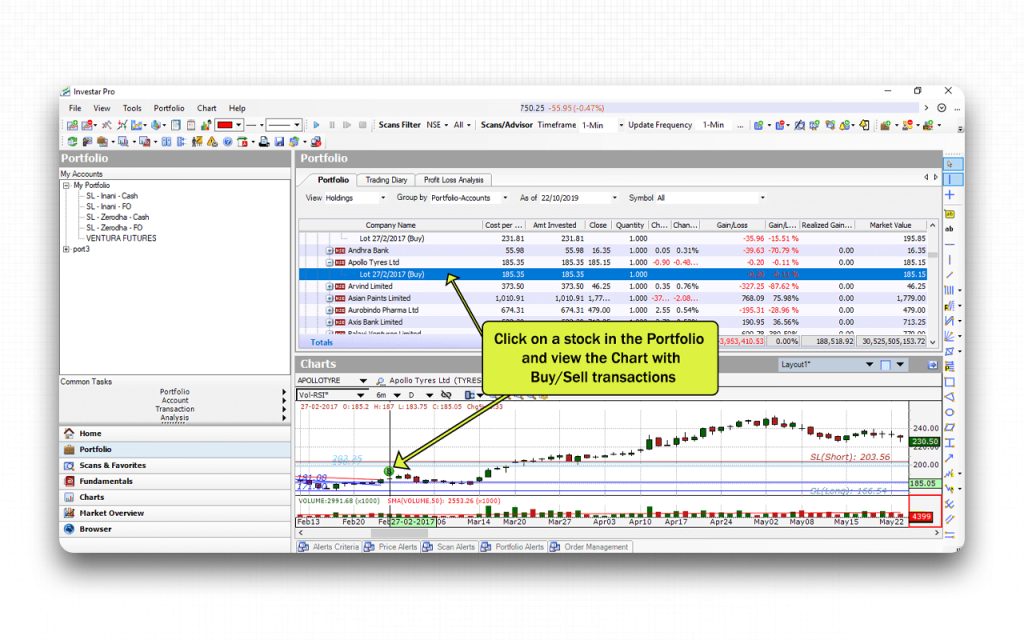
The learning curve for Investar is steep, and that’s what makes its dedicated Education section provide quick-start tutorials for both technical analysis training and Investar software training, video guides, and webinars for beginners to intermediate to expert users.
Investar Company Details
- Company Type: Private
- Headquarters: Vadodara, Gujarat, India
- Year Founded: 2008
- CEO: Himanshu Patil
- Number of Employees: 11-50
- Number of Users: Over 133,333 registered users & 106 active users.
- Company Description: Investar is a software product of the company, Prosean Technologies Pvt. Ltd. The solution was developed to automate trading analysis tools so that traders can get a reliable assessment of the market in real time and take the right trade at the right time. The investors who wish to make huge investment in different companies can refer to the financials of the respective companies and then decide whether to invest in them or not. Everything from technical analysis tools, including charts and indicators, to fundamental analysis and portfolio management features is included in the software product.
Top Investar Alternatives
Are you looking for more advanced backtesting capabilities or a more modern, intuitive interface than what Investar currently offers? These platforms provide specialized technical analysis tools and seamless scanning features to help you track market trends and refine your trading strategy with greater efficiency.
| Platform | What It Offers Beyond Investar | Best Suited For |
|---|---|---|
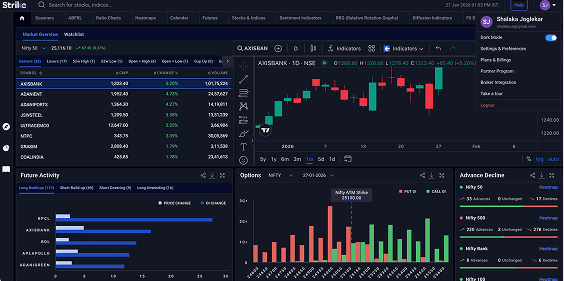
| Strike Money | Advanced analytics: proprietary scanners, heatmaps, sector/stock-momentum comparison (Relative Rotation Graphs), sentiment indicators, options & futures-focused tools. | Traders and investors who want a compact all-in-one toolkit with advanced scanning, F&O analytics, and market-wide heatmap/sector-momentum analysisUseful for both short-term trades and long-term picks. |
| Amibroker | High-performance desktop software with advanced custom scripting (AFL), lightning-fast chart rendering and scanning, and powerful backtesting and system development for algorithmic trading. | Professional traders, algo-traders, and strategy developers who need deep customization, historical backtesting, and full control over trading logic. |
| TradingView (India / global version) | Cloud-based charting with 100+ built-in indicators, customizable charts, multi-device access, custom scripting (Pine Script), community scripts & ideas, plus real-time data integration (via brokers) and flexibility across global & Indian markets, as detailed in our TradingView review. | Traders who want high flexibility, advanced charting, device-agnostic access, and community-driven scripts, suitable for technical traders ranging from beginners to professionals. |
| Chartink | Web-based, lightweight stock screener focused on Indian markets (NSE/BSE), with customizable live filters/scans, ability to filter using technical conditions without heavy charting overhead, and fast scanning across many stocks, as detailed in our Chartink review. | Swing traders, breakout or momentum traders, or users who want a lightweight yet powerful scanner for quick setups without needing heavy charting or full analysis suites. |
| Fyers One / Fyers ecosystem | Integrated charting & trading, good charting tools, intraday & EOD charts, screener functionality, and direct execution via broker. Option-chain and derivatives analysis, along with a charting engine via TradingView/ChartIQ, depending on version. | Retail traders (intraday or swing) or regular investors who want real-time execution, good charting, analysis, broker integration, essentially a seamless trading and analysis platform. |
Is Strike Money the Best Alternative to Investar?
Yes, Strike Money is the best alternative to Investar because it offers deeper analytics, modern tools, F&O-focused insights, AI-driven scanners, and a far more powerful market-analysis engine at a lower or equivalent price point.
| Category | Strike Money | Investar |
|---|---|---|
| Scanners | Real-time advanced scanners, F&O scanners, sector & sentiment scanners | Basic scanners, fewer categories |
| Heatmaps & Market Breadth | Comprehensive heatmaps, sector rotation, and market breadth tools | Not available |
| F&O Tools | Advanced option chain, OI analysis, IV, long/short build-up, futures analysis | Basic OI + option chain; limited futures tools |
| Trade Discovery | Strong AI-based and pattern-based trade discovery | Mainly chart patterns; fewer discovery tools |
| User Interface | Modern, fast, web-based, lightweight | Slightly dated (desktop-heavy) |
| Speed & Performance | Very fast scanning + real-time updates | Slower during heavy scans |
| Best For | Active traders, F&O traders, intraday & swing traders | Technical analysts & equity chart-focused traders |
| Monthly Pro Pricing | ₹649 | ₹1345 |
| Value for Money | High — more features for lower cost | Medium — many features need upgrades |
| Free Trial | Yes | Yes |
| Why It’s Better | More analytics, more indicators, stronger scanners, better UI, cheaper | Good for charting but lacks breadth & F&O depth |
Is Investar Worth It?
Yes, Investar is absolutely worth it, especially if you are an active trader or investor.
If you are someone who is into buying a holding a position for too long, it’s better to go for other platforms. Investar reflects real-time changes in the data, and it thereby serves the active and frequent traders the best. The screeners, the charts, the embedded indicators, etc., make it the best product for technical analysis.
The automated detection of signals, patterns, and zones is quite impressive, but I recommend that you to conduct your own research as well and have solid data to support your trading decisions. The market is volatile, and the data is sensitive. So, being alert all the time and not blindly following the frequent fluctuations might not be a good idea.
The retail investors can also be part of the Investar user base. They can follow the fundamental analysis tools and make their own assessment based on the financials that the software provides. From the balance sheet of the company to the financial ratios, it makes accessible all elements that can help them make better and wiser investment decisions.
The software is quite expensive, which might not be worth paying for as a casual trader. But it has its Lite version, where you can enjoy access to the tools, though limited to a certain number, free of cost.
In case you are a beginner, it is recommended to learn trading before you download this software. Even if you use the free version, you won’t get the hang of the features if you aren’t aware of the fundamentals.
FAQs about Investar
Is Investar Free to Use?
Yes, Investar is free to use, at least to a certain extent. It offers a “Lite” edition that is free for lifetime, with basic charting, fixed-parameter indicators, limited drawing tools and EOD data, which are enough for beginners to start technical analysis without paying.
Is Investar Safe and Secure?
Yes, Investar can be considered safe and secure as it uses secure payment processing via a trusted gateway with SSL encryption for subscriptions. Also, the domain is long-established and uses HTTPS, which helps ensure safe browsing and data transmission. However, the level of safety also depends on user practices, like strong passwords, secure devices, and careful handling of credentials.
Can a Beginner Use Investar?
Yes, a beginner can use Investar because it offers a simple interface, auto-analysis tools, and free tutorials that make charting and scanning easy to understand. The free Lite edition also helps new users practice technical analysis without any cost.
Is There a Mobile App for Investar?
Yes, Investar does have a mobile app. It’s available for Android (and previously for iOS), allowing users to view real-time or near-real-time charts, watchlists, and technical‑analysis features on their smartphone.
Is the Investar Interface Customizable?
Yes, the Investar interface is customizable. You can save and restore chart layouts as multiple windows, sync modes, vertical/horizontal splits, apply custom time‑frames, and create or modify scan/screener conditions to suit your style.
![15 Investing.com Alternatives [Free+Paid] You Should Use in 2026](https://www.strike.money/wp-content/uploads/2026/04/Investing.com-Alternatives-768x482.jpg)
 38 mins
![15 TradeStation Alternatives [Free+Paid] You Should Use in 2026](https://www.strike.money/wp-content/uploads/2026/04/TradeStation-Alternatives-768x482.jpg)
![15 Chartink Alternatives [Free+Paid] You Should Use in 2026](https://www.strike.money/wp-content/uploads/2026/04/Chartlink-Alternatives-768x482.jpg)