Chartink Review (Data-Backed) 2026: Features, Pros vs Cons, Pricing, Reviews, Is It Worth It?

 Author

 Editor
This Chartink review has been designed as a guide to help traders and investors decide whether they should choose it over the other available market alternatives. In this Chartink review, you will not only get to know about the features and benefits that the platform comes with, but also have an opportunity to explore it better through my personal experience.
Here, I will discuss the features, benefits, challenges, pricing structure, and every aspect of Chartink that I have used and checked myself. From the efficient screener feature to the slight delays in reflecting updates, I will tell you everything you should know about Chartink.
What is Chartink?
Chartink is a platform that helps traders analyze the Indian stock market through advanced screeners and charting tools. It is an unfunded platform, which recorded revenue of approximately $1.91 million in March 2024. Chartink serves both fundamental and technical analysis purposes.
Whether traders desire to leverage indicators to assess the market or investors look for the ratios of companies they consider investing in, Chartink serves the purpose of both kinds of users.
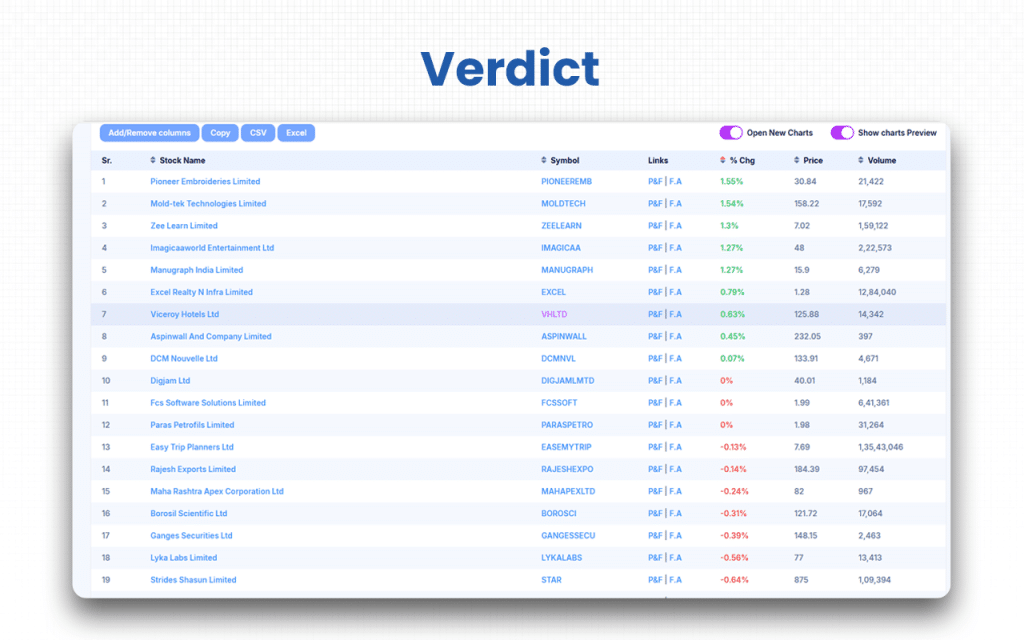
Chartink offers customizable stock screeners and allows traders to set alarm systems so that they get notified of the respective condition at the right time. If you want to get your stocks filtered based on certain criteria, this screener can help you. For the screener to work correctly, traders must ensure that they use accurate criteria. The customizable screener and scanner feature is what makes it the best among the best.
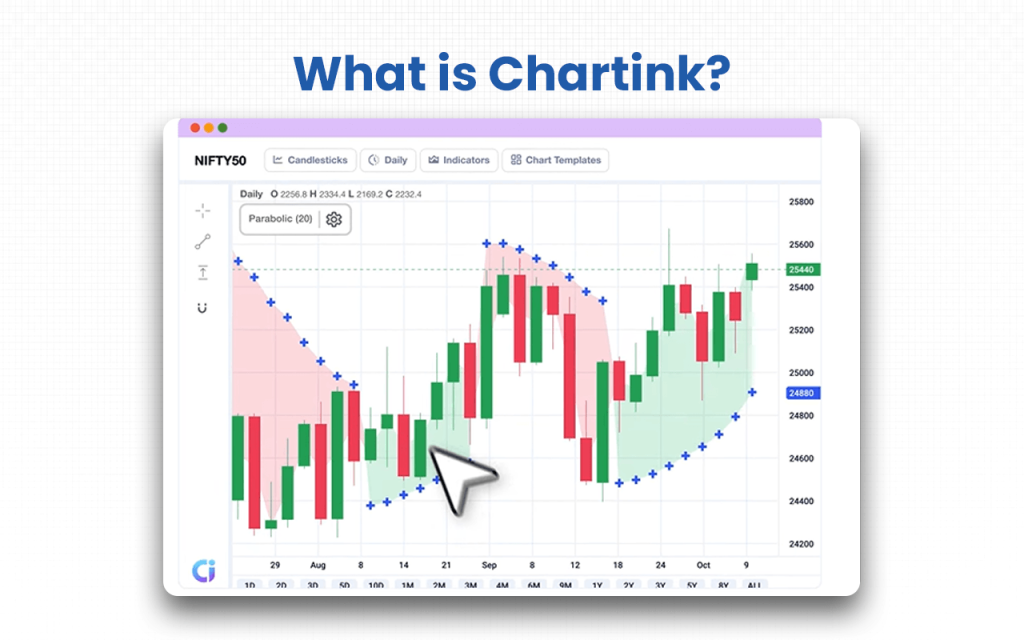
Chartink offers a huge database of historical data that helps traders assess the current market based on certain parameters. The datasets that the platform offers to traders are directly extracted from the Indian stock exchanges, and hence, the accuracy cannot be questioned. It’s this reliability of Chartink that convinces the existing users to never switch to another alternative.
Where the technicalities offered are amazing, the delayed updates become a concern for basic product users. I signed up for Chartink and chose the basic plan. Though it helped me with almost everything, I got stuck with it reflecting the updates slightly later than it should have. It made me lose out on a few bugs. But my friends who used the version asked me to upgrade my membership to premium to resolve the issue. I did, and I started getting real-time updates.
Verdict
Overall Rating: 4.5/5
My experience with Chartink has been amazing, even though I started as a free user. Trust me, I paid nothing, yet I had access to candlestick and PnF charts. Chartink also allowed me to customize stock screeners and carry out intraday trading. Using these tools helped me visualize the market scenario much better and thereby make well-informed trading decisions.
I felt the need to upgrade my membership only when I started struggling with getting real-time updates frequently. One of my friends recommended going premium if I wanted to access stock information and data without even slight delays. It worked.
Though the delays are not significant, I had to use premium for once to see the difference. However, the difference was not even that noticeable.
The platform is easy to use with efficient customer support services, which most of the trading, brokerage or analysis platforms do not ensure.
Key Features
There are six key features, looking into which will help you know why you should consider Chartink as your financial analysis partner.
- Chart customization: Like other platforms, Chartink does not offer any scripting language or query language. Still, it is easy to use when it comes to customization of charts and indicators since it offers a user-friendly interface to traders with easy navigation. You can plot indicators on the charts and make them work as you wish.
- Efficient scanning: The best thing for me while using Chartink was the simplified scanning it offered. I set the criteria, and that’s it. The scanner worked in accordance and notified me when it was time to take action. If you are someone who wants to shortlist and get your stocks scanned with respect to specific criteria, Chartink is a must-try.
- User-friendly interface: You can have a chance to keep an eye on the broader market perspectives through customized analytics.
- Robust customer support: The support services offered by the platform are too good. Most of the traders find it difficult to connect with the team that operates their platforms. With Chartink, you get a dedicated team of executives, always available to assist you.
- Fast alerts: Premium users can set alerts on Chartink, which notify them as and when the criteria set for each stock they are dealing in are met. As a result, traders like us never miss out on any stock. We get to monitor all stocks on the server and decide on taking a trade as and when an alert is received.
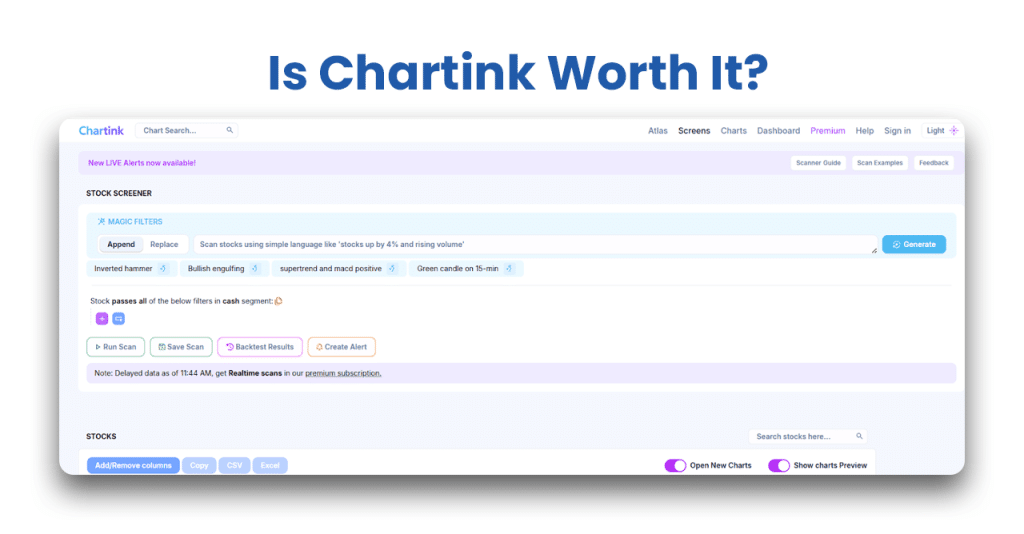
- Magic filters: Chartink comes with smart market filters that help traders identify opportunities instantly and make better trading decisions without any doubts.
After going through the features, you might be willing to know the benefits of these features, right? Don’t worry, I will share all the benefits point-wise for you in the next section.
Chartink Advantages
The eight quick benefits of associating with Chartink include everything from its basic plan with advanced features to its robust customer support service.
- Chartink offers almost all its features, including PnF and candlestick charts, free of cost.
- It offers customization for screeners, charts, widgets, indicators, etc., without having to provide traders a separate query or scripting language.
- The platform offers a vast database, which includes data from the 1980s, for backtesting.
- The data that Chartink makes available for reference is directly taken from the NSE, and hence, they don’t mislead users.
- The premium version offers scan alerts, which notify traders of stock price movement matching their custom criteria.
- Traders can easily identify the support and resistance levels for stocks during the trading hours.
- Analysts can identify stocks rising sharply while their volumes grow over the last three 5-minute candles.
- Its customer support is highly appreciated, as most traders, when they collaborate with a platform, find issues with the assistance from customer service. Chartink does not trouble users that way.
Now that the pros are known, you must be aware of the cons of the platform too, which have been discussed immediately after.
Chartink Disadvantages
While the advantages are many, Chartlink does have three disadvantages that you must know of.
- The premium version is highly questionable. While some users find it worthwhile, a few say that the features offered after upgrading the membership remain the same. For me, it has been an added advantage when I upgraded to the premium version, as it gave me access to scan alerts and the data updates were faster than before.
- If you are an intraday trader, do not stick to the basic free-of-cost plan, as it will delay your access to the most recent data. Upgrade and enjoy Chartink’s better version.
- Novice traders must be cautious and must not rely entirely on the screeners on the platform. They must back the analysis with their own knowledge.
Apart from the challenges mentioned above, which are common for all trading or analysis platforms, traders won’t find the platform lagging in any other aspects.
Overall Summary
Overall Rating: 4.5 / 5
Chartink stands out as a powerful and reliable stock screening platform for Indian traders and investors. It offers a balanced mix of free and premium tools for both technical and fundamental analysis, supported by real-time alerts and a highly customizable screener interface.
| Feature | Rating (out of 5) | Notes |
|---|---|---|
| Ease of Use | 4.6 | Clean and intuitive interface suitable even for beginners; no scripting language required. |
| Screeners & Filters | 4.8 | Highly customizable with both technical and fundamental parameters; one of the best in India. |
| Charting Tools | 4.4 | Offers candlestick, PnF, and intraday charts; lacks advanced pattern recognition. |
| Real-time Data | 4.2 | Real-time for premium users; minor delays in the free plan (~5 min). |
| Alerts & Notifications | 4.7 | Accurate and fast alerts via SMS, Email, and Webhook (Premium). |
| Customer Support | 4.0 | Helpful but limited to email assistance only. |
| Value for Money | 4.5 | Excellent free version; premium plan reasonably priced for added features. |
| Mobile Accessibility | 4.3 | Mobile browser works well; app version is limited compared to the desktop. |
| Overall Reliability | 4.6 | Data sourced directly from NSE; trusted by retail and professional traders alike. |
Chartink Pricing Structure
Chartink’s pricing structure offers a free version with basic features, but a delay in data. Upgrading to their Premium subscription unlocks advanced versions of the core features for users.
| Plan | Price (India) | What’s included |
|---|---|---|
| Free | ₹ 0 | Basic access: scans & charts with ~5-minute delay; limited timeframes (≥5 min); cannot run custom alerts. |
| Premium – Monthly | ~ ₹ 780/month | Near-real-time data (1-minute updates), ability to run scans/charts in 1/2/3-minute timeframes, alerts via SMS/Email/Webhook, private scans & dashboards, dedicated scanner support. |
| Premium – Yearly | ~ ₹ 8,500/year (i.e. ~10+% savings vs monthly) | Same feature set as monthly Premium, billed annually. |
Who is Chartink for?
Chartink is specifically designed for retail traders, who can be either intraday or swing traders, educators, chart developers, and analysts.
- Retail traders: Being one myself, I know how effectively Chartink serves the purpose. It has all technical and volume-based data to help intraday and swing traders take relevant trades at the right time. Even if you are not a premium user, you will get sufficient benefits.
- Educators: Anyone who wants to make novice traders learn and explore the field of trading, along with enabling them to acquire skills to read and interpret different indicators, can come to Chartink. They can build and share scan logic or alerts using Chartink’s engine.
- Analysts: The financial analysts out there can opt for Cjartink as they can easily identify the stocks that undergo a sharp rise while marking significant growth in volume over the last three 5-minute candles. Spotting this pattern makes them suggest the new buying interest and indicates upsides to their clients.
While you can be a creator of different algos on Chartink, you cannot consider this platform if you are seeking trading advice or if you want to use pre-built indicators.
Chartink Customer Support Concerns
Chartink’s customer support service reviews show a mixed opinion from users. While some users find the platform easy to use and understand without having much to connect with the customer support team, a few show disappointment with the limited channels available for customer service delivery.
Chartink only offers to assist users through email, which seems to be inconvenient to some, especially when they need a quick resolution.
I have never required connecting with the customer service people at Chartink so far; hence, I might not be a great help to you over here. But you can check if they are efficient enough by contacting them directly through their Help page.
What are Chartink’s Review Ratings from Review Sites?
| Platform | Rating | Review Summary |
|---|---|---|
| SociableLabs | 4.0 / 5 stars (11 verified reviews) | Users generally satisfied: value for money ≈ 3.9/5; pricing & quality ≈ 3.5/5; customer support ≈ 4.0/5. Many positive comments on ease of use and support. |
| Google Play Store app | 4.64 / 5 stars (7,433 ratings) | Highly rated; frequently praised for usability and usefulness for traders, especially beginners. Common complaints: too many ads in the free version, app glitches. |
| Justdial (Mumbai listing) | 3.9 / 5 stars (7 ratings) | Moderate rating; some users point out service/support issues along with positives. |
| JoinChargeback | 3.2 / 5 stars (5 reviews) | Lower score; criticisms focus on billing/subscription and support responsiveness. |
What are the Core Features of Chartink?
The core features of Chartink have been classified into three broad categories, namely stock scanning, charting and analysis, and smart interface and integrations.
Stock Scanning
When you have a wide array of stocks available to invest in, it becomes important to sort the best among them to narrow down the list. That’s what Chartink effectively helps you with. The stock screeners and scanners allow you to have a look at the list and shortlist the ones that you are genuinely interested in.
- Customize screener: We, the traders/investors, are given an opportunity to customize the screeners based on our parameters. As mature users, we can set our priorities and, based on that, choose the stocks that we find would be fruitful to trade or invest in.
- In-built scanners: On Chartink, you also get pre-built screeners that you can refer to check the latest trends, patterns, and breakouts.
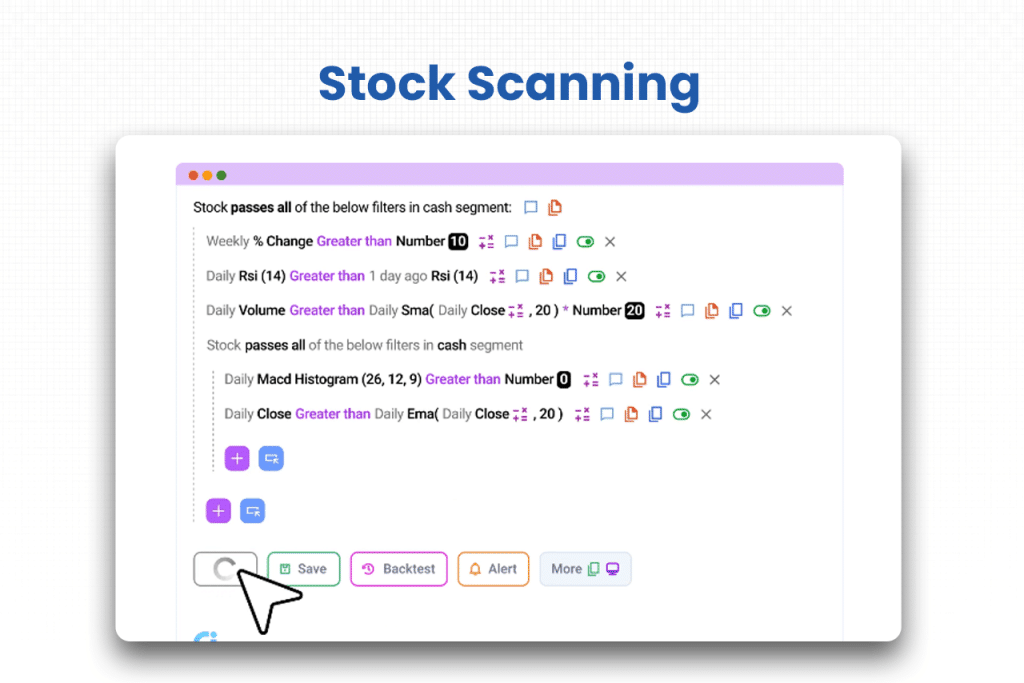
- Real-time data: As a frequent user of the platform, I can say that it brings to you the real-time data, but if you are a non-premium user, you might witness delays in updates. On the other hand, if you go for a premium subscription, you will get access to real-time updates, including one to three-minute timeframes.
- Set Alerts: When you scan a list of stocks, you have a set of criteria mentioned for customization. And that’s where you require someone to notify you that the criteria matched. This is when Chartink can help you. You can set your alert for the criteria met, and you will be notified accordingly.
Charting and Analysis
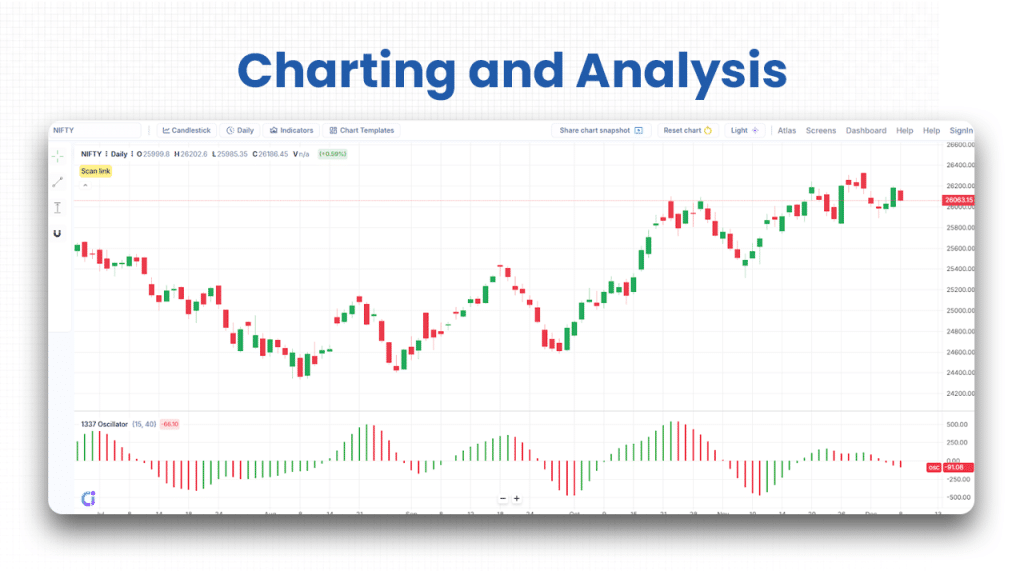
While a customized screener helps you shortlist stocks on the basis of the basic financials of the listed companies, advanced charting tools and indicators help you conduct technical analysis. You can customize the charts and indicators, and that too without using any separate scripting language.
- Detailed charts: Chartink allows you to have a detailed look at the charts and apply custom indicators to check what works for you based on your preferred parameters. You can view the candlestick, PnF, and larger charts with historical data to assess the market better than anyone else.
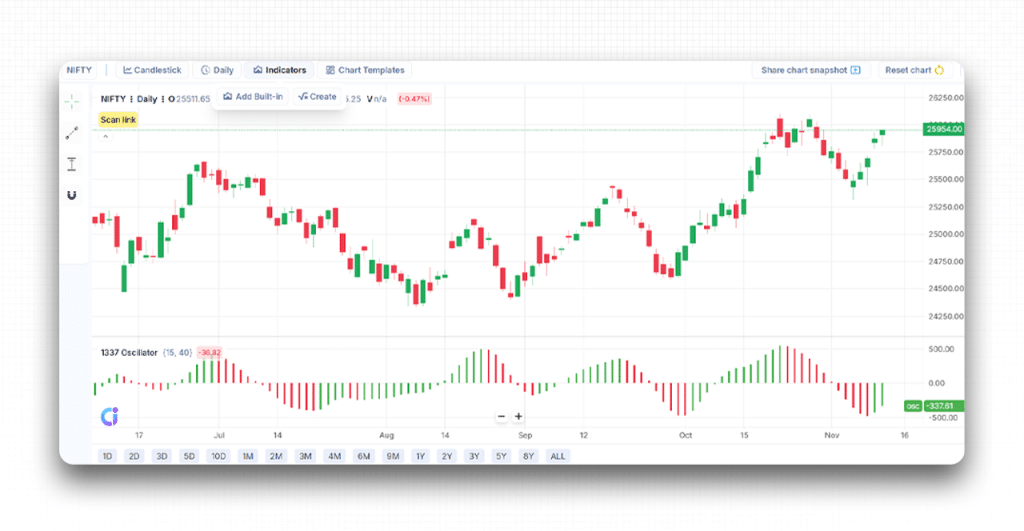
- Intraday charting: This is something I have specifically been into as an intraday trader. The best feature of this platform is that it offers auto-refresh options to users like us, who genuinely need it.
- Personalized watchlists: Though Chartink does not help traders to execute trades, it helps them do everything that requires taking the next step. Using the platform, you can create and manage a watchlist of your own and have your portfolio always ready for reference.
Smart Interface & Integrations
Chartink knows that users are in search of platforms that deploy smarter features and technologies for quick results. Hence, it has also incorporated some smart steps to ensure it serves the traders better than anyone else in the market.
- Smart filters: Chartink offers AI-powered filters to users. As a result, any input from the users turns into smart market filters. The words you use get transformed into filters, and you can make decisions based on the filtered stocks and related details.
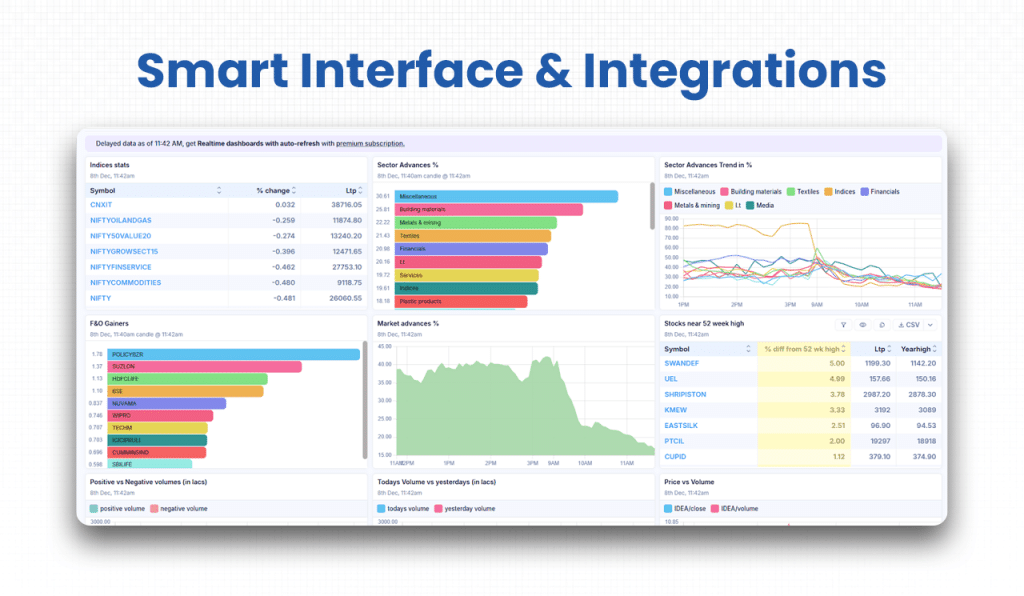
- Third-party integrations: Chartink integrates multiple third-party platforms to make it easier for its users to avoid switching between tabs or browsers for minute things. While its alerts are generated via webhook, it uses AlgoTest for trade execution to make it convenient for users to take trades instantly if they wish to.
- NSE collaboration: The huge data that is displayed on Chartink comes directly from the NSE, and hence, traders can fully rely on the platform for making well-informed trading decisions.
The features are enough to convince you why you should go for Chartink. Try the features yourself, and you will understand how convenient and powerful the platform is.
Supported Markets and Assets on Chartink
Supported Markets
- National Stock Exchange of India (NSE): Chartink primarily supports NSE-listed securities.
- Indian equity market only: The platform focuses on Indian stocks and derivatives; international markets are not currently supported.
- Real-time & end-of-day (EOD) data: Price data is sourced directly from NSE feeds with near real-time updates for premium users.
Supported Assets
- Equity Stocks: All NSE-listed companies across sectors.
- Equity Futures: Includes scanners for Futures Intraday and Stocks Futures.
- Derivatives (Futures/Options): Futures are supported; options data is limited or indirectly referenced in derivative scanners.
- Indices: Major NSE indices such as NIFTY 50, BANK NIFTY, and sectoral indices appear in scans.
- Technical & Fundamental Parameters: Charts and screeners support both technical indicators (EMA, RSI, MACD, etc.) and fundamentals (P/E, book value, volume, etc.).
Broker Integration and Trading Execution of Chartink
Chartink is an analysis platform, and hence, it does provide integration with other platforms to make redirection from one platform to another easier for its users.
- The first and most reliable collaboration it has is with the NSE, from which it extracts the data for its users.
- Chartink has a webhook integration for alerts, which is one of the most significant reasons for traders to choose it over alternatives. Traders get a chance to develop a screener on Chartink and then set up an alert with a webhook URL, which then generates signals when trader-set criteria are met for particular stocks.
- The webhook alerts can be linked to third-party platforms, like OpenAlgo, which offer support to broker order execution.
- One thing that worked for me was the extension of Chartink to TradingView. The former might not offer an advanced chart view. In that case, this extension allows users to paste the watchlist to TradingView or get redirected to TradingView by clicking on Chartlink symbol links.
So far as the trading execution on Chartink is concerned, it is not a platform that executes trades, but it does offer opportunities for involvement of third-party platforms that do so.
Chartink’s User Interface & Learning Curve
Chartink’s user interface is easy-to-use and interactive, and serves the purpose of even those who visit Chartink or begin trading for the first time.
- The scanner interface is visually clean and follows a logical grammar-style layout: you add filters like “Close > 500”.
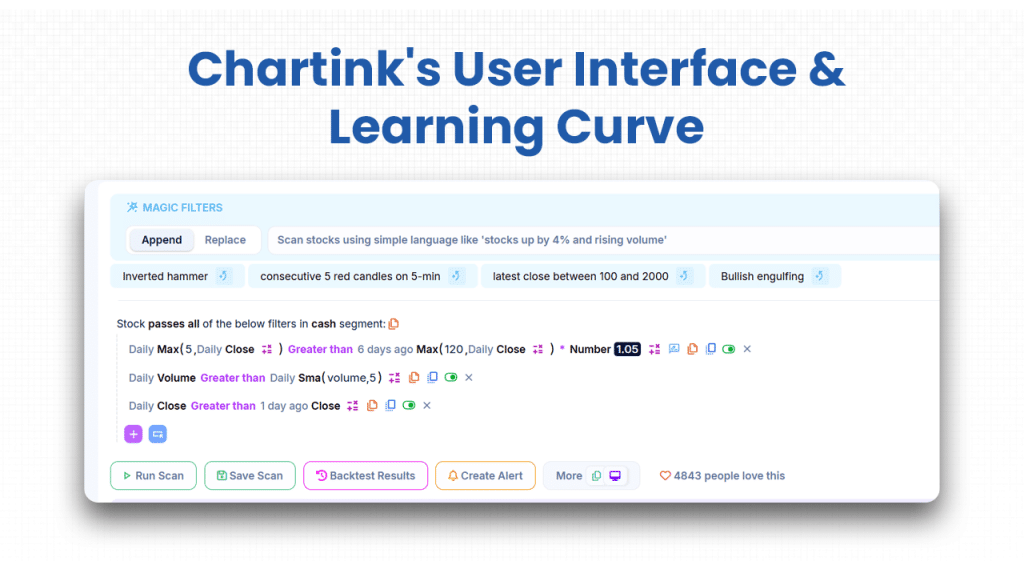
- It supports both technical and fundamental filters (RSI, MACD, P/E, etc), which are clearly labelled.
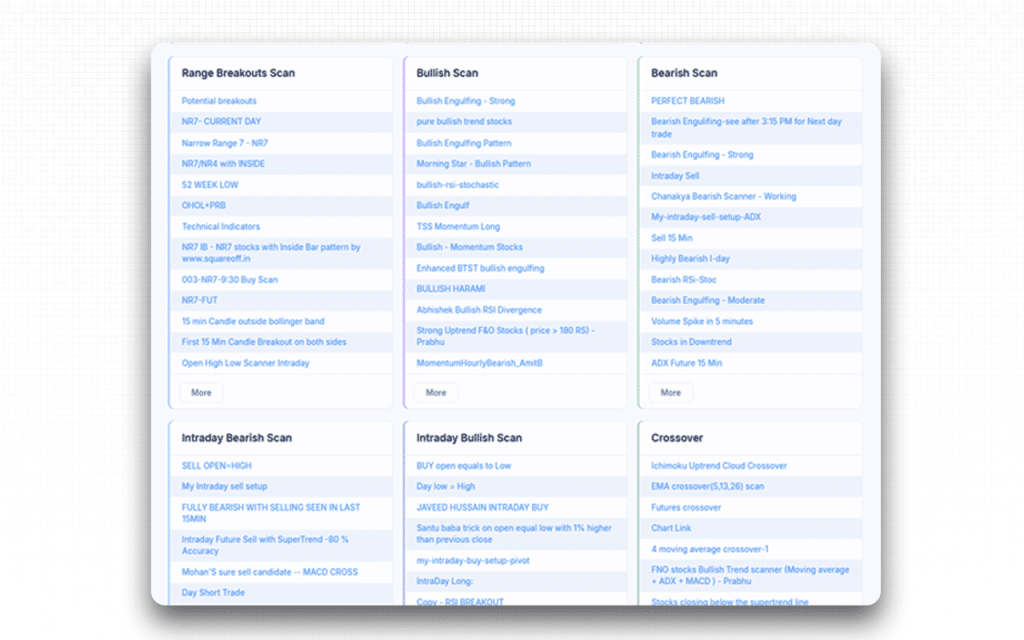
- On the charting pane, you can add indicators using the menu on the top panel.
Chartink provides a list of articles that guide you on how to build scans, add indicators, use offsets and timeframes. This eases the learning curve for the traders and investors.
Chartink Company Details
- Company Type: Private
- Headquarters: Pune, India
- Year Founded: 2010
- CEO/Founder: Ruby Anand
- Number of Employees: 260
- Number of Users: Not publicly disclosed
- Company Description: Chartink is an unfunded Indian company that offers financial charts and advanced technical tools for traders to use and conduct both fundamental and technical analysis. This platform helps them study and interpret the financial data in the best way possible before making a trading or investment decision. Through Chartink, traders get to access data coming directly from the NSE, along with having an opportunity to create and customize their strategies and indicators without using any separate query or scripting engine. It also lets traders set alerts to be notified whenever their set criteria for a stock are met, thereby enabling them to take the right trade at the right time.
Top Chartink Alternatives
Are you looking for more than what TradeStation has to offer? From modern, user-friendly interfaces to superior data integration and advanced charting, the platforms below provide the specialized tools that help you gain an edge in today’s volatile markets.
| Platform | What It Offers Beyond Chartink | Ideal For |
|---|---|---|
| Strike Money | Advanced F&O and options analytics tailored for Indian markets (heat-maps, sentiment, payoff graphics).Chartink is stronger in screening but less in deep derivatives strategy tools. | Traders focused on Indian derivatives (options/futures) who want more than just stock screening. |
| Streak (by Zerodha) | Strategy building + backtesting + execution integration (especially if using Zerodha)Chartink lacks native execution/tools for strategy automation. | Traders who want scanning plus strategy/test/execution in one ecosystem. |
| Trendlyne | Strong fundamentals + quant scores + corporate data overlays, as detailed in our Trendlyne review. • Chartink emphasizes screens more than deep fundamental analytics. | Long-term investors & quant analysts wanting screening plus fundamentals. |
| StockEdge | AI-powered pattern recognition, advanced screeners, combination scans, and multi-dimensional analytics beyond simple filters, as highlighted in our StockEdge review. • Chartink is into filter-based screening, but does not promise an automatic chart-pattern recognition feature. | Traders and investors who want ready-made advanced scans (including chart patterns) beyond what a basic screener offers. |
| Tickertape | User-friendly, visually clean interface with strong discovery & market dashboards, as noted in our Tickertape review. • Chartink is more feature-rich but also steeper to learn. | Beginners and intermediate users who want simple stock discovery and scanning without a steep learning curve. |
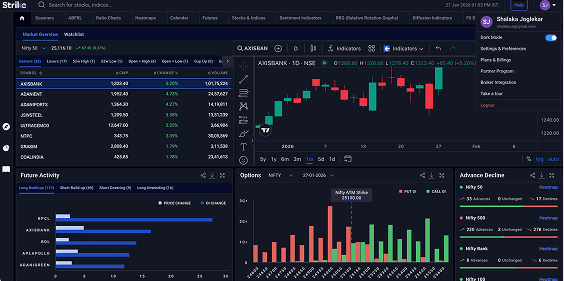
Is Strike Money the Best Alternative to Chartink?
Yes, Strike Money is the best alternative to Chartink as it supports a detailed feature and price comparison to support that preference.
| Feature Category | Chartink | Strike Money |
|---|---|---|
| Core Focus | Stock/equity screening for Indian markets; custom scanner filters. | Comprehensive analytics: equities + futures + options + derivatives; strategy visuals, OI & Greeks. |
| Screeners / Filters | Yes, strong. Custom filters, technical + fundamental. | Yes, plus deeper analytics, heatmaps, multi-strike OI, etc. |
| Real-time / Data Quality | The premium plan gives near-real-time scanning/charts every minute. Some user feedback about small delays. | Strong real-time derivatives data (OI, chain, Greeks) tailored for F&O trades. |
| Options / F&O Capabilities | Some support (scans for F&O & futures) but less emphasised; user concerns about mismatch/data delays. | Built for F&O / options: options chain, Greeks, OI buildup, skew, etc. |
| Visual / Advanced Analytics | Good for screens, but less emphasis on visual analytics like heatmaps, RRG. Some limitations (pattern recognition is weaker). | Strong visual analytics (heatmaps, RRG, sentiment), more “beyond basic filter” features. |
| Price / Subscription (India) | Premium: ~ ₹780/month for full features. | Pro plan: ~ ₹649/month (or ~₹3600 for 6 months) currently shown. |
| Ideal For | Equity traders/screeners who need custom scans and alerts. | Traders who do equities and/ or derivatives (F&O, options), want multi-dimensional insights, not just filtering. |
Is Chartink Worth It?
Yes, Chartink is totally worth it.
I have been using Chartink for a long time, and I enjoyed every bit of it, be it as a basic product user or as a premium user. If you are a trader and investor who wants to analyze the financial market without paying anything, you can come to Chartink.
For me, the best feature on the platform has been its stock screeners. I came to Chartink only once and then couldn’t leave it. Today, it is one of the most reliable sites that I use for my analysis before taking a trade or making an investment.
Whether it is about checking the financial ratios of a company I am interested in or using custom indicators, Chartink has always helped me conduct effective fundamental and technical analyses. Its alert system, however, is the best. But you can get it only when you upgrade to a premium membership.
Though there is a slight delay in updating the data being displayed on the platform, the period of delay is too short to be noticed. Hence, it is still reliable.
FAQs about Chartink
Is Chartink Free to Use?
Yes, Chartink can be used for free, but with limitations. You can access basic scanners and create filter-based scans without paying. However, advanced features like real-time data, alerts, and some intraday timeframes require the paid Premium plan.
Is Chartink Safe and Secure?
Yes, Chartink is safe and secure for users.
- The platform has a published Privacy Policy stating that they collect personal information (e.g., name, email) when you register, use cookies, and do not sell or trade your personal data except as required or with trusted partners.
- They maintain reasonable technical, organisational and physical safeguards” to protect user data from unauthorized access or disclosure.
- They advise that transmission over the internet is not absolutely secure, so risk cannot be eliminated, but minimized.
Can a Beginner Use Chartink?
Yes, a beginner can use Chartink effectively, but with some restrictions. The platform offers a relatively user-friendly scanner interface and provides guides and FAQs to help you get started. However, to unlock its full potential, such as custom scripts, intraday minute-level scans, alerts, and interpreting advanced data, you’ll need to invest a bit of time learning how technical/fundamental filters work and how to use the logic correctly.
Is There a Mobile App for Chartink?
Yes, Chartink can be used on mobile devices, but partially. It is mainly a web-based platform accessible through any browser. While there’s a Chartink Screener app available on the Google Play Store, it offers limited functionality compared to the full web version.
Chartink itself confirms that there is no official Android or iOS app yet, so for the complete experience and real-time scanning features, users should access Chartink directly through their mobile browser.
Is the Chartink Interface Customizable?
Yes, the interface of Chartink is customizable to a considerable extent. For example, you can build your own custom filters using technical indicators like RSI or SMA, combine timeframes, and create entirely new custom indicators which become selectable in your scans.
![15 Investing.com Alternatives [Free+Paid] You Should Use in 2026](https://www.strike.money/wp-content/uploads/2026/04/Investing.com-Alternatives-768x482.jpg)
 38 mins
![15 TradeStation Alternatives [Free+Paid] You Should Use in 2026](https://www.strike.money/wp-content/uploads/2026/04/TradeStation-Alternatives-768x482.jpg)
![15 Chartink Alternatives [Free+Paid] You Should Use in 2026](https://www.strike.money/wp-content/uploads/2026/04/Chartlink-Alternatives-768x482.jpg)