GoCharting Review (Data-Backed) 2026: Features, Pros vs Cons, Pricing, Reviews, Is It Worth It?

 Author

 Editor
This GoCharting review article discusses the features, benefits, restrictions, and pricing structure, along with other details about the platform. Gocharting review, once you go through it, will help you know the reasons why you should choose it over other alternatives available in the trading market.
This review will act as your guide to deciding if GoCharting is the platform that will serve as the best trading partner for you, or if you need something that it doesn’t offer. Let us dive deep into what GoCharting is, its use cases, supported markets, available integrations, and how users rate it with respect to its features.
What is GoCharting?
GoCharting is a trading platform that is meant for different asset classes and multiple exchanges, mainly MCX and NSE. It is the only charting tool that comes with an advanced web-based Orderflow analysis feature, making it easier for financial market participants to assess assets and execute trades directly from the charts by linking their broker accounts.
GoCharting also offers a set of indicators, like Moving Averages, CPR Pivots, SuperTrend, and Oscillators, to help traders and investors check the plus and minus related to the assets from all perspectives, allowing them to make wise and well-informed trading decisions. There are multiple drawing tools and chart layouts available to be customized, for traders and investors to perform advanced technical analysis.
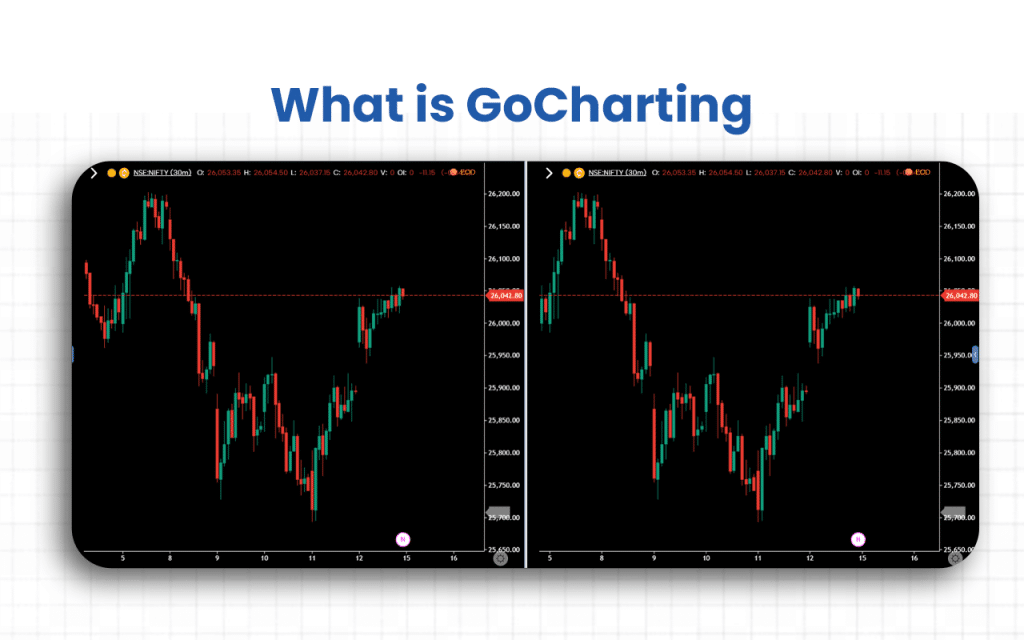
Besides mature market participants, GoCharting also assists those who are just starting off. When I started as a beginner, I loved its Market Profile (TPO) charts, which are normally not available except on the institutional-level desktop platform, which is quite expensive, especially for beginners.
GoCharting with these charts made understanding charts and patterns easier for me. Now, when I have learnt a lot of things, I would definitely recommend it to both beginners and advanced-level participants.
Like other platforms, GoCharting also offers Volume Profile tools to help traders and investors identify the value areas along with support and resistance levels, assisting them in making better decisions about when to take a trade.
Verdict
Overall rating – 4/5
Before providing a review for GoCharting, I tried each and every feature of the platform. While the features like brokerage integration, API access, and Orderflow analysis make the platform unique and effective, the lack of mobile support makes it a little less accessible to users who prefer trading on portable devices.
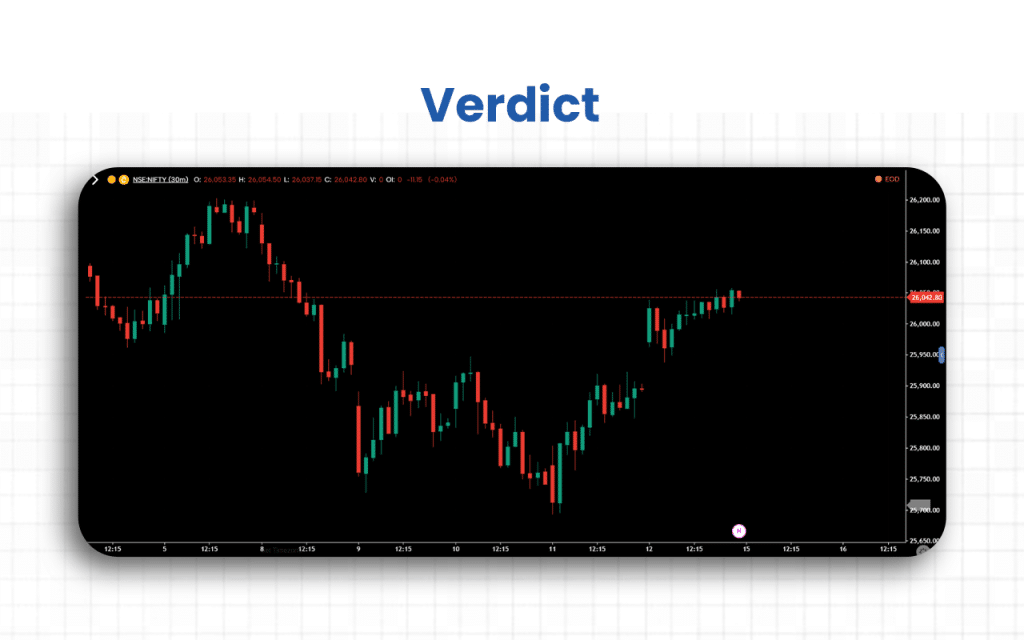
I found GoCharting offering detailed analysis tools, but backtesting features need to be improved, and there is room for improvement and customization.
If you want to track assets, the platform is effective and useful, but if you are looking forward to data export options, you might have to rethink.
Key Features
There are seven key features that make traders opt for GoCharting over other trading platforms available. These include the powerful chart tools, a feasible trading process, smart notifications, personalized scripts, backtesting, cloud-based personalization, and watchlist maintenance.
- Powerful Charts: There are a number of charts available for traders/investors, which they can access from anywhere at any time. These charts are compatible with multiple devices, support multiple languages, track multiple assets, and allow payments through multiple modes/systems.
- One-click Trading: Taking a trade is just a one-click affair for traders/investors. This is my personal favorite as I could link my broker account directly and take a trade instantly.
- Smart Alerts: You can set alerts for notifications and get signalled for any market movement so that you can decide whether it’s the right time to take a particular trade.
- Lipi Scripts: GoCharting offers a personalized Lipi Scripting Engine, using which a trader/investor can create their 1000+ custom scripts and automate the strategies as and when required.
- Backtesting: Using this feature helps you to revisit the past movements through replay bars and trade on current or expired contracts.
- Cloud-based Customizations: GoCharting offers a cloud-based framework where traders/investors can save their chart and indicator templates and personalize them per their needs.
- Watchlist and Portfolio: I love this feature of GoCharting. One can prepare a watchlist to keep a tab on the entire market simultaneously.
Now that the features are known, it is easier for you to understand why I am recommending GoCharting to you to start with.
GoCharting Advantages
There are eight major advantages of using the GoCharting platform.
- Multi-asset support allows charting and trading across stocks, futures, options, crypto and forex.
- Advanced order-flow and volume tools include footprint charts, imbalances, cumulative delta, and open interest heatmaps.
- Wide range of chart types & customization for Renko, Kagi, Heiken-Ashi, custom scripts, overlays, etc.
- Broker integration supports connectivity with Indian, US, and crypto/forex brokers.
- Scripting capabilities include a custom scripting language (Lipi Script) for indicators, alerts, and automated strategies.
- Watchlist & analytics tools bulk symbol import/export, scanners, alerts from watchlists.
- Competitive pricing offers this feature-rich platform at an affordable rate.
- Compare multiple instruments (or indicators) on the same view, with a scale option for clearer relative performance.
Along with advantages come the restrictions that the traders/investors must be aware of.
GoCharting Disadvantages
There are four primary disadvantages of GoCharting that make the platform questionable.
- Lipi Script doesn’t support certain advanced chart types and cannot access external data sources fully.
- Scripts are subject to strict resource limits, including execution time, number of variables/scopes, and history buffer size, which may restrict complex custom indicators/strategies.
- Performance issues, like slow loading, freezing/faulty charts, bugs in drawing tools or replay mode, may exist.
- Backtesting and strategy-building features are less capable than specialized platforms.
Though the flaws are there, the strong technical benefits make traders/investors still trust GoCharting as an effective trading and charting platform.
Overall Summary
Overall Rating: 4/5
Based on six key feature parameters, we compiled GoCharting’s 2025 rating data from multiple user reviews and trusted sources.
| Feature | Rating (out of 5) | Notes |
|---|---|---|
| User Interface & Ease of Use | 4.2 | Clean and modern interface; slightly steep learning curve for beginners |
| Charting Tools & Indicators | 4.8 | Offers indicators, footprint charts, DOM trading, and volume analytics |
| Order Execution & Broker Integration | 4.3 | Direct trading from charts with support for multiple Indian brokers |
| Mobile & Cross-Device Experience | 4.0 | Fully functional mobile app; a few advanced tools are limited on mobile |
| Customer Support | 2.8 | Responses can be slow; limited assistance for free users |
| Pricing & Value | 4.1 | Free plan with ample tools; paid tiers add powerful analytics at a fair cost |
GoCharting Pricing Structure
GoCharting offers a range of pricing plans designed to suit different types of traders, from beginners exploring basic charting tools to professionals needing advanced analytics and real-time data.
| Plan Name | Monthly / Annual Cost* | Key Features |
|---|---|---|
| Free | $0 | Basic charting tools, EOD data, and limited layout/templates. |
| India Lite | Approx. US $ 5 / US $ 8 per month (billed annually) | Broker connection required. Adds more charts, custom intervals, and options chain access. |
| India NSE Premium | Approx. US $ 11 per month (billed annually) | Full real-time NSE data, order-flow charts, scripting engine, and advanced features. |
| Other Regions / Premium Plans | Varies (contact sales) | For users/traders outside India or needing upgraded data/asset coverage. |
The tiered pricing ensures flexibility, allowing users to choose plans based on their trading frequency, market access needs, and analytical depth.
Who is GoCharting for?
GoCharting is ideal for scalpers and intraday traders, traders with various asset classes, quantitative traders, and traders with advanced charting requirements.
- Scalpers and intraday traders: With features like the Scalpro terminal, GoCharting enables trading at ease. Such tools are for traders who opt for fast-paced trading or quick returns.
- Traders with varied asset classes: Gocharting offers support for a wide range of markets, and hence anyone who wants to deal in different asset classes at the same time can opt for this platform.
- Quantitative traders: Gocharting offers a strategy analyzer feature wherein traders can frame custom strategies and assess how they performed using backtesting features. The support for Lipi script allows traders to create and automate custom scripts. This feasibility to customize strategies makes it the best fit for quantitative traders and strategy developers.
- Traders looking for advanced charts: GoCharting offers a wide range of chart types, which traders can use to conduct in-depth analysis. Features, like footprint charting, order flow metrics, and market flow charting, help traders get an advanced view of the market and make trading decisions accordingly.
GoCharting is not meant for traders who want to have a more interactive platform filled with social features. Plus, if you want to have a second-based charting option here for analysis, you must look for a different alternative.
GoCharting Customer Support Concerns
While I have personally not faced any glitches in the customer support service, there are people I know who have concerns related to GoCharting’s support team.
- Some users report that the response from the customer support team is mostly delayed, or sometimes there is no response at all.
- There are users who think that the customer support executives lack product knowledge and hence can hardly assist.
- Some traders found that updates/ clarifications on raised tickets are missing or inconsistent.
- For some users, the delay in expected quick fixes during trading hours led to losses.
One of the users, Rony, on Trustpilot wrote:
“I am experiencing Real-time data time lag very frequently nowadays, and nobody is available on chat when you need help.”
To connect with the GoCharting team, you can email admin@gocharting.com or call +1309-319-3755. You can also WhatsApp or message at +352-691359365.
What are GoCharting’s Review Ratings from Review Sites?
| Platform | Rating | Review Summary |
|---|---|---|
| Trustpilot | 2.6 / 5 (13 reviews) | Mixed to negative: Many complaints about customer support, data/chart issues. |
| JustUseApp (mobile app) | 3.6 / 5 | Moderate: Users like features but mention stability/performance problems. |
| App Store (iOS) | 2.9 / 5 (42 ratings) | Lower rating: Several users are frustrated with missing features & usability. |
| Chrome-Stats (web app reviews) | ~3.85 / 5 (2,097 ratings) | Higher than others: users appreciate features but note bugs & glitches. |
What are the Core Features of GoCharting?
The core features of GoCharting are broadly classified into four categories: charting analytics, Orderflow charting, order execution, and options desk.
Charting Analytics
GoCharting provides users with exposure to multiple chart types, available on multiple devices, multiple languages, for multiple asset classes, and with multiple payment systems. Users can have the opportunity to check the market movements and compare charts to finally reach a decision on whether to take a trade at a particular time or not.
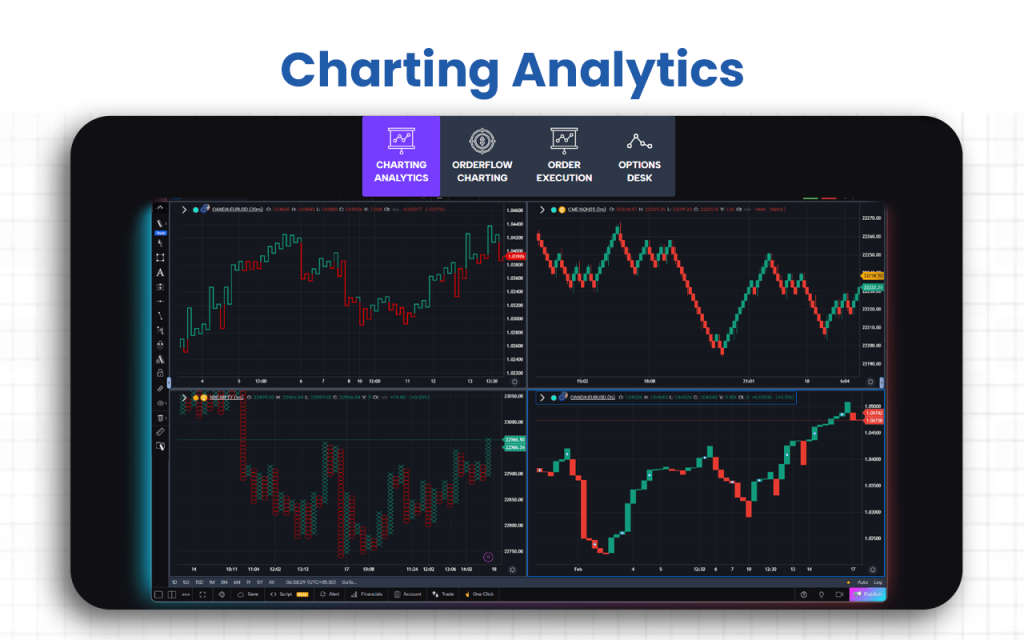
- Multiple chart types: Multiple charting tools with both basic and advanced features are available to traders. They can use them for the best trading advantage. Some of these include Kagi Renko, Line Break, Heiken-Ashi, Cluster, Imbalance chart, Tick or custom interval-based charts.
- Drawings and indicators: An array of drawing tools and indicators is available, which traders can use to assess the volatility, support and resistance levels, trends, reversal points, etc. for technical analysis. Some of them include indicators on indicators, Fibonacci and Gann, oscillators and momentum, trend volatility, harmonic patterns, volume and orderflow, etc.
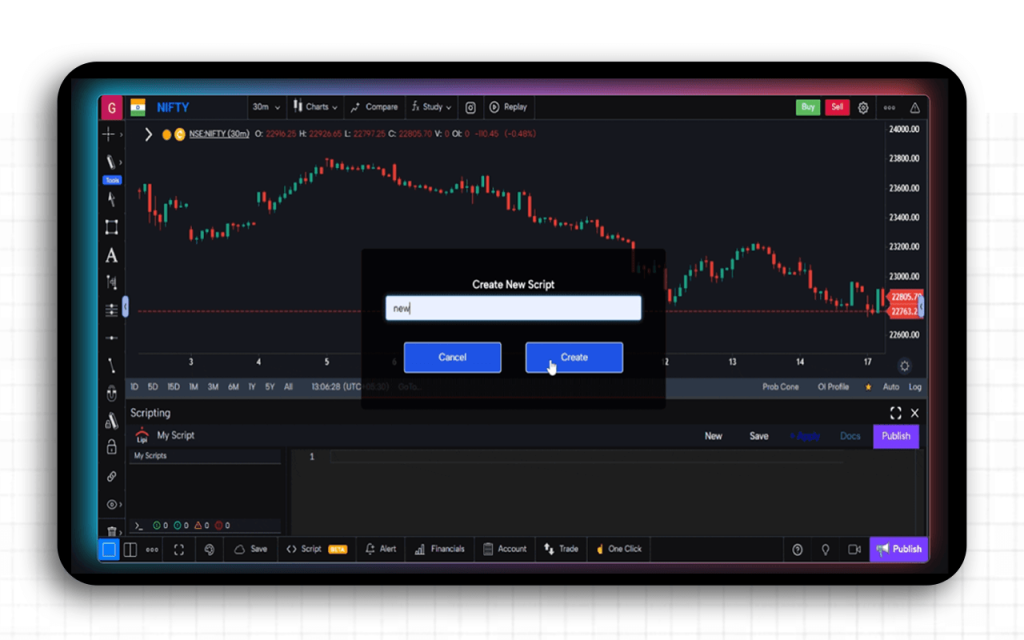
- Lipi scripts: Traders can create custom scripts to automate and personalize their strategies using the Lipi Scripting Engine. There are 1000+ built-in scripts for users, orderflow metrics available to be used in the code, API doc for efficient documentation using examples and code snippets, and complete community support.
- News and analysis: The platform offers contextual news and covers events that can help you make wise trading and investment decisions. This makes fundamental analysis fruitful for users. You also get exposed to the Forex macroeconomic calendar.
- Backtesting: This feature allows you to go back to the historical trends and contracts using replay bars and take trades. This feature, however, as per many users I came across, is not found to be efficient.
- Scales and axes: With GoCharting, you get to scale your charts based on your ranges for further and better analysis. The options available for scaling include linear, log and square root scale, inverse scale, multiple axes, edge coordinators, and lock aspect ratio to change zoom mode.
- Cloud-based customization: Save your personalized charts and indicators on GoCharting’s cloud servers. Through this platform, you will get customized color options, full-screen mode on the browser, export option for data to Excel, context menus and time zones, layered charting objects, etc.
- Watchlist and portfolio: GoCharting allows traders and investors to keep a check on the entire market through a specifically created watchlist. This gives them a clear view of their portfolio and keeps all information related to the same handy.
Orderflow Charting
This is the feature that makes GoCharting the most unique trading and charting platform. Through this feature, traders can conduct Orderflow analysis to keep a tab on the traded volume at each price level.
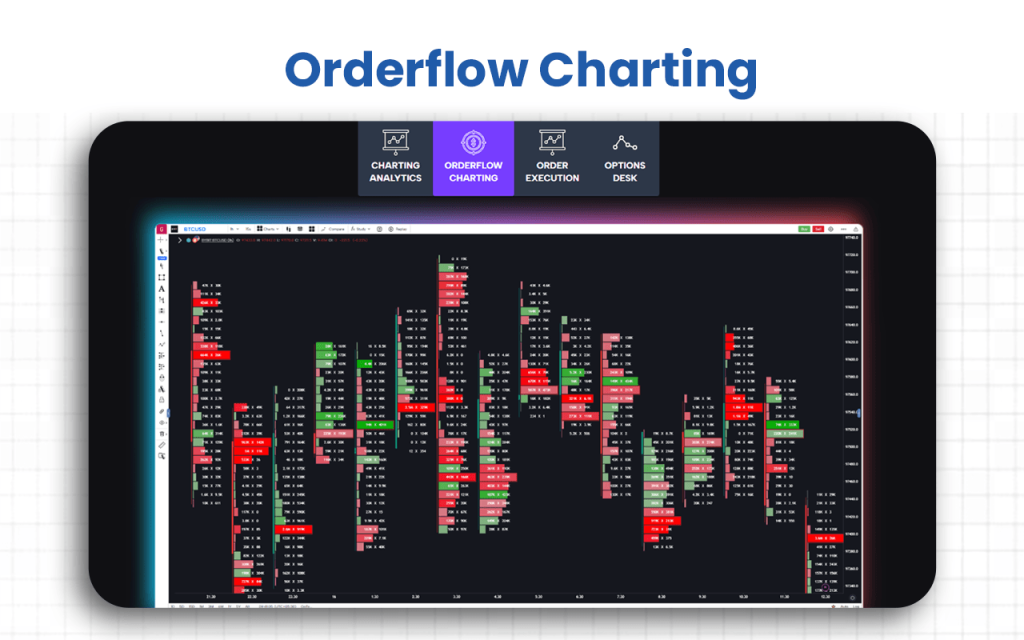
- Footprint: Get access to all details related to the market, be in terms of price, volume, time, and Orderflow through a single chart. GoCharting has 21+ metrics for you to choose from.
- Imbalance chart: Traders get a set of professional tools that reflect the distribution of the trading volume at each price level, showing an imbalance between buying and selling. The benefits of using this chart include learning the only zero lag indicator in the world, automated resistance and support lines, and analyzing the behavior of the markeṭ participants.
- Volume profile: You can add a volume profile with respect to specific time periods. You can also identify the point of control and value area using GoCharting, which makes analyzing the market movements for wiser trading decision-making easier.
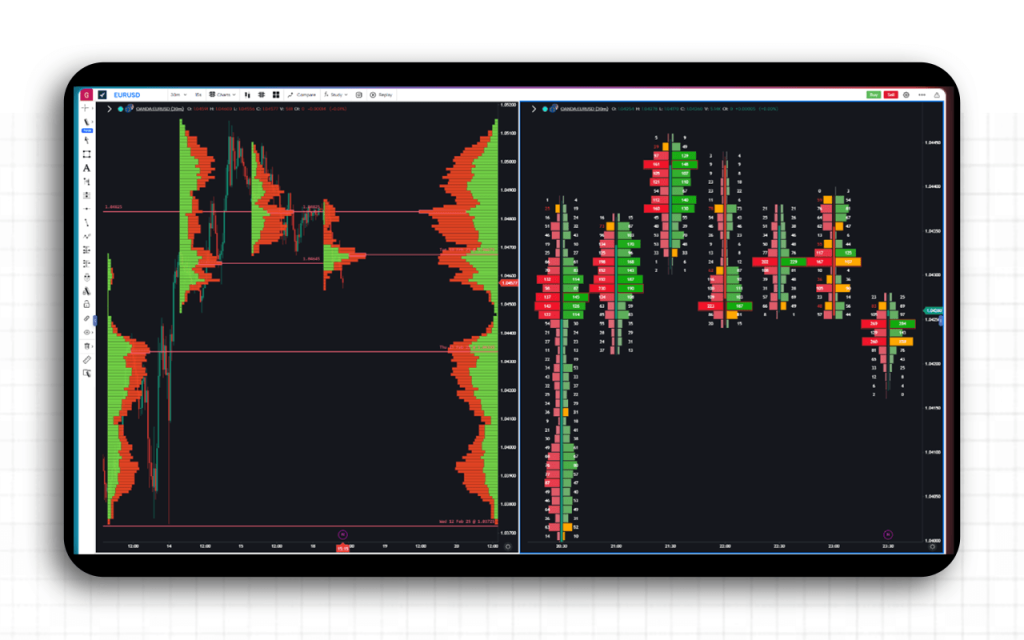
- Market profile: Get access to the market profile, namely TPO, to understand and analyze the price distribution for the day or for a trading session. You can identify crucial SR price levels, check value area or point of control or single print, and merge and unmerge market profiles.
- Volume sales tools: GoCharting allows traders/investors to get direct access to the order flow chart, leveraging historical time and sales, and an advanced depth of market (DOM) panel.
Besides these, you also get exposure to delta bars, bar statistics, histograms, support/resistance lines, and VWAP.
Order Execution
When it comes to executing orders, GoCharting has tried to keep the process simple and hassle-free. This helps traders act quickly and efficiently from within their charts.
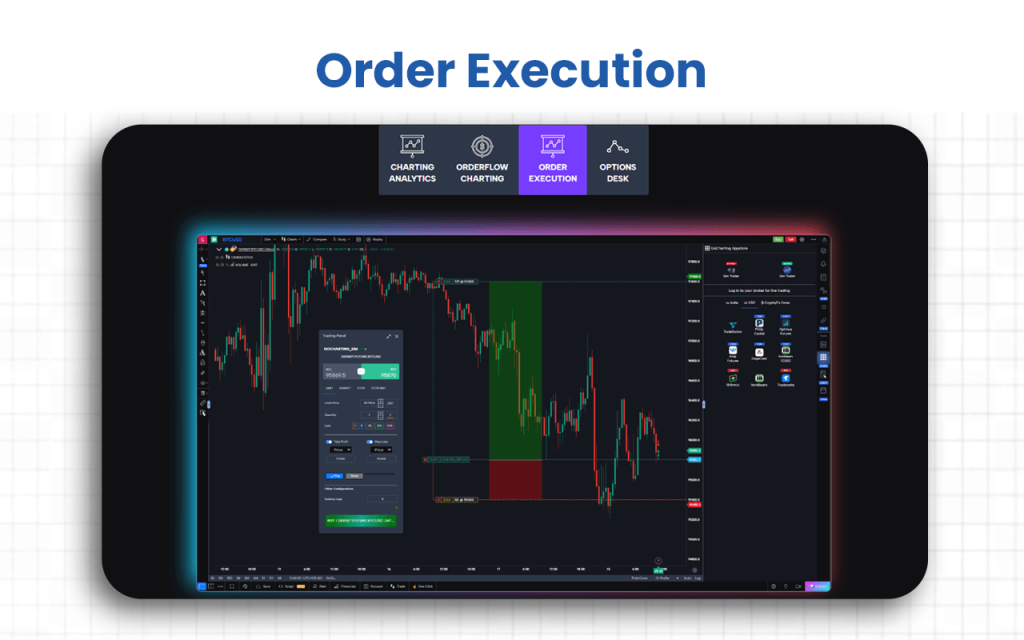
- Chart & DOM trading: Users can place trades directly from the chart interface. They can click near the current price to place buy/sell, drag SL/TP lines on the chart to manage orders. Traders can view bid/ask depth, pending limit orders, and execute market/limit/stop-limit orders via the DOM widget.
- Multiple order types: GoCharting gives traders the liberty to place any type of order, basic or smart. This way, they can keep their portfolio balanced and have a backup for mitigating risks with other profitable investments. The types of orders one can place and execute on GoCharting include market orders, limit orders, stop orders, and bracket orders.
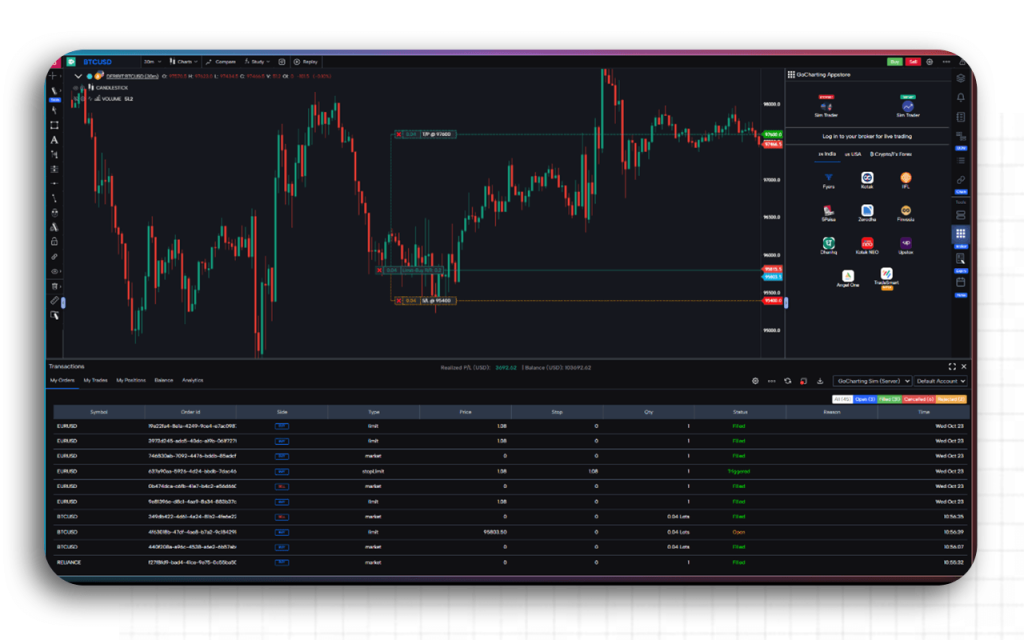
- Paper and live trading: This is my favorite. With GoCharting, you get an opportunity to connect your brokerage account and start trading on the platform without paying anything extra. This way, you get access to all trading information in one place, along with hot buttons to close and exit orders.
Options Desk
It gives traders a full suite view of option chains, open interest, flow and Greeks, enabling data-driven decisions. It combines advanced charting, risk analysis and built-in trading tools so you can analyze and execute option strategies, all from a single platform.
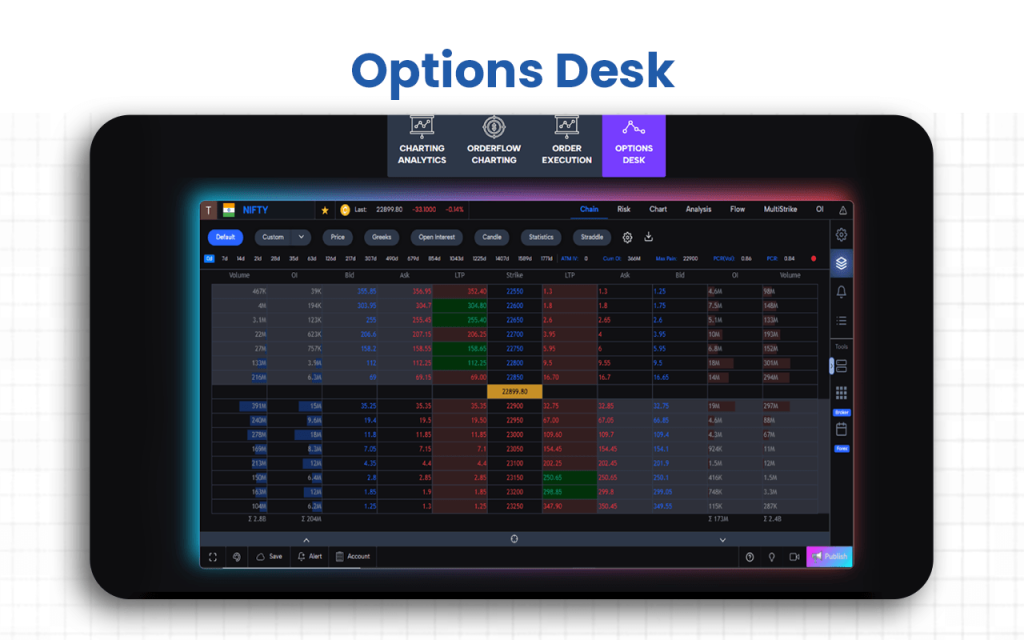
- Options trading and analysis: The Options Desk offers a dedicated interface for options traders that integrates a full options chain view, risk-analysis tools and charting, enabling you to analyze exposures, trade directly and track payoff profiles from one place.
- Gamma exposure: The platform supports Gamma exposure metrics via its open interest (OI)-profile tool, enabling you to see how options gamma, i.e., sensitivity of delta, is positioned across strikes/expiries, helping identify where market-makers may hedge and where the underlying may gravitate.
- Strategy analyzer: Within the Risk and Analysis modules, you can model profit & loss scenarios, compare multiple expiry datasets, and set up multi-leg options strategies to evaluate potential outcomes under different market moves.
- Volatility skews & surface: The Analysis dashboard lets you visualize implied volatility across strikes and expiries (vol skews/surfaces), track straddle premiums, and compare volatility behaviour between different expiries, giving insight into volatility structure beyond just price.
- Multistrike charts: This tool lets you monitor multiple strike prices simultaneously, display metrics like OI, OI change, Greeks and volume for many strikes side-by-side, and graph individual strike behaviour, aiding in selecting optimal strikes for strategy.
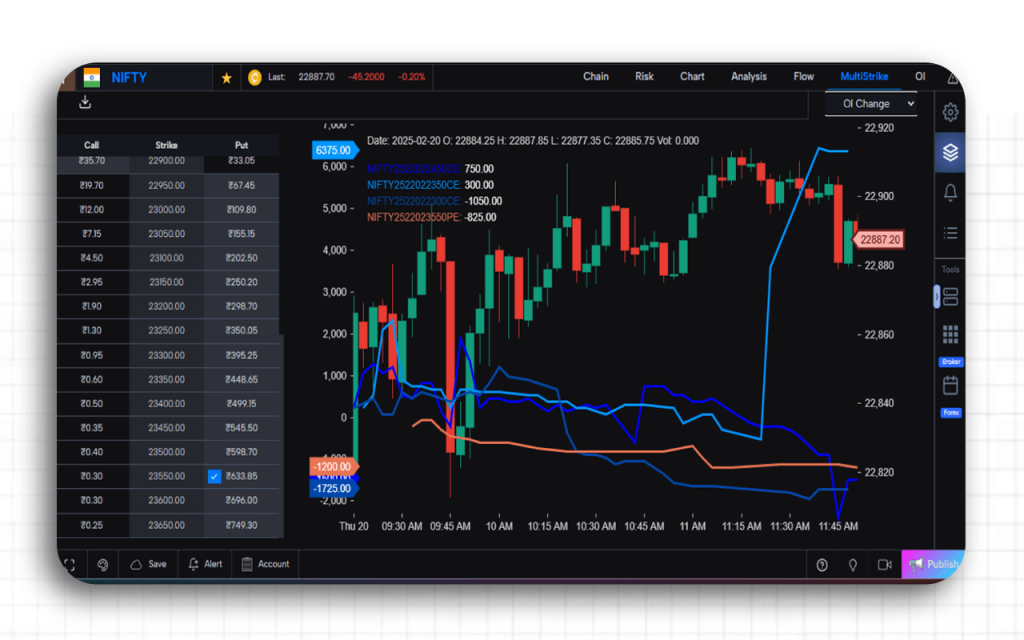
- Options flow: The Flow module integrates both futures and options data, allowing you to view flows of capital (in/outs), OI changes, and directional bias in the options market, helping detect trader sentiment and structural directional moves.
Once you learn to use all the above features of GoCharting, you will understand why most of the traders, especially those dealing in varied asset classes, choose this as their go-to platform.
Supported Markets and Assets on GoCharting
Supported Markets (India-Specific)
- NSE & BSE Coverage: GoCharting provides live charts and real-time market data from India’s leading stock exchanges, like the National Stock Exchange (NSE) and the Bombay Stock Exchange (BSE), ensuring complete visibility into equity and derivatives markets.
- Indian Indices: The platform tracks all major benchmark indices, including Nifty 50, Sensex, Bank Nifty, Fin Nifty, and sectoral indices, allowing traders to analyze market breadth and sector performance effectively.
- Indian Stocks & ETFs: Users can access an extensive range of Indian equities, ETFs, and sector-based instruments with full technical, volume, and order-flow analytics.
- Global Market Connectivity: In addition to Indian exchanges, GoCharting offers connectivity to global markets across the U.S., Europe, and Asia, helping traders perform cross-market or inter-asset correlation studies.
Supported Assets
- Equities: Advanced charting and analytical tools for both Indian and international listed companies, suitable for swing, positional, and intraday analysis.
- Cryptocurrencies: Real-time price, volume, and order-book data from top global crypto exchanges, covering major cryptocurrencies such as Bitcoin, Ethereum, and leading altcoins.
- Forex: Support for global currency pairs, including INR crosses, with the ability to analyze trends, volatility, and volume distribution.
- Commodities: Comprehensive data tracking for commodities like gold, silver, crude oil, natural gas, and agricultural products traded on MCX and international exchanges.
- Indices & Bonds: Integration of major global indices and bond yield data into the charting environment, helping users monitor macroeconomic trends and portfolio correlations.
Broker Integration and Trading Execution of GoCharting
GoCharting allows you to connect your broker account to its platform, enabling you to execute trades directly from charts, Depth of Market views, or other integrated trading widgets.
- The connection process involves selecting your broker from the list, authenticating via API or credentials, and configuring broker settings (product type, disclosed quantity, order types, etc.).
- Once integrated, you can place live orders (market, limit, stop-loss) via GoCharting’s interface, monitor executions, view your positions, and optionally switch into paper/simulated mode.
- The platform supports scalping and quick-trade workflows, making the chart itself an execution surface: right-clicking price levels, quick trade modes, and visual tracking of order fills.
The liberty to connect their own brokers with the charting tools is what makes GoCharting one of the most sought-after trading platforms.
GoCharting’s User Interface & Learning Curve
GoCharting offers a clean, intuitive, and fully web-based interface designed for traders of all experience levels.
- The platform’s layout is customizable, allowing users to arrange charts, DOM panels, and data widgets according to their trading style.
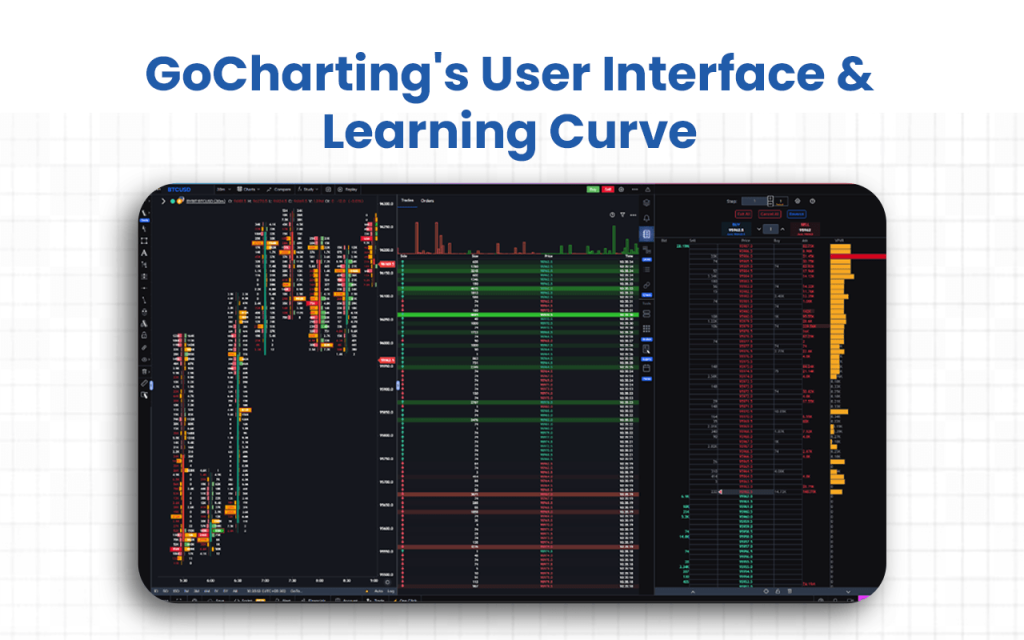
- The modern design provides real-time interactivity. Traders can place orders directly from charts, view live market depth, and access multiple analysis modules within a unified workspace.
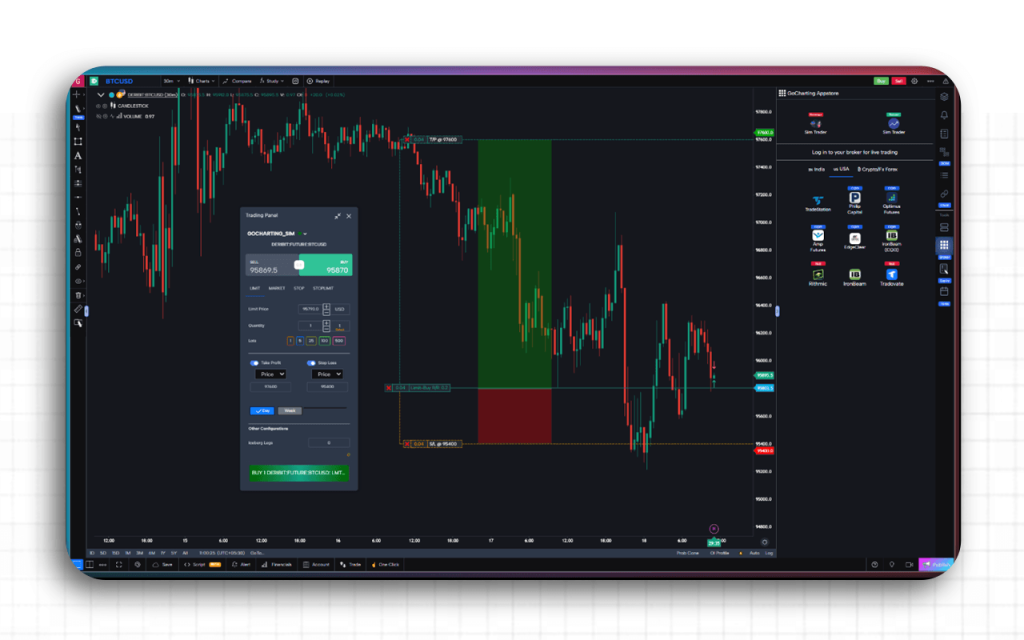
- The integration of dark and light themes, shortcut keys, and responsive design further enhances user comfort and efficiency across devices.
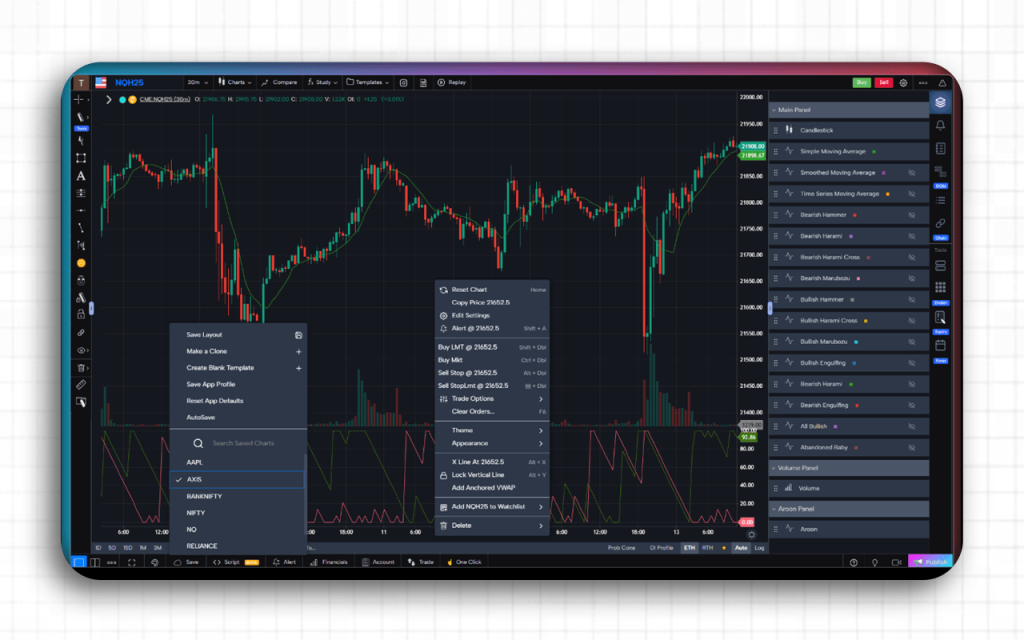
While GoCharting is beginner-friendly in navigation, mastering its advanced tools, such as order flow, footprint charts, and options analytics, may require some learning.
The platform mitigates this with detailed documentation, community forums, and in-app tutorials that guide users through setup and feature usage. For experienced traders, the learning curve is short, as GoCharting’s UI closely resembles professional trading terminals. However, for newcomers to advanced analytics, consistent practice with paper trading and help resources, especially the Docathlon, ensures a smooth transition toward proficient use.
GoCharting Company Details
- Company Type: Private
- Headquarters: House No. 13, Debkutir, Ulubari, GS Road, Guwahati, Assam – 781007
- Year Founded: 2021
- CEO: Sushanta Deb
- Number of Employees: 2-10 employees
- Number of Users: Numbers not disclosed
- Company Description: GoCharting is one of the most sought-after trading and charting platforms for traders, especially those involved in varied asset classes. The Order flow analysis tool that this platform offers makes it one of a kind. Besides this unique trait, GoCharting also has multiple chart types and indicators available to enable traders to assess the market well and make well-informed trading/investment decisions.
Top GoCharting Alternatives
Are you looking for more advanced order-flow features or a different approach to multi-asset charting than what GoCharting offers? These platforms provide specialized analytical tools and enhanced visualization capabilities to help you gain a clearer, more precise edge in your market analysis.
| Platform | What It Offers Beyond GoCharting | Ideal For |
|---|---|---|
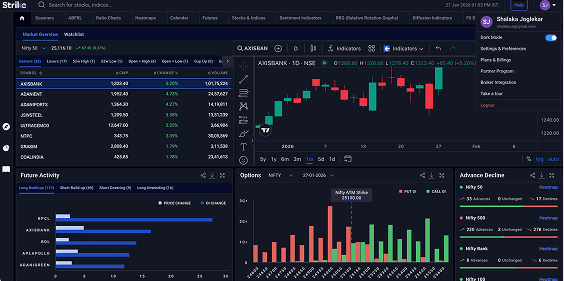
| Strike Money | · Combines in-depth analytics, intelligent screeners, heatmaps, sentiment indicators, and dedicated options/futures tools· Bringing together analysis and idea generation more than execution. | Traders and investors focused on finding ideas, screening across stocks/options, and building strategy edges rather than only execution tools. |
| Fyers | · Indian broker-platform with built-in advanced charting and direct trading, offering tight integration between chart view and order execution· GoCharting is more analytics-centric. | Traders in India who want both good analytics + very smooth execution in one place. |
| Zerodha Kite | · Extremely strong execution, very broad user base, robust reliability· GoCharting may excel in order-flow/charting depth.· Zerodha wins in proven broker execution. | Cost-conscious active traders who prioritise execution speed and low disruption over ultra-deep analytics. |
| Upstox Pro | · Comes with advanced web/mobile charting tools, easily trade from the chart.· GoCharting heavily focuses on order flow and depth analysis. | Traders who want a modern interface, global asset access, and ease of use across mobile/web. |
Is Strike Money the Best Alternative to GoCharting?
Yes, Strike Money is the best alternative to GoCharting, especially for those who are more into analyzing than execution.
| Feature / Aspect | Strike Money | GoCharting |
|---|---|---|
| Primary Strength | Focused on deep stock & options analytics for Indian markets: scanners, heat-maps, sentiment, options strategy-builder. | Strong in charting, order-flow, DOM, multi‐asset markets and broker integration. |
| User Interface & Ease of Use | Designed for analysts and traders with an intuitive UI for screening, filtering, and idea generation. | More professional/complex interface, powerful for advanced traders, but longer learning curve. |
| Coverage / Market Focus | Primarily Indian stocks, futures & options, hence very strong in Indian-market analytics. | Broader asset-class coverage (stocks, futures, forex, crypto globally) and advanced tools like footprint, DOM. |
| Pricing | · ₹ 649/month for Pro plan (6-month, annual discounts available). | · Free tier available;· India Lite ~ ₹ 504/month· India NSE Premium ~ ₹ 1,260/month. |
| Ideal Use-Case | Traders/investors who prioritize analysis, screening, and strategy building, especially in the Indian market. | Traders who need deep execution tools, charting + order-flow with multi-asset support and broker integration. |
| Why Strike has the edge | Lower cost, simpler UI, very strong analytics for Indian markets, making it more accessible for many retail traders. | While fully featured, higher complexity and cost may be more than needed for many users focusing on Indian equities/options analytics. |
Is GoCharting Worth It?
Yes, GoCharting is absolutely worth it. After trying the platform myself both as a beginner and intermediate-level trader, I can say that the feature-rich charting tools offer the best assistance when it comes to comparing the market performance for varied asset classes.
When I started, the most useful feature that acted as a guide for me on GoCharting was its Docathlon, a complete documentation of the features and how to use them. Going through it step-by-step helped me practice and understand every aspect of the platform.
I find the pricing quite lenient, though the basic plan does not cover a lot of things. So, you might have to pay for accessing even the basic features on GoCharting.
Yes, I have faced some issues with the mobile interface, but the desktop version has always worked for me.
My friends, however, have one more grievance, which I would like to share with you, regarding the customer support, which mostly responds after you miss your chances. However, I have never had any such experience yet.
FAQs about GoCharting
Is GoCharting Free to Use?
Yes, GoCharting offers a free plan that allows users to access basic charting tools and analytics without any cost. However, most of its advanced features, such as real-time market data, order-flow charts, and broker integrations, are available only under paid plans. The free version is ideal for beginners exploring the platform, while active traders may need to upgrade to unlock full functionality and live trading capabilities.
Is GoCharting Safe and Secure?
Yes, GoCharting is generally considered safe and legitimate for trading and analysis. The platform uses encryption and secure login protocols to protect user data and has a publicly listed privacy policy. However, reviews indicate occasional reliability issues such as chart lags and limited transparency about data handling. Those linking broker accounts or handling large trades are recommended to take standard precautions, like verifying integrations and using strong security settings.
Can a Beginner Use GoCharting?
Yes, beginners can use GoCharting, especially with its free plan that offers access to basic charts, indicators, and drawing tools. The platform’s clean interface and easy signup make it beginner-friendly. However, advanced features like order flow analysis, DOM trading, and broker integration may feel complex at first. New users are advised to start with paper trading and gradually explore advanced tools as they become more confident.
Is There a Mobile App for GoCharting?
Yes, GoCharting offers a mobile app for both Android and iOS users. The app provides access to live charts, market depth, technical indicators, and multi-asset tracking for stocks, commodities, forex, and crypto. While it includes most web features, some advanced tools may be limited, making it best suited for on-the-go charting and quick analysis.
Is the GoCharting Interface Customizable?
Yes, GoCharting’s interface is highly customizable. It allows users to tailor their trading workspace to personal preferences. You can modify chart layouts, switch between light and dark themes, adjust grid and background settings, and save custom templates for indicators and drawings. Multi-chart layouts, synced tools, and saved preferences make it easy to create a setup that fits different trading styles.
![15 Investing.com Alternatives [Free+Paid] You Should Use in 2026](https://www.strike.money/wp-content/uploads/2026/04/Investing.com-Alternatives-768x482.jpg)
 38 mins
![15 TradeStation Alternatives [Free+Paid] You Should Use in 2026](https://www.strike.money/wp-content/uploads/2026/04/TradeStation-Alternatives-768x482.jpg)
![15 Chartink Alternatives [Free+Paid] You Should Use in 2026](https://www.strike.money/wp-content/uploads/2026/04/Chartlink-Alternatives-768x482.jpg)