Quantsapp Review (Data-Backed) 2026: Features, Pros vs Cons, Pricing, Reviews, Is It Worth It?

 Author

 Editor
The Quantsapp review has been prepared to give traders looking for a trading partner an overall idea about the platform so that they can decide whether to use it. In this Quantsapp review, you will come across the features that the platform offers in addition to its benefits, challenges, pricing structure, and alternatives, which you may consider if needed.
To make sure this Quantsapp review covers everything, I personally used all its features and navigated through the website. Based on my personal experiences, I will tell you where this platform excels and where it is found not meeting the standards. By the end of this review article, you will possibly know if you want to sign up for Quantsapp or go for its alternative.
What is Quantsapp?
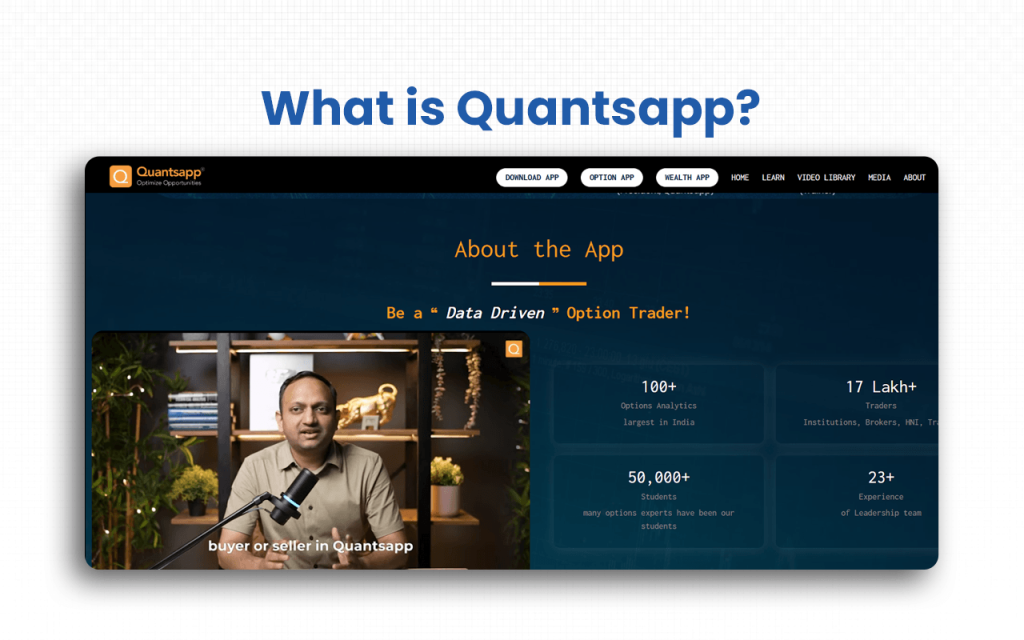
Quantsapp is a futures and options analytics app currently serving its Indian clients, but aiming to extend its reach to overseas users as well from the US, Europe, and Canada. As of October 2025, it has been observed that 54.05% traders use mobile devices, while 45.95% of them opt for its desktop version. Traders preferring the app on a portable device reflect the popularity of Quantsapp among the active users who look for a reliable real-time stock data source for trading.
Quantsapp comes with 25 real-time free tools, 59 real-time premium tools, and two options algorithms, offering the best possible features to enable traders to analyze stocks and the overall market. Justifying its tagline, Optimizing Opportunities, Quantsapp tries its level best to make traders identify opportunities and instantly liquidate them.
While using Quantsapp, you get instant market updates through pop-ups displaying announcements that the company makes from time to time. As a result, you can make your trading decisions accordingly. I have been into options trading for quite some time, and I found the platform worth a try.
I won’t say it is the best because you have even better alternatives available for an options trading partnership.
Verdict
Overall Rating – 4.2/5
Though I joined Quantsapp, I know people who have been using the app for more than four years, and they only have good things to say about it. For many, the platform’s advisory services have been of great help as they guided the users in choosing fruitful options. But if you ask me, I would differ in opinion.
As a first-time user, the basic free tools did not help me much. It was my curiosity after listening to my Quantsapp user friends that made me go premium. This premium version, to be honest, was heavy on my pocket. But my urge to explore left me with no option. Trust me, as a free user, you get almost nothing on Quanstapp.
So, if you sign up, it is recommended to go for premium if you genuinely want to leverage it.
Next, landing on the Quantsapp website will make you feel like it’s more of a course provider than an analytics platform. Their homepage talks about courses that would train you in analyzing the options market and accordingly take your trades. I honestly felt like they were selling their courses more than their services.
So, don’t find it strange if you get the same feeling landing on their website!
Key Features
There are seven quick key features that will tell you why to give Quansapp a try. These include everything from being a real-time data source to a learning resource provider.
- Quantsapp is known for displaying real-time stock data, which makes it the best fit for active traders.
- The visual representation of the data in the form of charts helps traders get a clear, slope-like view of the stock performances in the market.
- You also have a comprehensive options strategy builder, which you can use to create, customize, analyze, and execute strategies – all from one place.
- Quantsapp also offer extensive educational resources to users, especially beginners who need to explore the field of trading through different concepts, webinars, and videos.
- The platform offers a wide range of analytics tools to traders, including an options algorithm that helps them optimize trades.
- Through backtesting, it enables traders to read historical data and identify current trends based on the same.
- The FnO news section appears to be a blessing for intraday traders who enter and exit a trade instantly, as and when they notice a significant opportunity.
Now that you know what signing up for Quantsapp would bring to your table, it’s time to explore the benefits that you get as a user.
Quantsapp Advantages
There are seven major benefits that Quantsapp has to offer its users, including its large repository of analytics tools and its user-friendly interface.
- Quantsapp comes with an extensive repository of options trading analytics, thereby offering deep data-backed insights across OI, IV, PCR, Greeks, and multi-timeframe market behaviour.
- Its user-friendly interface is packed with diverse tools, ensuring smooth navigation for beginners while offering advanced functionalities for expert-level analysis.
- Quantsapp offers real-time stock and derivatives data, making active and intraday traders react instantly to market movements without delays.
- Visually rich charting ecosystem, presenting data in slope-like, easy-to-grasp formats that help traders identify trends, momentum shifts, and breakout zones quickly.
- It is also an extensive learning resource provider, featuring 200+ hours of free videos, webinars, and concept-based modules that help beginners strengthen their trading foundation.
- It helps traders study historical data, validate strategies, identify recurring patterns, and make more confident, data-driven decisions.
- The app gives instant updates on market-moving events, ideal for traders who rely on quick entries and exits.
After the advantages, let us have a look at the challenges that Quantsapp brings forth to those who choose to sign up for it.
Quantsapp Disadvantages
The three disadvantages that raise concerns over choosing Quantsapp as your partner in trading include issues with their expensive premium plan and their forceful selling of courses.
- Most of Quantsapp’s significant features are hidden behind their premium plan, which is expensive enough, especially for beginners or occasional traders.
- Their advisory services, as I shared, have been appreciated by my circle of trader friends, but the recent users have criticized the same and called it a “scam.”
- Quantsapp tried to sell their trading courses and force users to buy them. This is something that has been annoying me, too. Whenever you connect with the customer support team, they start asking you to buy the course to be able to understand the issue and resolve any problem that arises.
Despite the challenges, we cannot deny the efficiency of the analytics tools that Quanstapp offers for effective options trading, for sure.
Overall Summary
Overall Rating: 4.2 / 5
Quantsapp is a comprehensive options trading analytics platform that caters to a wide range of users, from retail traders to institutions. It offers real-time stock and derivatives data, advanced analytics, backtesting tools, and an extensive learning resource library.
| Feature | Rating (out of 5) | Notes |
|---|---|---|
| Chart Analysis | 4.5 | Provides single, strategy, and Greeks charts with clear visualizations; ideal for active traders. |
| Data Analytics | 4.3 | Includes options chain, OI analysis, built-up, Gain & Pain, FnO news, and India VIX; extensive, but some advanced tools are premium-only. |
| Market Monitoring | 4.2 | Covers PCR, IV scanner, pair trading, backtesting, advance-decline, seasonality; useful for both intraday and positional traders. |
| Market Assessment | 4.0 | Features like Ban List, Liquidity Finder, Options Calculator, Deals & Holdings, and Holidays are helpful for operational and regulatory awareness. |
| Learning & Education | 4.4 | Offers 200+ hours of webinars, courses, and demo videos; excellent for beginners, though some resources push premium courses. |
| User Interface & Customization | 4.1 | Dashboard is modular and customizable; easy for beginners, but the deep toolset may require a learning curve. |
| Customer Support | 3.2 | Partially responsive; issues with delayed replies and forceful course promotion affect user experience. |
Quantsapp Pricing Structure
Quantsapp offers a free plan alongside a paid plan. The free plan gives access to a subset of tools, while the paid plan unlocks full analytics, back-testing, strategy builder/optimizer, real-time data and advanced features to serve traders who need complete options/trading analytics and comprehensive market tools.
| Plan | Cost / Payment | Included Features / Tools |
|---|---|---|
| Free | ₹ 0 / Free | Access to basic analytics tools, including core features like charts (single, strategy, Greeks), basic options and futures OI data, essential utilities such as ban-list, liquidity finder, market news, basic order/trade data (to a limited extent), and some fundamental analytics. |
| PRO (Paid) | ₹ 2,950 per month (inclusive of taxes) | All free-plan toolsPlus premium tools and advanced functionality, including advanced order & trade analytics, volume & real-time OI changes across timeframes, FnO scanning tools, strategy builder/optimizer, back-testing (historical options/futures), comprehensive charting & analytics (IV, Greeks, multi-strike OI, built-up cycles, sector-level charts), What-if analysis, full access to live data, and advanced utilities for serious traders. |
Who is Quantsapp for?
Quantsapp is mainly for retail traders, brokers, institutions, students, and High Net Worth Individuals (HNIs).
- Retail traders: Quantsapp offers reliable real-time data, intuitive charts, and scanners that simplify daily decision-making for this group of traders.
- Brokers: The advanced analytics tools available on the platform allow brokers to analyze the options market and strengthen client advisory and trade recommendations.
- Institutions: The powerful algorithms, historical data, and in-depth models help these entities in conducting large-scale market research, helping them make better financial decisions.
- Students: Quantsapp offers a wide range of courses, specifically giving finance students access to educational content, webinars, and real-time examples that help them build strong market fundamentals.
- HNWIs: The sophisticated multi-leg strategy tools, portfolio-level insights, and predictive analytics allow these individuals to optimize high-volume, premium trading strategies.
Quantsapp is not for someone looking for a third-party to take control of the trades on their behalf. Plus, the platform does not guarantee profits. It instead provides analysis tools for users to make data-backed trading decisions.
Quantsapp Customer Support Concerns
Quantsapp’s customer support team is partially responsive, depending on the type of issues you have. There are some serious allegations that surround Quantsapp, making it difficult for anyone out there to trust it.
- Sales tactics: I will share my personal experience here. I called the support people when I initially started using this platform to get some assistance with website navigation. They could hardly solve the issue, but yes, they told me that I won’t be able to trade on their app until I choose to educate myself through the courses they offer. Fast forward to this date, no matter how stuck I am on the platform, I never call them.
- Scam advisory: While the old users are satisfied with the advisory services, the ones who have recently joined have a lot of complaints against them. According to some reviews, the team deletes the trade advice from the Quantsapp notification section.
- Delayed response: The customer support team never responds to emails for queries. They, on the contrary, call users after a considerable delay so that no traces of the reports are found.
One of the users, Manish Arora, wrote on Trustpilot:
“Totally unprofessional attitude. Non-supportive once you subscribe. 100s of such subscriptions are available online. They are adamant and non-cooperative….They expect people to leave their work and attend classes. I recommend trying other options, which consider the worth of your time, priorities/work time, and your money.”
If you want to check how the customer support team handles your queries, you can connect with them by calling 080-6941-8470 or emailing them at support@Quantsapp.com. You can also request a callback from the team through their Contact Us page.
What are Quantsapp’s Review Ratings from Review Sites?
| Platform | Rating / Score | Review Summary — What Users / Reviewers Say |
|---|---|---|
| Google Play Store (Android app) | 4.4/5(≈ 31,700+ reviews) | Many users appreciate the user-friendly interface, real-time market data, and variety of analytics tools; some complain about subscription cost, and a portion of users find the app difficult if they lack prior trading knowledge. |
| Apple App Store (iOS app) | 4.7/5(≈ 6,000+ ratings) | Users commend the app’s usefulness for Futures & Options trading, praising features like trade ideas, open interest, and buyer-seller volume data, though some feel more educational/help content would further improve the experience. |
| Trustpilot | 1.6/5(based on 24 reviews) | Critics mention poor reliability, bugs or outages during market hours, weak customer support, and unfulfilled promises, especially for paid users. |
| Justdial | 4.4/5(based on ~724 ratings) | Positive feedback for the app’s usability, real-time data strength, and useful market-analysis tools; some users cited issues with customer support or difficulty obtaining demos. |
What are the Core Features of Quantsapp?
The core features of Quantsapp can be classified into four categories – chart analysis, data analytics, market monitoring, and market assessment.
Chart Analysis
Quantsapp provides comprehensive charting tools that help traders visualize price action and understand strategy behaviour in real time.
- Order and Trade: This feature displays executed orders and trade actions directly on the price chart, offering a clear visual context for decision-making.
- Single Chart: It provides a clean, focused chart view that enables quick analysis of price movement without distractions.
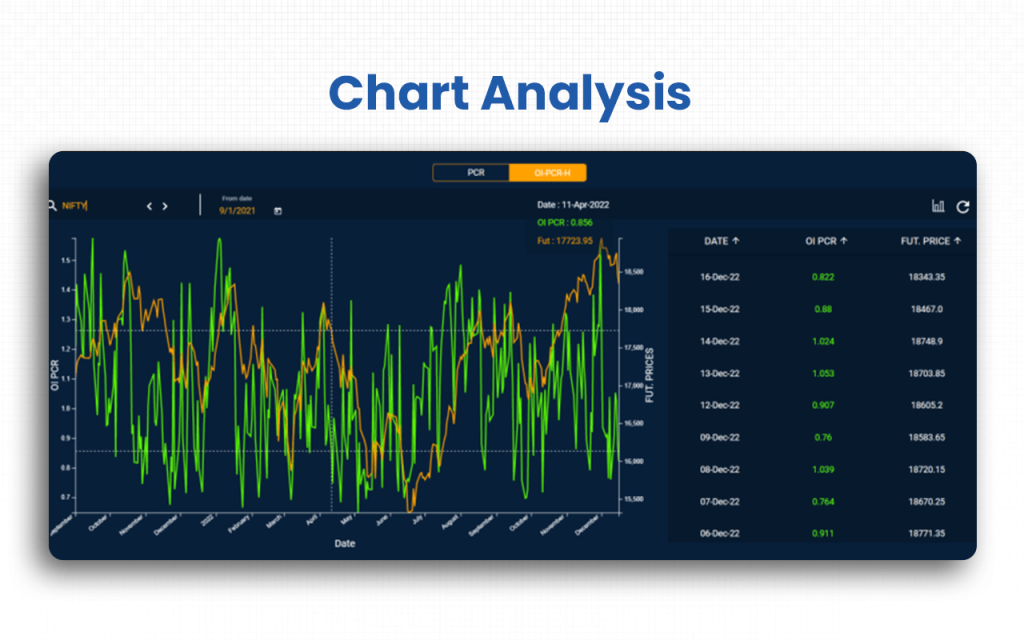
- Strategy Chart: This tool allows traders to overlay multi-leg option strategies onto the underlying chart for better strategy performance assessment.
- Greeks Chart: It shows real-time changes in Delta, Gamma, Theta, and Vega, making it easier to monitor risk and sensitivity.
Data Analytics
Quantsapp’s advanced analytics help traders decode market behaviour, derivatives activity, and sentiment through data-driven insights.
- Synopsis: This feature provides a consolidated snapshot of crucial market indicators in a single view.
- FnO News: It delivers real-time derivatives-focused updates that help traders respond instantly to market changes.
- Open Interest: This tool analyzes OI shifts to help identify long buildup, short buildup, and unwinding patterns.
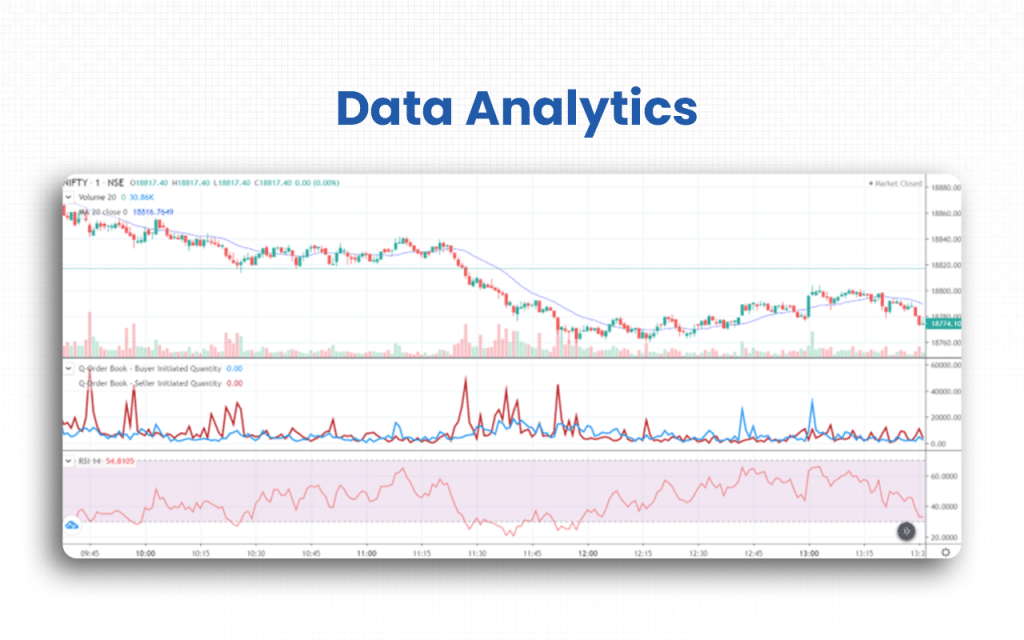
- Options Chain: It offers a detailed options chain with Greeks, implied volatility, and open interest at each strike.
- Built-up: This analysis shows whether positions are being built or unwound, offering clues about market direction.
- Gain and Pain: It highlights strike levels where the majority of traders stand to gain or lose money.
- Options Triggers: This feature sends alerts for significant changes in price, volume, OI, and volatility.
- India VIX: It provides a quick indication of market volatility and risk sentiment.
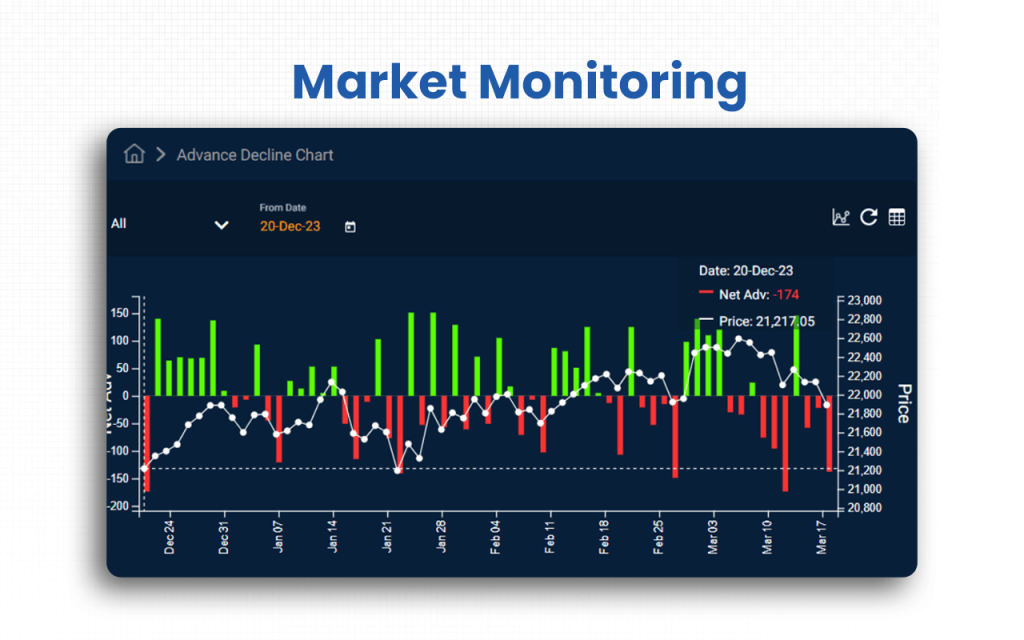
Market Monitoring
These tools help traders track real-time market conditions, sentiment shifts, and ongoing strategy performance.
- Gainers and Losers: This feature identifies the strongest and weakest stocks in real time.
- Pair Trading: It highlights correlation-based trading opportunities between two instruments.
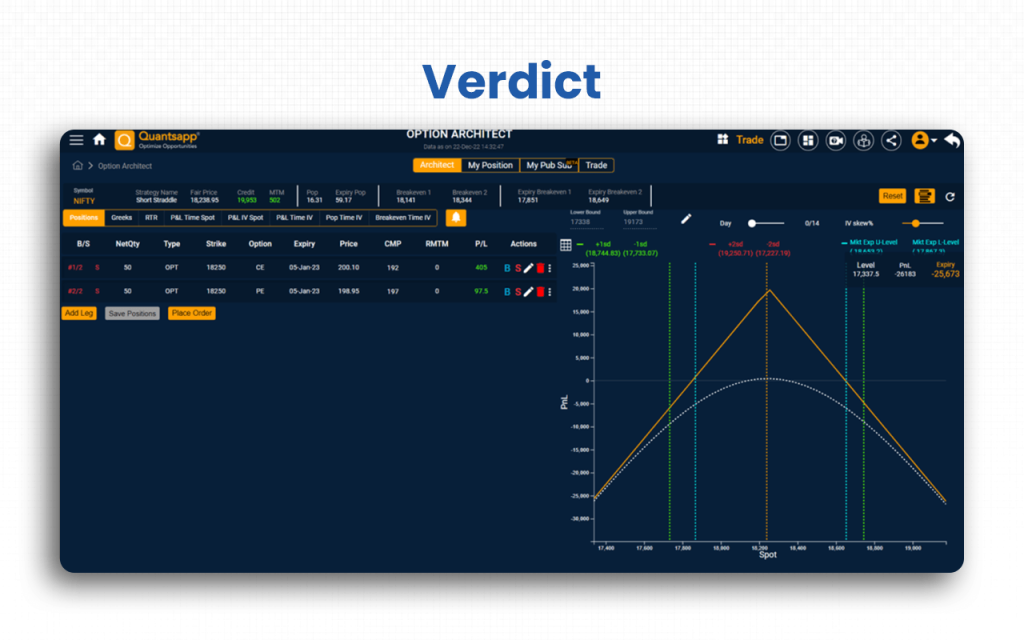
- Architect: This tool allows traders to create, customize, and monitor option strategies efficiently.
- Implied Volatility: It helps detect sudden spikes or drops in IV across different stocks and indices.
- PCR: This indicator shows the overall market sentiment by comparing put and call volumes.
- Backtesting: It enables traders to validate their strategies using historical data for better confidence.
- Rollover: This feature provides insight into how positions are being carried forward across series.
- Participant Data: It tracks the activities of FIIs, DIIs, and retail traders to understand market behaviour.
- Advance Decline: This indicator reflects overall market breadth and strength.
- Seasonality: It highlights recurring historical movement patterns for stocks and indices.
Market Assessment
This set of tools helps traders evaluate trading conditions, liquidity, and regulatory aspects of the market.
- Ban List: This feature informs traders about stocks currently under F&O restrictions.
- Liquidity Finder: It identifies highly liquid strikes to help ensure smoother and faster order execution.
- Options Calculator: This tool allows users to compute option prices, implied volatility, and Greeks instantly.
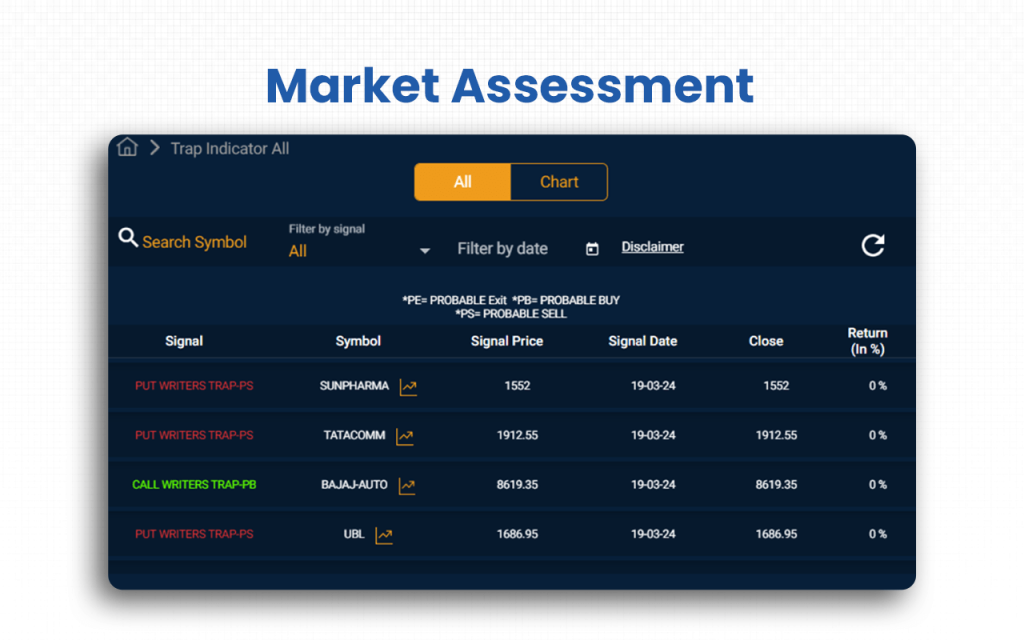
- Deals and Holdings: It tracks bulk deals, block deals, and major shareholding activity for transparency.
- Holidays: This section lists exchange holidays to help traders plan their trading sessions.
- Circulars: They provide important exchange-related announcements and regulatory updates.
Besides serving your trading needs, however, Quantsapp will also meet your educational needs if you want to learn more about trading to become a pro trader.
Supported Markets and Assets on Quantsapp
Supported Markets
Quantsapp primarily covers Indian markets, including equity, index, and derivatives markets (stock futures/options, index futures/options, etc.).
Supported Assets
- Equity (Indian stocks listed on Indian exchanges) with option & futures derivative support.
- Index-based assets and derivatives (e.g., major Indian indices and their F&O chains), including futures/options on indices.
- Commodity derivatives via commodity-derivatives exchange (via MCX), including metals, bullion, agro-commodities, and energy futures/options.
Broker Integration and Trading Execution of Quantsapp
Quantsapp offers broker integration with the top brokerage firms, thereby making it easy for traders to get a one-stop platform for everything from analyzing the market to taking trades.
The broker list includes the most reputable names in the industry.
- Zerodha
- Upstox
- Dhan
- 5paisa
- Motilal Oswal
- Fyers
- Choice
- Nuvama
- Aliceblu
- 5paisa – Xts
As you log in to Quantsapp, you can sync your analysis with the execution of trades. Choose the broker account you have. If you do not have an account with the listed broker, you can create a new one and then proceed with Quantsapp.
Quantsapp’s User Interface & Learning Curve
Quantsapp’s user interface is quite detailed. It will tell you about everything that it offers. However, the homepage, according to me, seems to be promoting their courses more than their services.
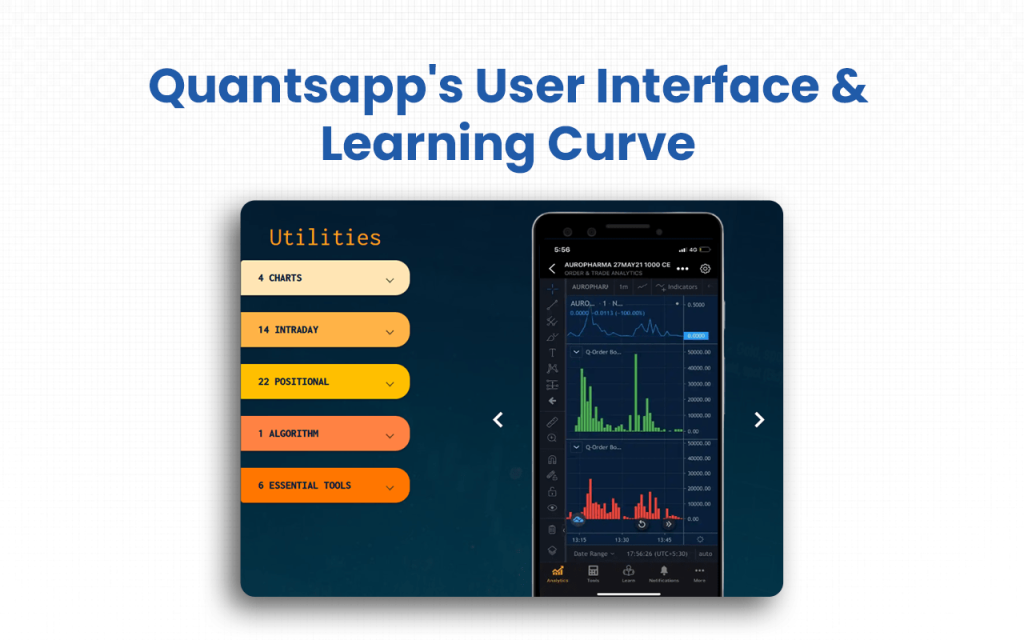
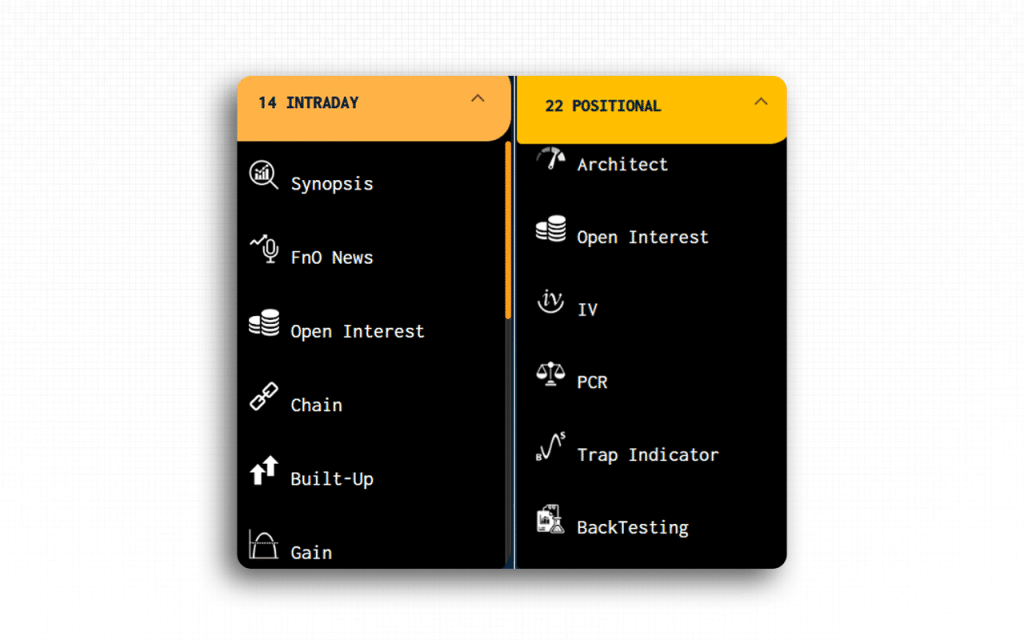
- Quantsapp advertises more than 100+ options analytics tools, all accessible through its UI under modules like charts, intraday, positional, option algorithm, and order & trade analytics.
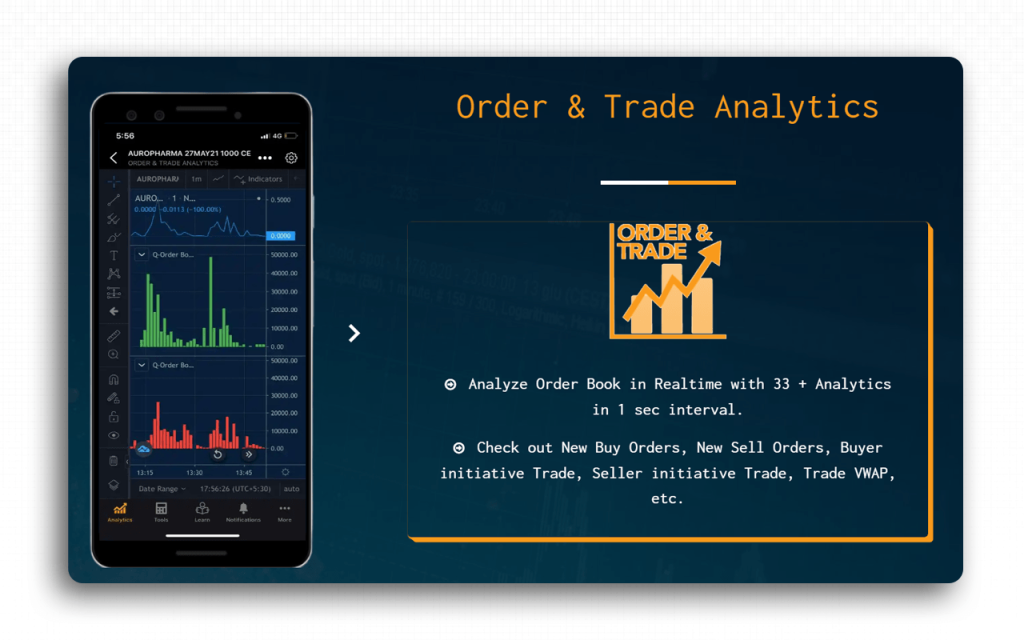
- The Order & Trade Analytics module claims to show detailed order-book data in real time, e.g., new buy orders, new sell orders, buyer-initiative trade, seller-initiative trade, trade VWAP, etc.
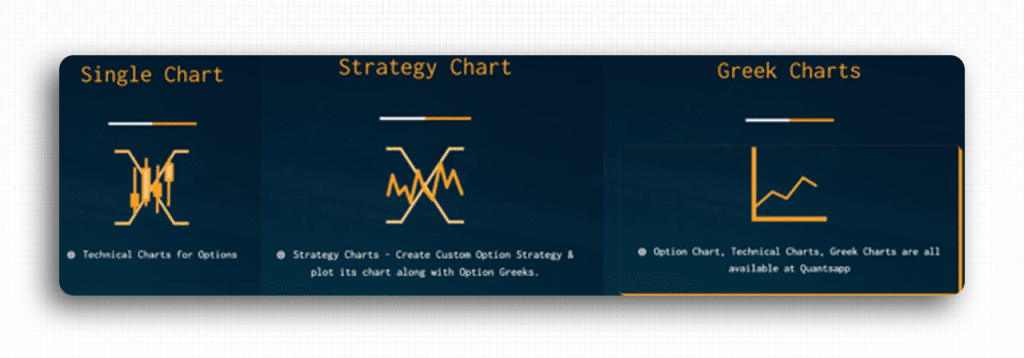
- It supports varied chart-based views: single chart, strategy chart, and Greek charts, which can help both intraday and positional traders visualize market data.
- It provides real-time data, including price, open interest, option Greeks, depth-of-market/order-book details, with low latency, per their App Store listing.
- For beginners, they have courses, including recorded webinars, demo videos, and educational content to help users understand options trading and how to use Quantsapp’s tools.
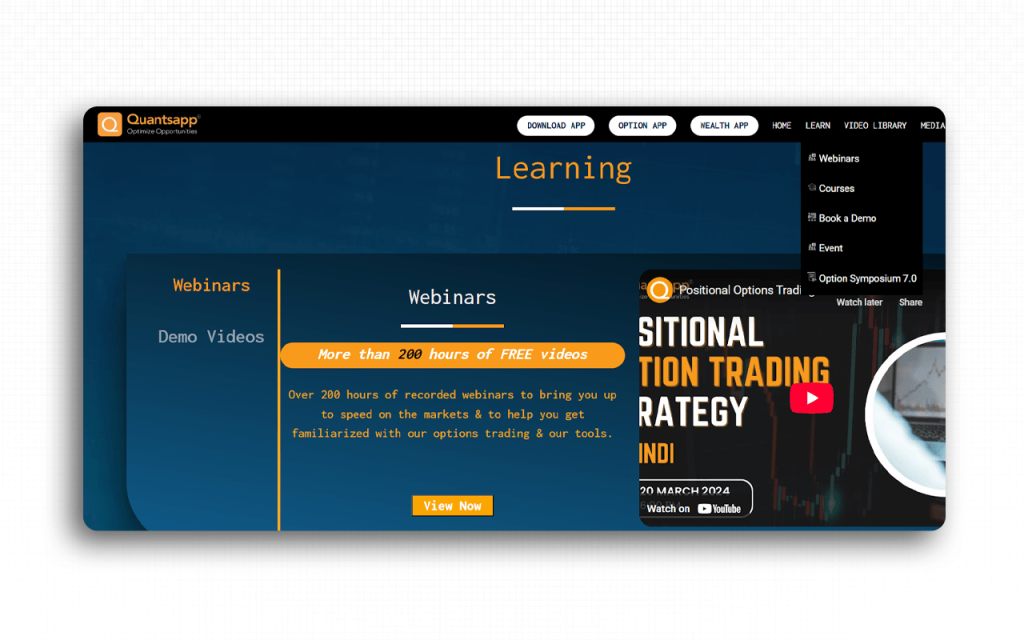
Though the UI is easy and smooth, if you require any assistance, Quantsapp has a Learn section where you get options, like webinars, courses, and book a demo, to teach you how the platform works in helping you execute your trades.
Quantsapp Company Details
- Company Type: Private
- Headquarters: Mumbai, India
- Year Founded: 2016
- CEO: Shubham Agarwal
- Number of Employees: 51-200
- Number of Users: 1.7+ million
- Company Description: Quantsapp is an options analytics platform that comes with more than 100 tools for users to examine the market from all aspects to finally decide where to invest. The broker integration it offers includes the most significant names in the trading niche. Though the premium services come at a high cost, the free version is there to guide traders with what they can expect to gain if they sign up for the platform. Quantsapp also offers courses for interested users, especially beginners, who are looking for resources to learn trading better.
Top Quantsapp Alternatives
Are you looking for more diverse options-trading models or more flexible analytical features than what Quantsapp currently provides? These platforms offer advanced derivatives toolkits and sophisticated strategy testing capabilities to help you gain a sharper, more data-driven edge in the options market.
| Platform | What It Offers Beyond Quantsapp | Ideal For |
|---|---|---|
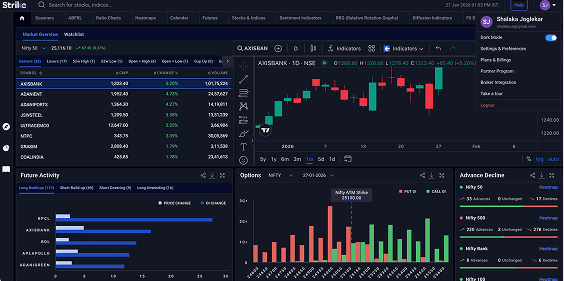
| Strike Money | Visual-first F&O analytics (heatmaps, diffusion/sentiment indicators, payoff visuals), Powerful stock-screeners and strike-selection tools, freemium entry + focused F&O scanners, built to surface tradeable strikes quickly and visually.Strike emphasises swift strike preference and visual filters so traders find the “best” strike faster. | Retail & active F&O traders who want highly visual strike-selection, fast screeners and low-friction freemium access. |
| Sensibull | Deep broker integrations for in-app execution, official strategy marketplace (prebuilt ideas). Direct trade templates and practice/virtual trading make moving from idea to execution seamless compared with Quantsapp’s analytics focus, which is often highlighted in any Sensibull review. | Traders who want broker-linked execution, policy-verified trade ideas and an easy strategy marketplace. |
| Opstra (Definedge) | Advanced multi-leg strategy builder, payoff & portfolio segregation, explicit backtesting/simulator for options strategies. Specialized charts like volatility skew and multi-strike OI analysis. Deeper strategy modelling than Quantsapp, making it a key strength highlighted in any Opstra (Definedge) review. | Advanced options strategists, quants and traders need rigorous backtests and payoff-level modelling. |
| Streak | Rule-based, no-code systematic strategy builder with automated backtesting & deployment (and free/unlocked access for Zerodha users)Excels at algorithmic rule automation more than Quantsapp’s manual strategy workflows. | Algo/systematic traders and Zerodha users who want quick rule-to-live automation and massive backtest capacity. |
| Stolo | One-window high-speed trading terminal, flow & OI heatmaps, basket orders and terminal-grade visualsFocused on execution ergonomics and live market flow, offering a more execution-centric experience than Quantsapp’s analysis-heavy product. | Traders wanting a fast execution terminal, live market-flow tools and easy basket/order handling. |
Is Strike Money the Best Alternative to Quantsapp?
Yes, I think Strike Money is the best alternative to Quantsapp for its strike-selection tools, visual analytics, and a balanced price-to-features ratio.
| Category | Strike Money | Quantsapp |
|---|---|---|
| What it focuses on (core advantage) | Visual, decision-first F&O tools: heatmaps, diffusion & sentiment indicators, strike-preference filters and fast scanners that surface tradeable strikes quickly.Ideal when you want speed + visual clarity to pick strikes. | Deep options analytics, Greeks/IV modelling, extensive options toolset (many institution-grade tools such as multi-strike OI, advanced Greeks, what-if analysis and strategy backtesting).Stronger if you need in-depth derivatives research. |
| Key features (high level) | Heatmaps (cash & F&O), scanners, strike filters, payoff visuals, screeners, sentiment & diffusion indicators, watchlist heatmaps. | Option chain analytics, real-time Greeks, order & trade analytics, backtesting, strategy builder, webinars/learning content, broad suite (45+ tools/many premium tools). |
| Learning curve & UI | Designed for quick visual reads, easier for strike selection and quick decisions; plenty of articles/blogs explaining indicators. Good for active retail traders and intraday players. | Feature-rich UI that targets both beginners (learning content) and advanced users; richer analytics may imply a steeper learning curve to master all premium tools. |
| Best use case / Ideal user | Retail & active F&O traders who prioritise fast strike selection, visual filters, and lower subscription costs. | Traders and researchers who need deep derivatives modelling, backtesting and institution-grade analytics. It is for those who prioritise depth over speed. |
| Why prefer | Lower entry price + focused visual tools = faster strike picks and lower friction to test/iterate trades.For traders whose primary need is to choose the right strike quickly (not necessarily run huge backtests or deep quant models), Strike gives better day-to-day edge per ₹ spent. | Quantsapp wins on breadth/depth of options analytics; if you require many premium, institution-style tools (and can pay for Pro), Quantsapp may still be preferable. |
Is Quantsapp Worth It?
Yes, Quantsapp is worth one try. After exploring it, if you think it’s working like you want it to, you may continue.
I have loved using the options analytics tools and features it has. There are many. So, I had a chance to compare my assessment and decide whether to take a trade. The user interface has also worked fine for me. If you are someone who wishes to check the features without signing up for the platform, you must know that it doesn’t allow you to do so.
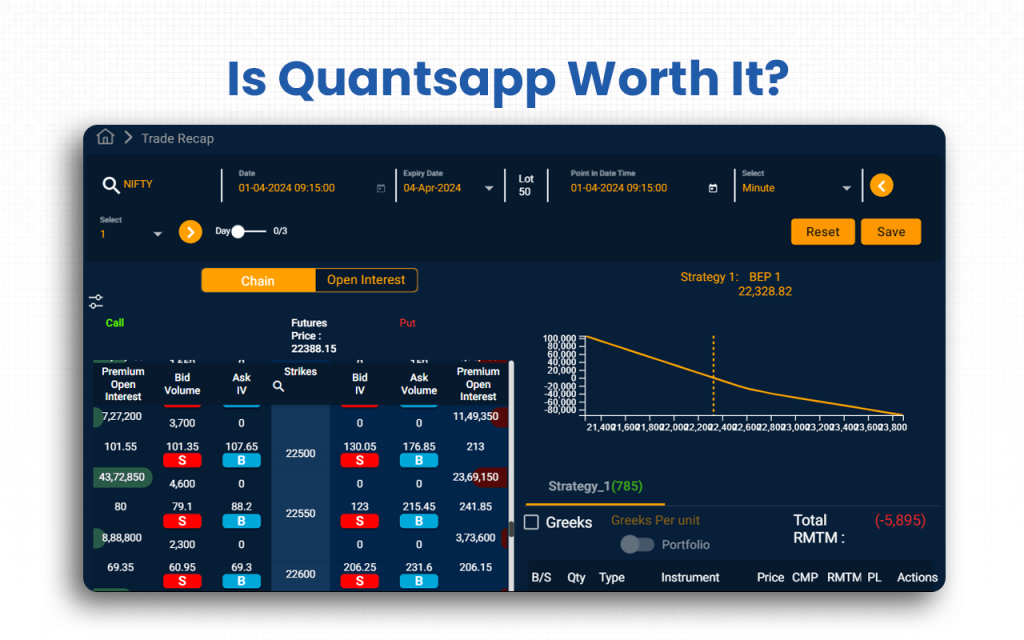
Quantsapp only keeps its homepage accessible to all. For the rest of your exploration journey, you have to sign up. Otherwise, you will not even be allowed to access their pricing page, forget about using the tools.
Before you seriously decide on choosing Quantsapp, be prepared that you will be criticized for your trading approaches by their customer support executive. This is only to remind them about their courses, without which, according to them, you won’t ever learn the core of trading.
FAQs about Quantsapp
Is Quantsapp Free to Use?
Yes, Quantsapp is partly free to use. It offers a free plan that gives access to a subset of its tools, like basic charts, option-chain data, OI data, some analytics, etc., while more advanced or premium tools require a paid Pro subscription.
Is Quantsapp Safe and Secure?
Yes, Quantsapp appears reasonably safe and secure. The official domain has a valid SSL certificate and is not flagged by major web-security checkers. As a trading analytics platform, Quantsapp is publicly known and serves many users, which suggests it is established rather than a fly-by-night scam.
Can a Beginner Use Quantsapp?
Yes, a beginner can use Quantsapp thanks to the learning resources that the platform offers. Quantsapp offers a Learn section, which includes options, like webinars, demo videos and educational content, intended to teach options trading from the basics. You can start small by using free tools and basic modules before committing to premium features.
Is There a Mobile App for Quantsapp?
Yes, Quantsapp does have a mobile app for both Android and iOS. You can download it from the Google Play Store or Apple’s App Store.
Is the Quantsapp Interface Customizable?
Yes, Quantsapp’s interface is customization. Quantsapp’s Dashboard module allows users to build a custom dashboard by picking and arranging the tools/analytics modules on their main screen. Users can tailor the display of charts, option chains, analytics, and other widgets as per their trading style, making the interface more personal and aligned with their workflow.
![15 Investing.com Alternatives [Free+Paid] You Should Use in 2026](https://www.strike.money/wp-content/uploads/2026/04/Investing.com-Alternatives-768x482.jpg)
 38 mins
![15 TradeStation Alternatives [Free+Paid] You Should Use in 2026](https://www.strike.money/wp-content/uploads/2026/04/TradeStation-Alternatives-768x482.jpg)
![15 Chartink Alternatives [Free+Paid] You Should Use in 2026](https://www.strike.money/wp-content/uploads/2026/04/Chartlink-Alternatives-768x482.jpg)