GTT Order (Good Till Triggered): How It Works, Types, Broker Rules & Charges, Limits

 Author

 Editor
GTT (Good Till Triggered) order allows you to place a limit order for more than one day to execute trade at your desired price. GTT order was first introduced by Zerodha in 2019 to help traders place their order in advance without watching the market constantly. Once your GTT order hits, your order automatically gets executed.
As Warren Buffett said, “The stock market is designed to transfer money from the Active to the Patient.” GTT orders are built for exactly this kind of patience, letting your strategy work in the background instead of demanding your constant attention. In this guide, we will be covering how GTT orders work, what are their types, broker rules and charges.
What Is a GTT Order?
GTT (Good Till Triggered) order is a feature provided by your brokers that lets you set a pre-determined price to execute your buy and sell order. This pre-determined price is known as a trigger price and once the trigger price is hit, the broker automatically places your order on the exchange.
Unlike normal day order, where a limit order is sent to an exchange immediately and stays active only for the current trading day, GTT order does not go live immediately on exchange, instead it gets stored by your brokers until your order gets triggered. Once your order gets triggered, your broker sends the limit order to the exchange to execute your order.
Why GTT Exists: Indian Exchanges Don’t Support GTC
One key reason GTT exists is that Indian exchanges generally do not support a true Good Till Cancelled (GTC) order for most retail cash-market use cases. A Good Till Cancelled (GTC) order is also an order type where your order immediately goes to the exchange instead of broker and stays there until it’s filled or manually cancelled.
However, in Indian exchanges, regular pending orders automatically get cancelled at the end of each trading day. Therefore the broker stores your instruction on its own systems and only sends a fresh order to exchange when the trigger condition is hit. That is why GTT is often described as a broker-side automation feature, not a native exchange order type.
Is a GTT Held at the Exchange or by Your Broker?
GTT orders are usually held by brokers, not by exchange. Until your decided trigger price is met, brokers store your orders to themself and sends it to exchange only when it triggered. It is also important to know that a GTT trigger does not guarantee your trade will happen. It only sends your buy or sell order to the exchange. Your order will execute only if there is someone willing to trade at your specified price.
How Does a GTT Order Work?
The GTT order works in five simple steps where you create GTT order, GTT order stored by broker, LTP reaches trigger price, order placed on exchange and exchange executes your order.
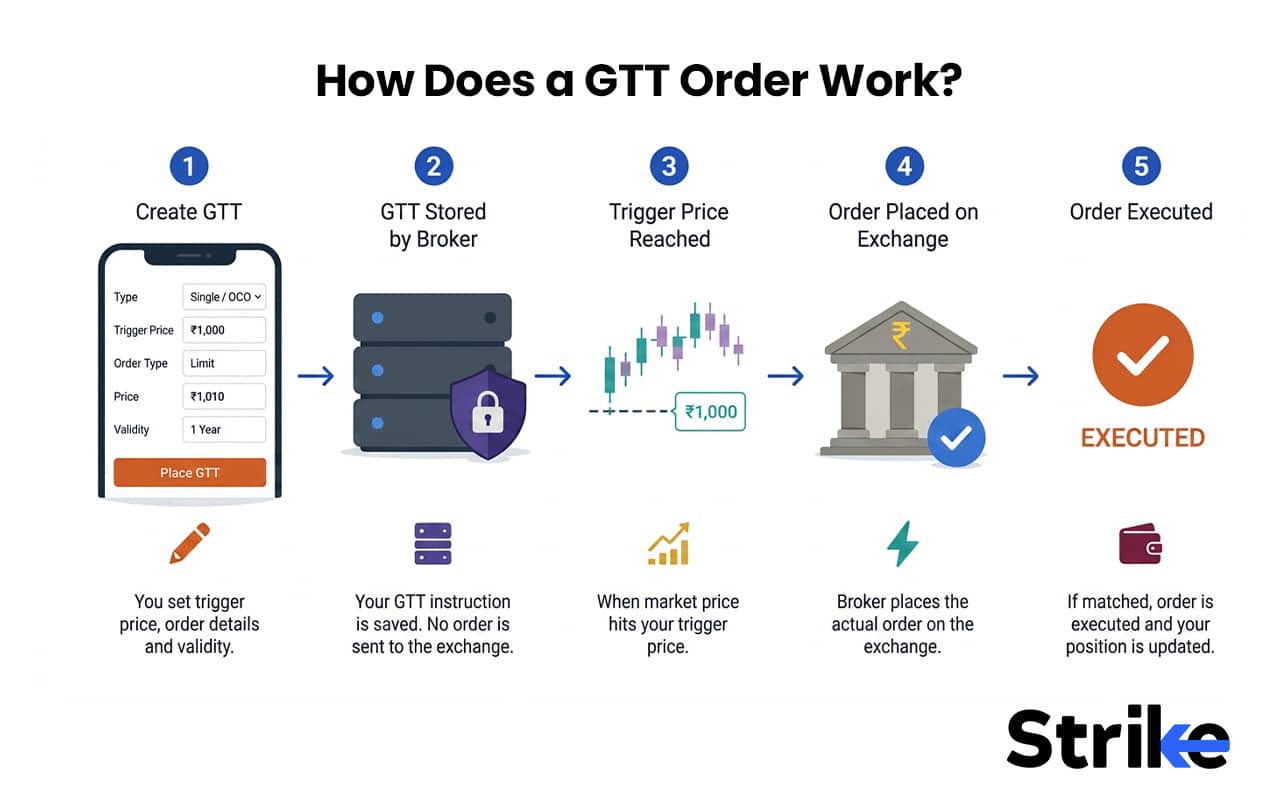
- Step-1 (Set the Trigger Price): Select a price at which you are willing to buy or sell a particular stock. Suppose Infosys is trading at ₹1,620 and you want to buy it at ₹1,600. So you set a trigger price at ₹1,600 in GTT order.
- Step-2 (Broker Stores the Order): Broker will store your GTT order until stock reaches to your desired price. In our example, a broker will store our order until Infosys reaches ₹1,600.
- Step-3 (Trigger Price Is Reached): As soon as price reaches our desired price (trigger price), the order gets activated.
- Step-4 (Order Is Sent to the Exchange): Brokers will immediately send your buy or sell order to the stock exchange after the selected price gets triggered. In our example. Broker immediately sends the order to exchange after Infosys reaches ₹1,600.
- Step 5: Trade Is Executed: Once the exchange receives your order, it will match the buyer or seller at your order price and the trade will be executed. Otherwise, the order may remain pending or expire according to the broker’s rules.
A GTT order does not execute automatically when the trigger price is reached. The trigger only places your order on the exchange. The trade is completed only if it finds a matching buyer or seller.
Trigger Price vs Limit Price
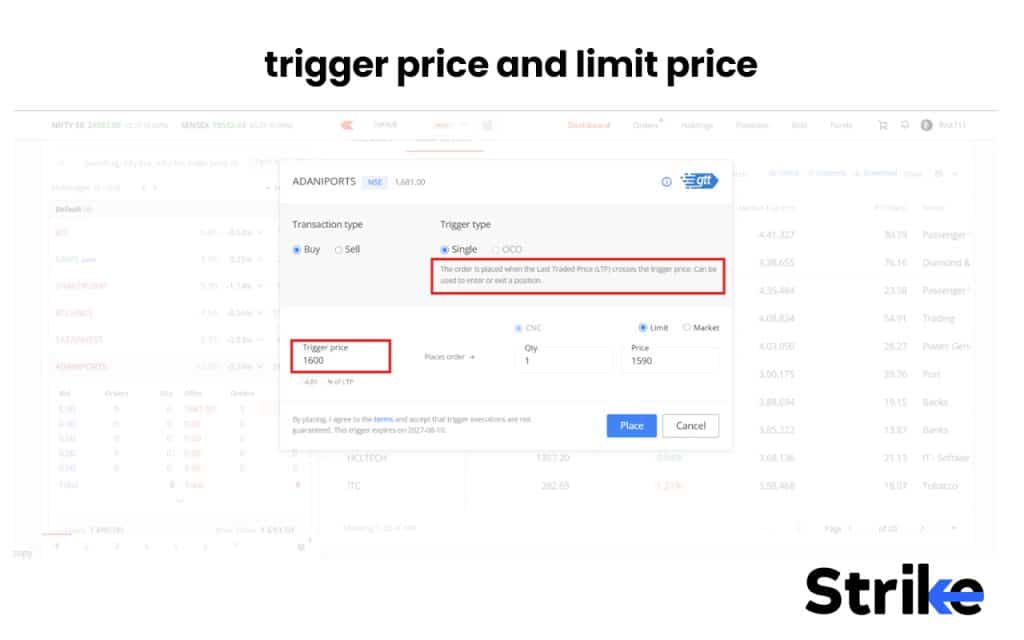
Trigger price is a price that activates your GTT order, while limit price is a maximum price (for buyers) or minimum price (for sellers) at which you’re willing to execute a position once triggered.
There should always be a buffer space between trigger price and limit price for smooth order execution. For a buy GTT, always set the limit price slightly above the trigger price to improve execution chances. For a sell GTT, always set the limit price slightly below the trigger price. A buffer space of 0.5% is typically considered good.
The Three-Stage Lifecycle: Active → Triggered → Executed
The GTT works in three major phases, activation, triggered, and execution.
| Stage | What’s Happening | Who Controls It |
|---|---|---|
| 1. Active | Order sits with broker; trigger not yet met | Broker’s system |
| 2. Triggered | LTP hits trigger price; broker fires a limit order to the exchange | Exchange order matching |
| 3. Executed | Order fills at limit price or better; GTT is marked complete | Exchange, subject to available liquidity |
It is also important to note that the GTT is a one time event, if your GTT gets triggered but your order execution fails, the GTT is not automatically triggered again. You may need to place a new GTT order.
Types of GTT Orders
Most of the Indian brokers offer two types of GTT order, which is single-trigger GTT order and OCO (One Cancels Other) GTT order.
1. Single-Trigger GTT (Buy and Sell)
Single-Trigger GTT order type uses only one trigger price, either to enter a new trade (Buy) or exit an existing one (Sell), making it a simplest form of GTT order where you set it, and forget it. This order type is commonly used to buy a stock on a dip, sell after a breakout, placing a long-term stop-loss, or planning trades without intraday monitoring.
2. OCO (One Cancels Other) GTT
OCO (One Cancels Other) GTT order type allows you to set two trigger prices simultaneously instead of one, where you can place trigger prices for target as well as stop-loss. The moment either one of these gets triggered, the broker automatically sends your limit order to exchange and cancel the other untriggered order. Hence, this order type is very useful for swing traders and positional traders.
Some brokers, including Zerodha, also allow a trailing stop-loss to be layered onto both single and OCO GTTs, where the stop-loss price automatically moves up as the stock price rises in your favour.
How to Place a GTT Order
You can place GTT orders in simple steps. These steps are almost identical across major brokers like Kite (Zerodha), Upstox Pro, Angel One, Groww, ICICI Direct, and Fyers.
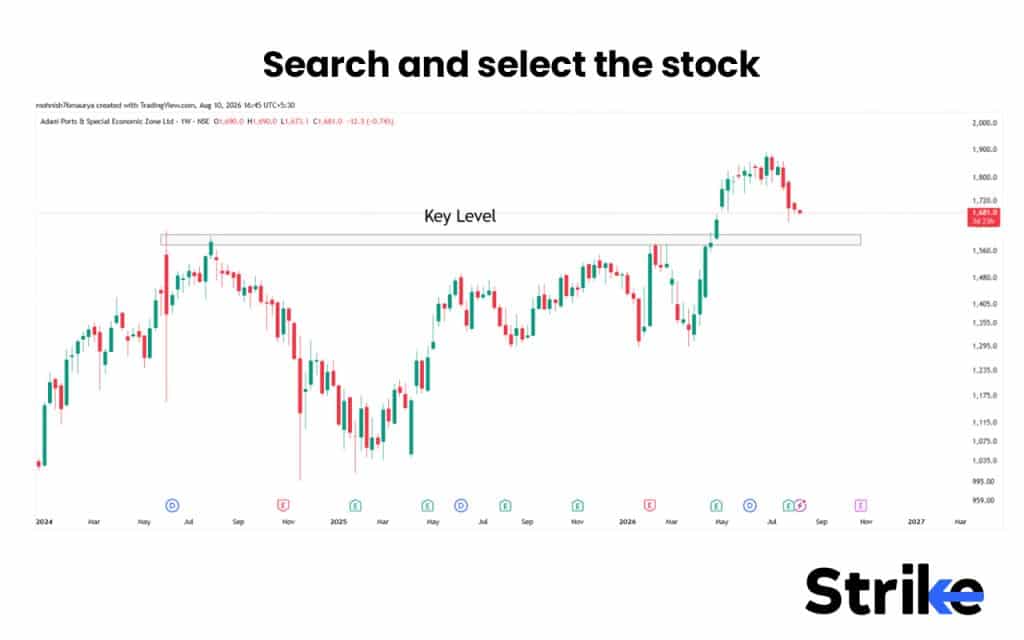
- Search and select the stock you want to buy using GTT order or click on already owned stock that you want to sell. Let’s create a GTT order for Adni Ports stock. I want to buy the Adani Ports stock near ₹1600 key level. I will search for Adani Ports in my brokers account.
- You will get multiple options to buy or sell the shares like CNC, MIS, NRML, GTT etc. I click on create GTT order.
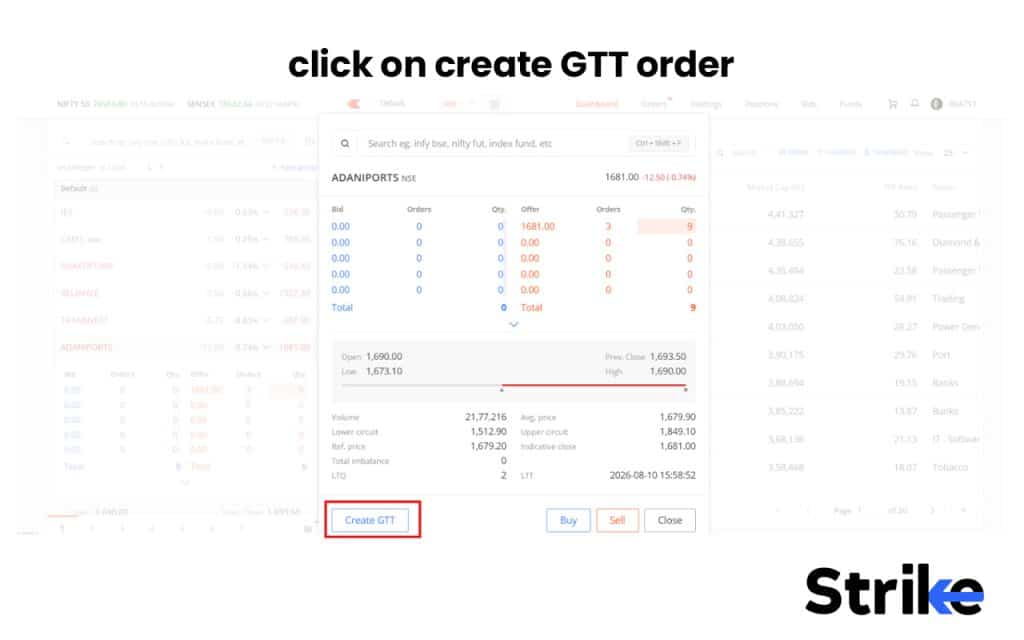
- Select “create GTT” order and add trigger price and limit price as per your requirement and execute the trade. Here, I will add ₹1600 as a trigger price and ₹1590 as a limit price. My trade will get executed within this ₹10 range.
- Once you place your order, your GTT order will reflect in a GTT order tab as “Active”.
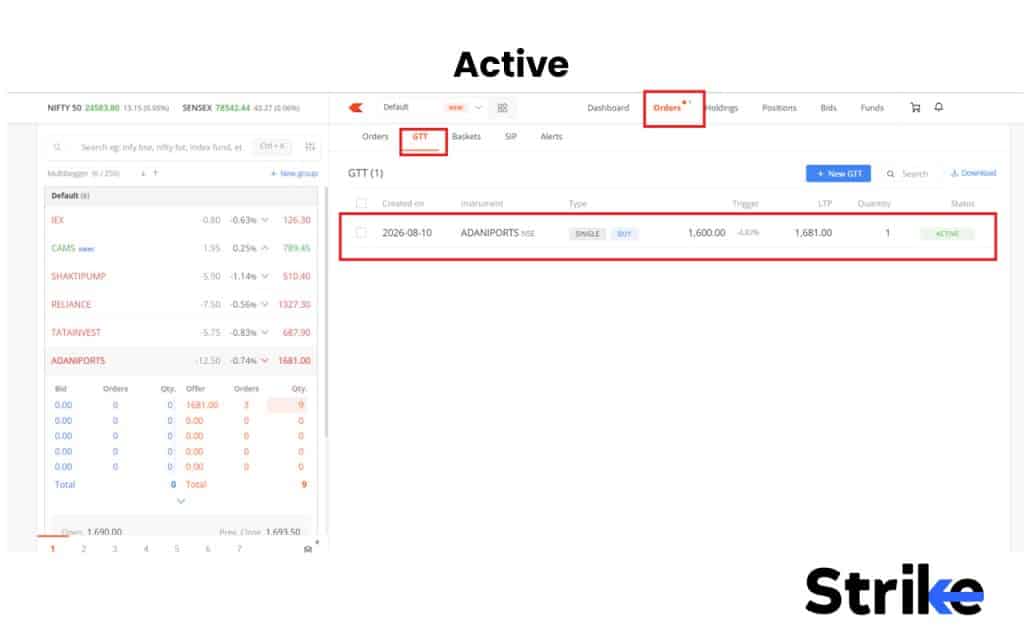
Once your GTT order triggers and trade executes, the shares will get automatically reflected in your holdings.
GTT Across Brokers: Rules & Charges
Rules and charges for GTT across the Indian brokers are the same. There are no specific charges for placing GTT orders and the GTT order remains active for 365 days across all the brokers.
The only thing that differs across brokers is maximum active GTT orders you can place and type of GTT orders available.
| Broker | Maximum active/pending GTTs | GTT types available |
|---|---|---|
| Zerodha | 500 | Single, OCO, Trailing Stop-Loss (TSL) |
| Upstox | Not publicly specified | Single, Target + Stop-Loss |
| Groww | 200 | GTT, OCO |
| Angel One | 50 | Single GTT |
| ICICI Direct | 300 | Single, OCO |
Once your order gets triggered, you will be charged normal brokerage and statutory charges such as STT, exchange charges, GST, stamp duty and DP charges.
The Limit-Price Buffer: Making Sure Your GTT Actually Fills
You should always keep some buffer between your GTT trigger price and a limit price, because many times, your order will get triggered, but won’t get executed. This usually happens because prices in the market move fast, the moment the trigger fires, the market may already have moved.
Therefore, by keeping some buffer space between your trigger price and limit price, you create a price tiny range, giving your order a room to get executed. Once your order gets triggered, it will get executed at any price within that tiny range.
- For Buy GTT Order: For a buy GTT order, the limit price should always be above the GTT trigger price. Suppose you have placed a buy GTT order at trigger price of ₹1,300, so your limit price should be near ₹1,305. This provides a range of ₹5 within which your order will get executed.
- For Sell GTT Order: For a sell GTT order, the limit price should always be below the GTT trigger price. Suppose you have placed a sell GTT order at trigger price of ₹1,300, so your limit price should be near ₹1,295. This provides a range of ₹5 within which your order will get executed.
A buffer of roughly 0.5% to 1% of the stock price is commonly used, but in case of highly volatile or illiquid stocks, we may need a wider buffer. If you try to place a GTT order very near to current market price (less than 0.25%) Zerodha won’t even let you place a GTT order.
GTT Order Validity: How Long Does It Last?
GTT order in India typically lasts for 365 days from the date it is placed. If the price never reaches your trigger level within that year, the GTT automatically expires and is cancelled; you’ll need to manually place it again if you still want that condition tracked.
However, for F&O contracts, the GTT order automatically gets invalidated one day after the contract’s expiry, since the underlying instrument itself ceases to exist.
GTT Limits & Eligibility Rules
The eligibility rules for GTT order that apply across the brokers are briefly discussed below.
- GTT order is only available for CNC (delivery) orders in equity cash, and NRML orders in F&O. It is not available for intraday trading. Some brokers like Zerodha, allow placing GTT orders for MTF as well.
- If your account operates under a POA (Power of Attorney) or DDPI (Demat Debit and Pledge Instruction), selling GTTs on your holdings would work more smoothly, since shares can be auto-debited at the time of execution.
- GTT orders can only be placed, modified, or cancelled during market hours, even though the trigger itself can sit active 24/7.
- Most brokers don’t support placing, modifying, or cancelling GTTs through a call-and-trade or dealing desk facility. You must manage them yourself through the app.
Why Did My GTT Order Fail?
There are six major reasons why your GTT order could have failed. These reasons are briefly discussed below.
- Insufficient funds during the time of triggering.
- Insufficient buffer between trigger price and limit price, causing your limit order to go unfilled.
- Gap opening, where a stock can jump beyond your trigger price and limit price.
- The stock hit a corporate action cutoff and the GTT was pre-emptively cancelled.
- Your GTT order could have expired.
- Broker or exchange system issue at the exact moment of triggering.
Once I used GTT order to buy VEDL stock at ₹690, which is around 5% down from the current market price. On April 30, 2026 VEDL announced an ex-demerger event where VEDL price fell by more than 62% to ₹280. This drop skipped my GTT order. I than manually reentered the adjusted price.
Corporate Actions & GTT Orders: The Trap Most Investors Miss
Corporate actions directly affect your GTT order execution because the price of stocks changes mechanically overnight due to corporate actions like stock splits, bonus issues, rights issues, mergers, demergers, and large special dividends and your GTT order keeps waiting for the old price.
Let’s understand this using a VEDL ex-demerger event where VEDL price fell by more than 62% on April 30. After the demerger news, VEDL stock fell from ₹773.60 on April 29, 2026 to around ₹280.85 on April 30, 2026.
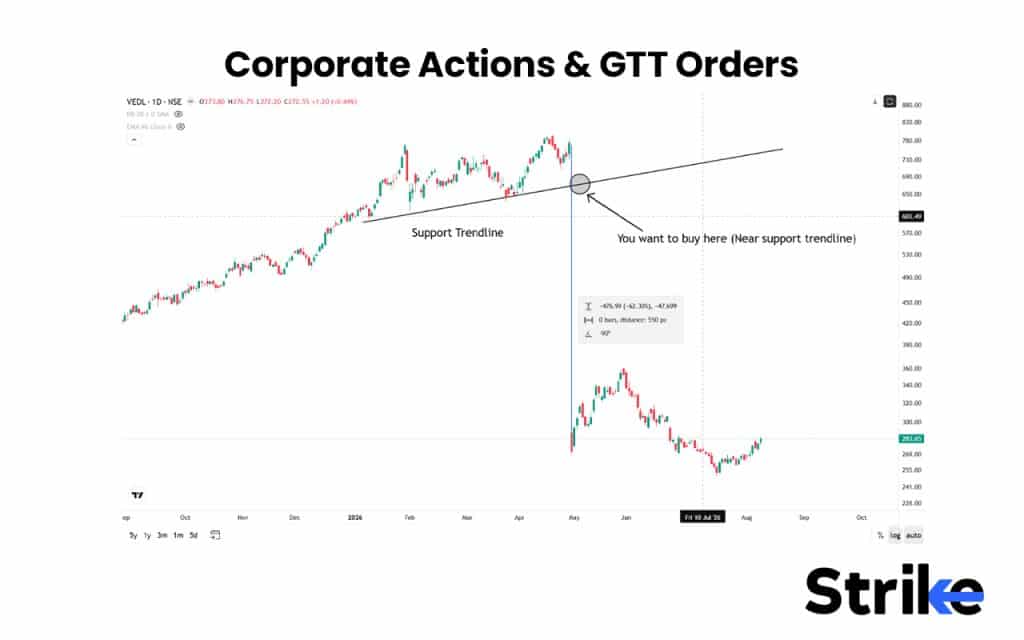
Suppose you wanted to buy VEDL stock at the support trendline, so you place your buy GTT order at price of ₹680. However, on April 30, 2026, stock directly fell by 62% due to the demerger event and the price suddenly dropped to ₹280, skipping your GTT order.
During such conditions, your brokers cancel pending GTT orders automatically before the ex-date of the corporate action and you are required to manually re-place the GTT after the action is reflected in the adjusted price, using fresh trigger/limit values as mandated by NSE Circular INSP/62528
GTT vs Other Order Types
There are 10 other different types of order apart from GTT that are designed to serve different purposes. Let’s compare the GTT order with other order types like GTC, GTD, SL-M, AMO, and etc.
GTT vs GTC (Good Till Cancelled)
| Aspect | GTT | GTC |
|---|---|---|
| Structure | Two-stage: trigger price → then order placed | Single-stage: order sits live until filled/cancelled |
| Presence in order book | Not in exchange order book until triggered | Sits in order book the whole time |
| Validity | Usually capped (~1 year, broker-dependent) | Can be indefinite in some markets |
| Best for | Waiting for a price level before committing | Keeping an order continuously live |
GTT vs GTD, VTC and Forever Order
| Aspect | GTT | GTD | VTC / Forever Order |
|---|---|---|---|
| Core idea | Trigger-based, fires an order on price condition | Order valid until a chosen expiry date | Order valid until manually cancelled |
| Duration control | Broker sets max window | User picks the exact date | No fixed end date |
| Trigger condition needed? | Yes | No | No |
| Key difference from GTT | No price-trigger logic | Same, no trigger logic | Same, no trigger logic |
GTT vs Limit, Stop-Loss and SL-M Orders
| Aspect | GTT | Limit | SL | SL-M |
|---|---|---|---|---|
| Executes at | Trigger → then limit/market order | Specified price or better | Trigger price → limit order | Trigger price → market order |
| Active duration | Weeks to months | Usually single trading day | Usually single trading day | Usually single trading day |
| Need daily monitoring? | No | Yes (unless day resets) | Yes | Yes |
| Relationship to GTT | GTT is a long-duration version of this trigger logic | Building block GTT uses | Building block GTT uses | Building block GTT uses |
GTT vs AMO, Bracket and Cover Orders
| Aspect | GTT | AMO | Bracket Order | Cover Order |
|---|---|---|---|---|
| Main purpose | Price-based trigger over long duration | Place order after market hours | Entry + stop-loss + target bundled | Entry + built-in stop-loss |
| Time restriction | None (weeks/months) | Executes at next session open | Usually intraday | Usually intraday |
| Margin benefit | No | No | Yes | Yes |
| Best for | Long-term “set and forget” price triggers | Trading outside market hours | Intraday risk-managed trades | Intraday trades needing leverage |
GTT vs Price Alerts
| Aspect | GTT | Price Alert |
|---|---|---|
| Action on trigger | Places the order automatically | Sends a notification only |
| Manual step needed | No | Yes, you decide and place the order |
| Best for | When you already know exact order parameters | When you want to reassess before acting |
| Risk | Executes even if conditions have changed | None, no order placed without your input |
The core differentiator: every other order type here (except AMO) lives and dies within a single trading session at the exchange. GTT is the only Indian retail order type that survives across weeks or months — precisely because it’s simulated by your broker rather than natively supported by the exchange.
When to Use a GTT and When Not To
You can use GTT order during the scenarios discussed below.
- You have a clear price level in mind.
- You cannot monitor the market daily.
- You want to buy on dips or sell at predefined targets.
- You want to combine target + stop-loss using OCO.
- You are managing swing or position trades.
You should avoid using GTT orders during the scenarios discussed below.
- You need instant execution.
- You are doing intraday trading.
- The stock is extremely illiquid.
- There is likely to be high volatility around results, news, or corporate actions.
- You have not left enough funds, holdings, or price buffer.

 21 mins